
 To Next Page
A
Arthur WagnerSep 16, 2025
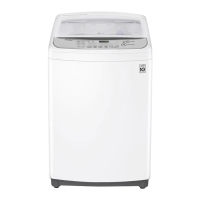
What to do if the water level sensor is not working correctly in my LG WTG9032WF?
- RrobertcohenSep 16, 2025
Close the water taps, unplug the LG washing machine, and call for service.

What to do if the water level sensor is not working correctly in my LG WTG9032WF?
Close the water taps, unplug the LG washing machine, and call for service.
What to do if I get error messages on my LG WTG9032WF?
If you're getting error messages on your LG Washer, here are some things to check: * Ensure the door is completely closed and that nothing is caught under it. * Make sure the water supply taps are fully open and the water line hoses are not kinked, pinched, or crushed. Straighten them if necessary. * Clean the water inlet filters if they are clogged. * Do not use leak limiting hoses. * If there are foreign objects caught between the wash plate and the inner basket, turn off the washing machine, press the POWER button, then press the Spin button (without selecting a cycle) to drain and spin the load. Remove the clothes and any foreign objects. * Ensure the drain hose is not kinked, pinched, or clogged and that the drain discharge is not more than 1.2 m above the bottom of the w...
Why is my LG Washer staining my clothes?
If your LG Washer is staining your clothes, consider the following: * The bleach or softener may have been dispensed too soon due to an overfilled dispenser compartment. Always measure bleach to prevent overfilling and close the dispenser drawer slowly. * Bleach or softener may have been added directly to the wash load in the drum. Always use the dispensers. * Clothes may not have been properly sorted. Always wash dark colors separately from light colors and whites, and never wash heavily soiled items with lightly soiled items.
Why won't my LG Washer connect to Wi-Fi?
If your LG Washer isn't connecting to Wi-Fi: * The password for the Wi-Fi network may be incorrect. Remove the Wi-Fi network connected to your smartphone and re-register your appliance on LG SmartThinQ. * Mobile data on your smartphone may be turned on. Turn it off and register the appliance using the Wi-Fi network. * The wireless network name (SSID) may be set incorrectly. It should be a combination of English letters and numbers without special characters. * The router frequency may not be 2.4 GHz. Only a 2.4 GHz router frequency is supported. Set the wireless router to 2.4 GHz. * The distance between the appliance and the router may be too far. Move the router closer to the appliance.
What to do if the load is out of balance in my LG Washer?
Manually redistribute the load if articles have become tangled in your LG Washer.
What does UE mean on my LG WTG9032WF Washer?
The UE code on your LG Washer means the automatic attempt to rebalance the load was not successful. The cycle has been paused to allow the load to be manually adjusted.
What to do for control error on my LG WTG9032WF?
Unplug the LG washing machine and wait 60 seconds. Reconnect power and try again. If the error code is not released, call for service.
What to do if there is a clutch error on my LG WTG9032WF Washer?
Unplug the LG washing machine and call for service.
What to do if a motor error has occurred in my LG Washer?
Allow the LG washing machine to stand for 30 minutes and then restart the cycle. If the error code is not released, call for service.
Why does my LG WTG9032WF cycle take longer than usual?
If your LG Washer cycle is taking longer than usual: * The load might be too small; add more items to balance the loads. * Heavy articles might be mixed with lighter items; wash articles of similar weight. * The load might be out of balance; manually redistribute the load if articles have become tangled.
Key safety guidelines to prevent risks and damage from unsafe operation.
Identifies and lists all components and parts included with the washing machine.
Details the various accessories that come with the washing machine for installation and use.
Provides detailed technical specifications for the WTG9032WF washing machine model.
Specifies the necessary conditions and clearances for optimal and safe appliance installation.
Instructions on how to properly connect the water supply hose to the water tap.
Detailed steps for connecting screw-type hoses to water taps, with or without threads.
Guides on attaching the hot and cold water inlet hoses to the washing machine.
Instructions for correctly installing the drain hose for proper water discharge.
Guidelines for positioning the drain hose to ensure efficient drainage and prevent issues.
Steps to ensure the washing machine is perfectly level for stable and quiet operation.
Step-by-step guide on how to operate the washing machine for the first time and subsequent washes.
Guidance on sorting clothes by fabric, color, and soil level for optimal washing results.
Instructions on the correct dosage and type of detergents, bleach, and softeners to use.
Proper method for adding fabric softener to the dispenser to avoid staining clothes.
Guidelines for safely adding liquid bleach to the dispenser for effective stain removal.
Explanation of each button, display, and indicator on the washing machine's control panel.
Details on selecting various wash programmes like Cotton, Extra Rinse, Quick Wash, and Delicates.
Information on specialized programmes like Eco Cotton, Quiet Wash, and Duvet washing.
How to adjust water level, wash time, rinse cycles, and spin speed for customized washes.
Using features like Time Delay, Intensive Wash, Soak, Turbo Clean, and temperature selection.
Setting specific wash, rinse, and spin cycles manually without using pre-set programmes.
How to activate and deactivate the Child Lock feature to prevent unintended operation.
Guide to connecting and using the LG SmartThinQ app for remote appliance control and monitoring.
Steps to download and install the LG SmartThinQ application on your smartphone.
Using features like Remote Start and Download Cycle via the smartphone application.
How to use the Smart Diagnosis feature for troubleshooting appliance issues via phone.
Instructions for using the Tub Clean cycle to maintain the washing machine's hygiene.
How to clean the water inlet filter to ensure proper water supply and prevent errors.
Steps for cleaning the lint filter to maintain efficient washing performance and prevent blockages.
Guide to cleaning the drain pump filter for smooth operation and preventing blockages.
Advice on how to protect the washing machine from freezing during winter months.
A guide to identifying and resolving common issues like noise, vibration, and poor stain removal.
Solutions for issues related to staining, water leakage, and improper dispensing.
Steps to resolve problems where the washing machine does not turn on or operate.
Solutions for issues with water filling, draining, wrinkling, and detergent dispensing.
Steps to fix problems with connecting the appliance and smartphone to the Wi-Fi network.
Explains common error codes displayed on the panel and their corresponding solutions.
 General