22
OPERATION
• The
Rinse Aid Refill
e
icon will illuminate when
more rinse aid is needed.
• If you notice cloudy spots, streaks or water
marks on the glassware after washing, increase
the setting level.
• Setting the control too high can cause foaming,
which will cause poor wash results.
• If the glass is smeared or foam is present on the
bottom, decrease the level setting.
• Setting the rinse aid control too low can cause
spotting and streaking on dishes and poor
drying results.
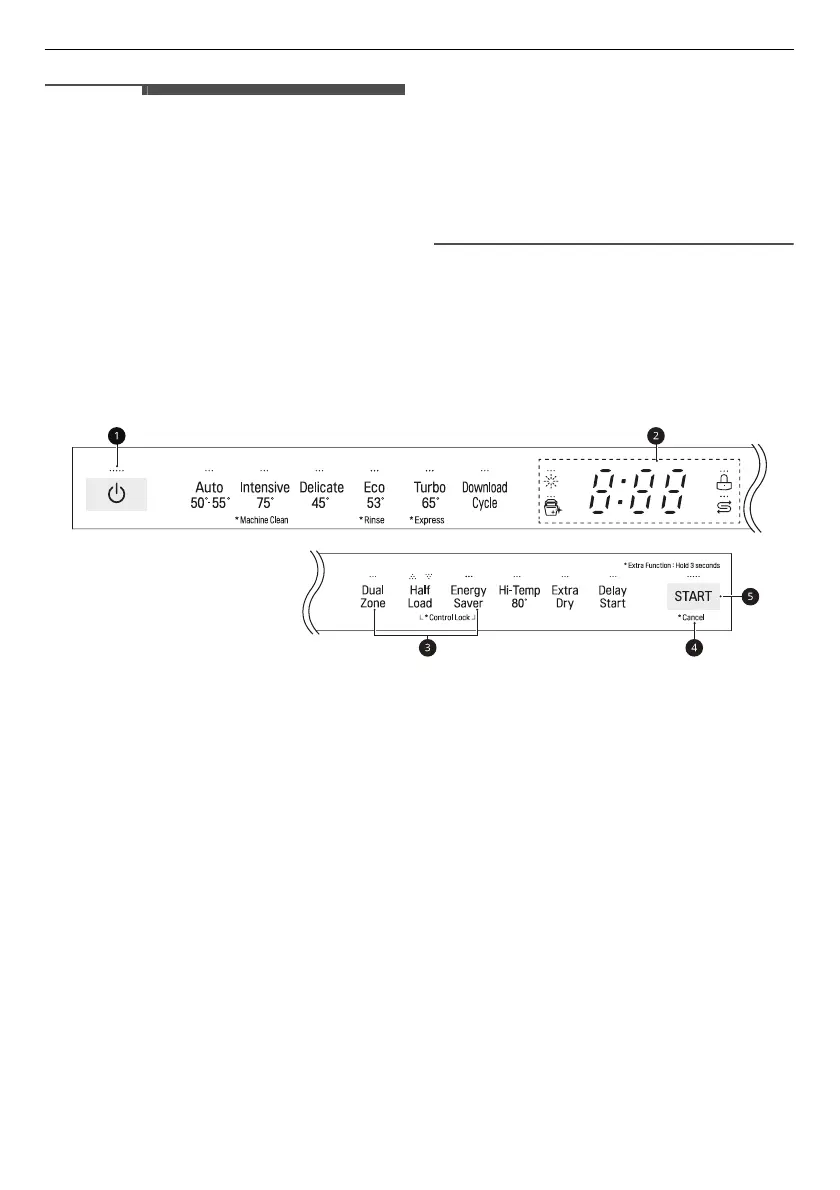
Control Panel
Control Panel Features
For Non-Steam Models
a
Power
• Press
Power
button to turn power on and off.
• After the cycle is complete, the power automatically turns off for purposes of safety and economy.
• If there is a power surge, power outage, or disruption of any kind, power is automatically turned off
for safety.
• When power is connected again, it will turn on automatically and resume the cycle.
b
Display
•
8:88
:
Digital Display
- The digital display on the control panel shows the ESTIMATED cycle time. When the cycle and
options are selected, the display shows the total estimated time to complete those selections.
During operation, the display shows the remaining estimated operating time.
- The estimated time shown on the display does not include delay times for heating water, etc.
- If
Delay Start
is selected, the display shows the delay time in hours.
- The
Auto
cycle time may vary depending on the soil level of your load.
•
e
:
Rinse Aid Icon
- This icon flashes when the rinse aid level is low. The LED automatically shuts off when the rinse aid
is refilled or the level is set to 0.



 To Next Page