Saving BPs
BPs can be saved from either the Build screen or the Set screen.
The edit box at the top of either screen shows the name of the last loaded or saved
file (/home/licor/apps/unnamed if you tapped Clear All in Build or New in
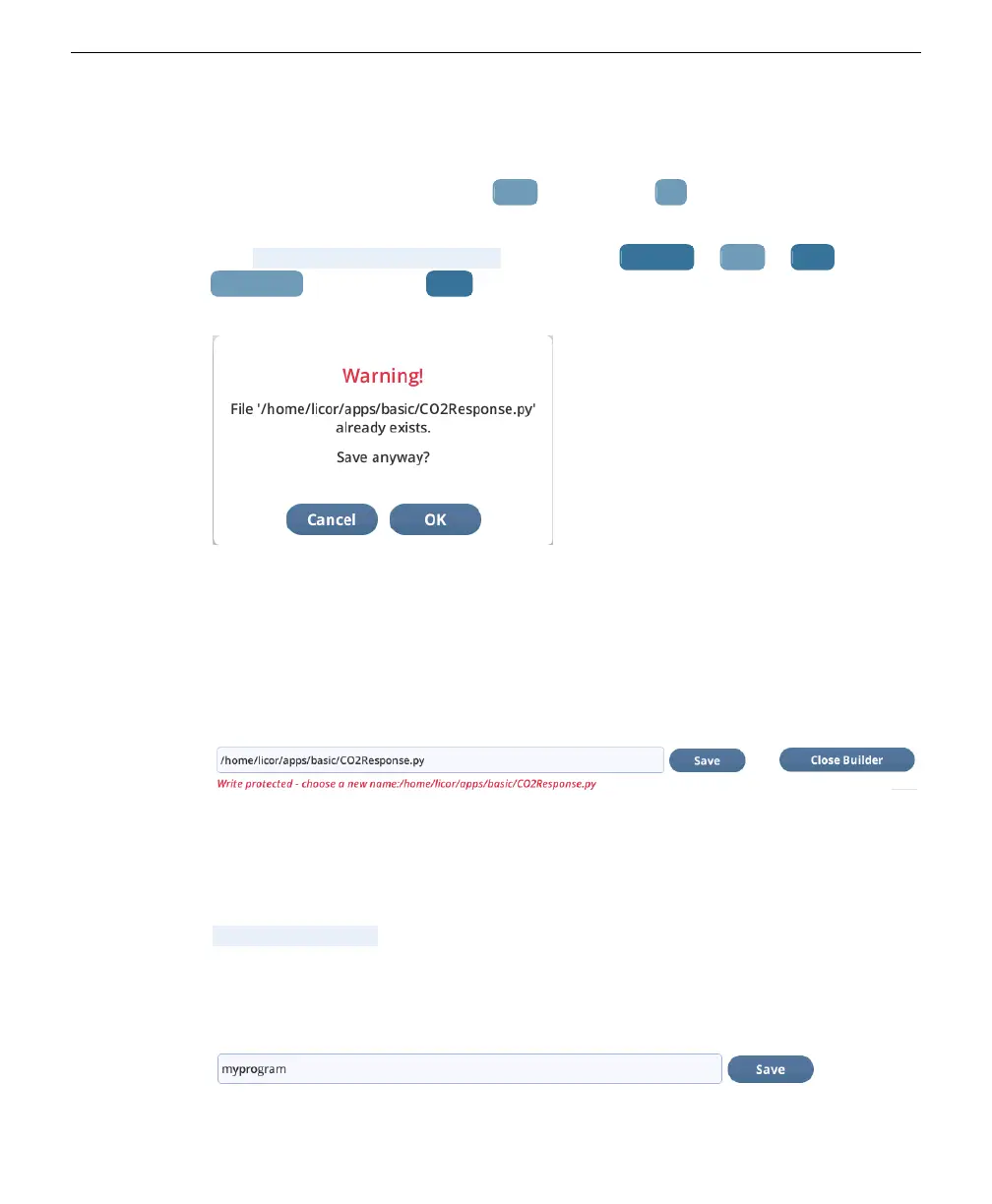
Open/New), so if you tap Save, that file will be overwritten. An overwrite dialog is
produced.
Figure 6-20. You are alerted when overwriting a file.
Factory supplied BPs (in the directories described in Directory information on
page6-15) are write protected, so it you wish to modify and save them, you will see
an error message (Figure 6-21 below). Similarly, you will get an error if you try to
write to a directory that is not there, or to one for which you do not have per-
mission.
Figure 6-21. Errors saving a BP are reported.
Use the edit box to rename the BP and/or change its location. If you aren't sure of
where to store a BP, follow the example in Section 6. on page6-1: clear the whole
entry, enter a name, and tap. If your name does not start out with
/home/licor/apps, the system will prepend it automatically. Also, if you don't end
with .json, it is appended automatically. The final name is always reported back
(unless there is an error).
1
Tap in the edit box, clear it, and type in a new name.
Section 6. Screen reference
6-17Saving BPs


 To Next Page