EasyManua.ls Logo

Liberty Safe - S&G Electronic Locks Changing Combinations; Change Master Code; Add or Change User Code; Delete User Code

Liberty Safe
13 pages
Print Icon
To Next Page IconTo Next Page
To Previous Page IconTo Previous Page
Loading...
Owner Use
and
Care Manual
$15.00
research
fee
provided
you
have
informed
Liberty
of
the
new
combination
code
and
you
meet
the
documentation
requirements.
See
the
warranty
for
more
details.
AWARNING!
Please
keep
door
open
when
changing
Electronic
Combination!
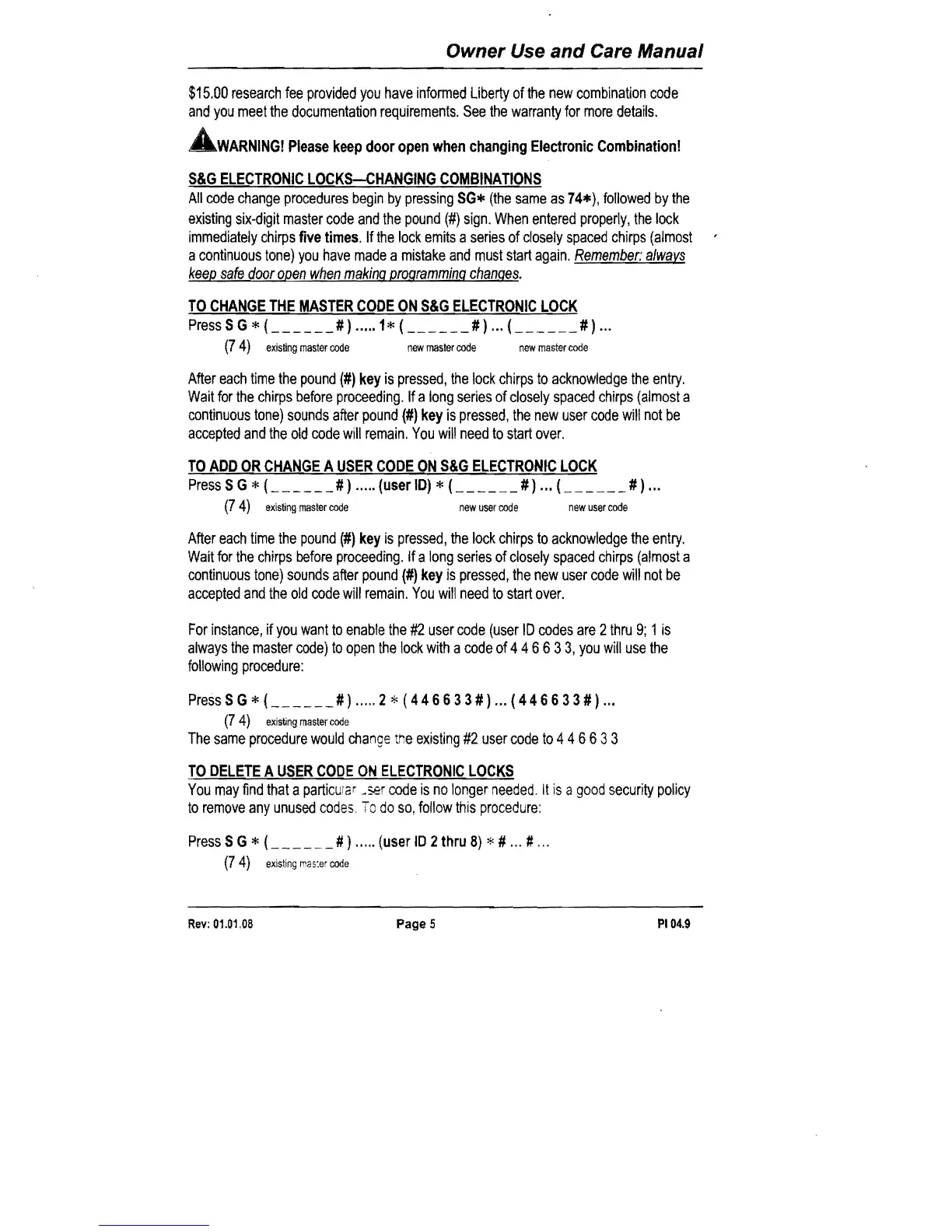
S&G
ELECTRONIC
LOCKS-CHANGING
COMBINATIONS
All
code
change
procedures
begin
by
pressing
SGIfc
(the
same
as
74*),
followed
by
the
existing
six-digit
master
code
and
the
pound
(#)
sign.
When
entered
properly,
the
lock
immediately
chirps
five
times.
If
the
lock
emits
a
series
of
closely
spaced
chirps
(almost
a
continuous
tone)
you
have
made
a
mistake
and
must
start
again.
Remember:
alwavs
keep
safe
door
open
when
making
programming
changes.
TO
CHANGE
THE
MASTER
CODE
ON
S&G
ELECTRONIC
LOCK
Press
S G * (
______
# ) ..... 1 * L
_____
# ) ... L
_____
# ) ...
(7
4)
existing
master
code
new
master
code
new
master
code
After
each
time
the
pound
(#)
key
is
pressed,
the
lock
chirps
to
acknowledge
the
entry.
Wait
for
the
chirps
before
proceeding.
If
a
long
series
of
closely
spaced
chirps
(almost
a
continuous
tone)
sounds
after
pound
(#)
key
is
pressed,
the
new
user
code
will
not
be
accepted
and
the
old
code
will
remain.
You
will
need
to
start
over.
TO
ADD
OR
CHANGE
A
USER
CODE
ON
S&G
ELECTRONIC
LOCK
PressSG*L
_____
#)
..
·
..
(userID}*{
___
#)
... {
___
#)
...
(7
4)
existing
master
code
new
user
code
new
user
code
After
each
time
the
pound
(#)
key
is
pressed,
the
lock
chirps
to
acknowledge
the
entry.
Wait
for
the
chirps
before
proceeding.
If a
long
series
of
closely
spaced
chirps
(almost
a
continuous
tone)
sounds
after
pound
(#)
key
is
pressed,
the
new
user
code
will
not
be
accepted
and
the
old
code
will
remain.
You
will
need
to
start
over.
For
instance,
if
you
want
to
enable
the
#2
user
code
(user
10
codes
are
2
thru
9;
1
is
always
the
master
code)
to
open
the
lock
with
a
code
of
446633,
you
will
use
the
following
procedure:
Press
S G * (
______
# ) ..... 2
*'
(4 4 6 6 3 3 # ) ... ( 4 4 6 6 3 3 # ) ...
(7
4)
exis~ng
master
code
The
same
procedure
would
change
me
existing
#2
user
code
to
4 4 6 6 3 3
TO
DELETE
A
USER
CODE
ON
ELECTRONIC
LOCKS
You
may
find
that
a
particuia
r
~ser
code
is
no
longer
needed.
It
is
a
good
security
policy
to
remove
any
unused
codes.
To
do
so,
follow
this
procedure:
PressSG*(
____
#}
.....
(userID2thru8)*#
...
# ...
(74)
existing
mas:er
code
Rev:
01.01.08
Page
5
PI
04.9

Related product manuals