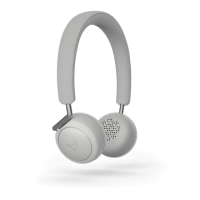
Use the Touch Interface on your Q Adapt On-Ear headphone to Play, Pause, skip track,
activate Hush function, or simply to crank up the volume. You can also answer and end phone
calls.
Play and Pause
Tap the Nightingale using two or more fingers to Pause music. Use the same procedure to Play
again.
Skip track - (forward)
Double-tap the Nightingale using two or more fingers to skip to next track.
Skip track - (backward)
Tripple-tap the Nightingale using two or more fingers to skip to previous track.
Talk-Through
Place your hand over the Touch Interface for 3 seconds to activate Talk-Through on your
headphones. The music is stopped and the microphones are activated allowing you to hear
people talking to you without having to remove your On-Ear. Use same procedure to resume
playback.
Answer and end a phone call
Use the built-in microphone for phone calls. Tap anywhere on the Touch Interface using two or
more fingers to answer and end a phone call.
Activate Siri (iOS)


 To Next Page