Need help?
Do you have a question about the LIBRATONE TRACK Air+ and is the answer not in the manual?
Connect the left earbud to your phone via Bluetooth in pairing mode.
Control music and calls by double-tapping earbuds; customization available in the app.
This document describes the TRACK Air+ earbuds, focusing on their functions, usage, and maintenance.
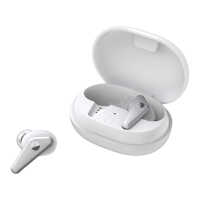
The TRACK Air+ earbuds are designed for wireless audio playback and communication, featuring smart noise cancellation and wear detection. They come with a charging case that doubles as a power source and a pairing hub. The earbuds are equipped with a function button and an indicator light (LED) for various operations and status indications. The charging case also has a function button, an indicator light, and a charging port.
First Use and Pairing: To begin, place both earbuds into the charging case. They will automatically power on and enter pairing mode. The initial connection involves pairing the left earbud with your phone via Bluetooth. Once the left earbud is connected, a pop-up window will appear on your phone (especially for iOS devices) to prompt pairing of the right earbud. Confirm this by clicking 'Pair' or 'Ok' to complete the connection.
If you need to manually enter pairing mode, ensure both earbuds are in the charging case, then long-press the function button on the case for 2 seconds. The indicator light will blink continuously, signaling that the earbuds are in pairing mode.
Power On and Off: The earbuds power on automatically when taken out of the charging case, allowing immediate use. To power them off, simply place them back into the charging case and close the cover.
Basic Operation (Gesture Control): For basic functions like playing/pausing music or answering/ending phone calls, double-tap either earbud. These functions can be customized further within the Libratone app.
Smart Noise Cancelling (CityMix® Smart): The TRACK Air+ features CityMix® Smart noise cancellation, which automatically adjusts its level based on your surroundings and movements. By default, CityMix® Smart is disabled but can be enabled and configured through the Libratone app. You also have the option to manually adjust the noise cancellation level within the app.
Wear Detect: The earbuds incorporate a wear detection feature. If you take both earbuds off, music playback will automatically pause, and any ongoing phone calls will be transferred back to your phone. When you put either earbud back on, music playback will resume, or phone calls will be answered automatically.
Sleep Mode: If there's no music playing or other interaction with the earbuds for a period, they will automatically enter sleep mode to conserve power. In sleep mode, the earbuds will disconnect from your device. To wake them up, simply pick up an earbud, and it will automatically reconnect to the last used device.
Connect to a New Device: To connect the earbuds to a new device, ensure both earbuds are in the charging case. Long-press the function button on the case for 2 seconds to enter pairing mode. The indicator light will blink continuously. Follow the initial pairing steps to complete the connection with the new device. Video guides for iOS and Android are available for this process.
Status Indication (LED): The indicator light (LED) on the charging case provides various status updates:
Charging Port Protection: To prevent damage to the charging port, it is crucial to ensure your earbuds are completely dry before placing them back into the charging case.
Master Earbud Management: It is recommended to keep both the left and right earbuds listed in your phone's Bluetooth device list. Each time the earbuds are used, the one taken out of the charging case first will automatically become the "master" earbud. This master earbud connects directly to your phone and transmits the audio signal to the other earbud. The master earbud can also function independently as a single headset. If an earbud is not in the Bluetooth device list, it cannot work independently when taken out. Keeping both earbuds in the list allows them to alternate as the master, balancing power consumption and extending overall working time.
Troubleshooting Playback Interruptions: The normal working distance for the earbuds is 10 meters in an unobstructed area. If the distance to the playing device exceeds 10 meters, music playback may be interrupted. Additionally, in environments with strong wireless interference, intermittent playback may occur due to the nature of true wireless earphones.
Troubleshooting Connection Issues: If the earbuds fail to connect to a previously paired phone, delete the earphone from the phone's Bluetooth device list. Then, press the function button on the charging case for 2 seconds to re-enter Bluetooth pairing mode and pair them with the phone again.
Replacing a Lost Earbud: If an earbud is lost and replaced with a new one, you must pair the two earbuds together first. Place both earbuds (the old and the new) into the charging case, then double-press and press-and-hold the function button for 5 seconds. When the white LED blinks, the earbuds are paired. This process also performs an automatic factory reset and enters pairing mode.
App Connectivity: To ensure a stable connection between the earbuds and the Libratone app, it is recommended to use a mobile phone with Bluetooth 4.2 or newer. You can verify your phone's Bluetooth version through its official website or other relevant channels.
 General
| Type | In-ear |
|---|---|
| Bluetooth | Bluetooth 5.0 |
| Water Resistance | IPX4 |
| Charging Port | USB-C |
| Driver Size | 5.3 mm |
| Frequency Response | 20 Hz - 20 kHz |
| Impedance | 16 Ohms |
| Microphone | Yes |
| Touch Controls | Yes |
| Noise Cancellation | Active Noise Cancellation (ANC) |
| Weight | 5.5 g (each earbud) |
| Bluetooth Codecs | AAC, SBC |
| Battery Life | 6 hours (earbuds), 24 hours (with case) |

 To Next Page