Page 4 / 18 Ausgabe SIEMENS-E mHT 03 11 16
03_03_1_Microface_E_Betriebshandbuch_mHT_eng_031116.doc
2.3 Microface Board and Jumper setting
In order to obtain the required functionality of the Microface controller acc. to the
specific needs of your application it is required to configure the Microface board
by an individual setting of jumpers during start-up of the unit.
Caution!
Never add / remove Jumpers when Microface is under power!
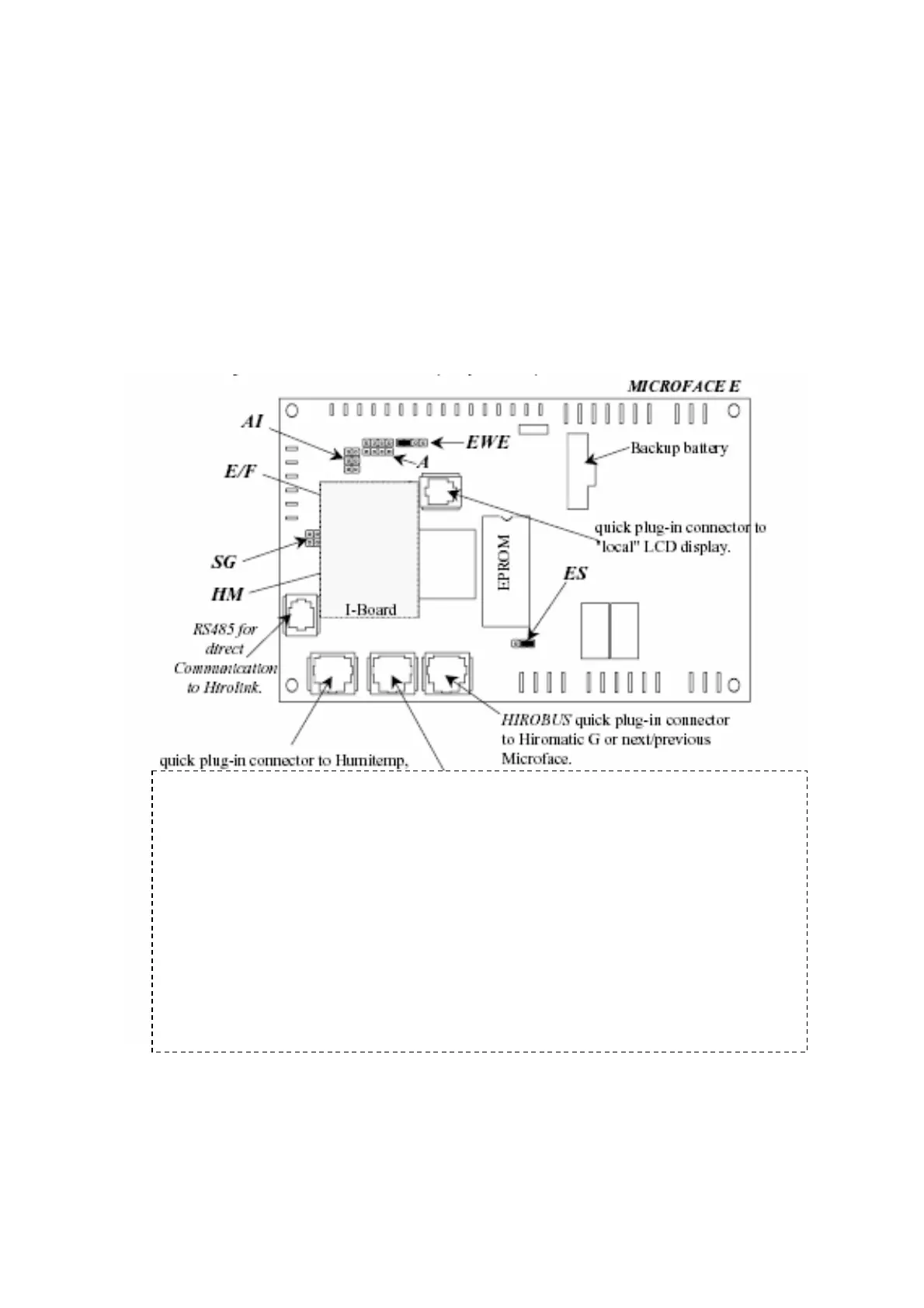
Fig. 2-3 Microface Jumpers and settings
Jumpers:
EWE: Eprom write enable. Always set this jumper
A: Adress setting. Units, to connect to other units: NO Jumper
A1: Analog inputs selection.
E/F: EPROM / Flash memory selection jumper. Set the jumper, when the EPROM is
installed. Do not set this jumper when Flash memory is installed.
SG: Subgroup ID settings.
HM: Comb connector for I-Module (only present, when humidifier is installed)
ES: EPROM/Flash memory size selection jumper. Set jumper between middle and right
pins for 1 or 2 Mbit size memory devices. Set jumper between middle and left pins
for 4 Mbit size memory devices.



 To Next Page