19
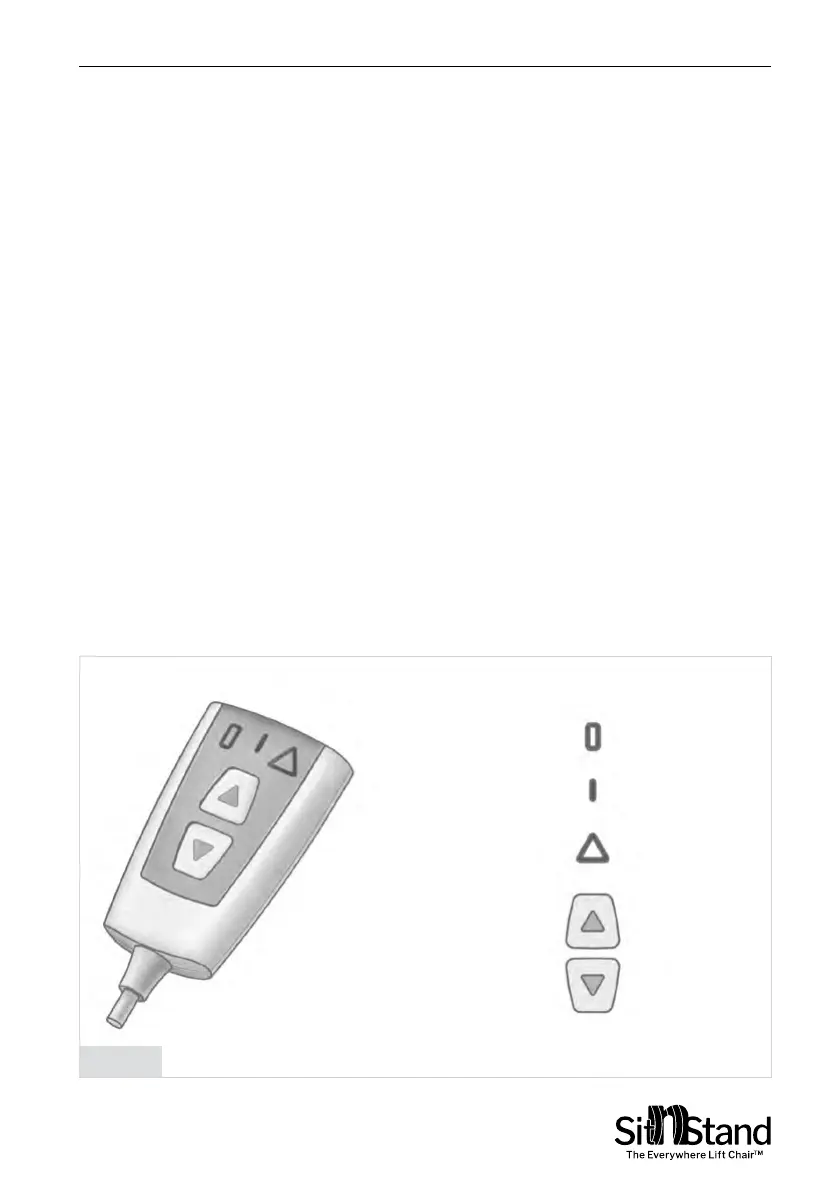
Controller Indicator Modes - Figure 7
1.
Standby Mode – the Green light ashes slowly (about one
ash per second) – The SitnStand Compact is now ready for
use and is waiting for your action.
2.
Working Mode – the Green light ashes quickly (about 5 times
a second) – The SitnStand Compact is operating (while in this
mode, the buttons will not respond).
3.
Charge Battery – the Orange light is on while the Standby/
Working mode green light is also ashing as described in 1 or
2 above – indicating that the battery needs recharging.
4.
Charge Battery – the Orange light is on and Standby/Working
mode Green light is off – battery is depleted. In this case, the
SitnStand Compact cushion can only be deated.
5.
Error – the Red and Green lights ash quickly – The SitnStand
Compact has identied a system fault – See troubleshooting
chapter.
User Manual | Using the Sitnstand
Charge Battery
Legend
Standing By/
Working Mode
Malfunction
Up Button
Down Button
Figure 7


 To Next Page