23
technical personnel to repair those parts of equipment
which are designated repairably can be supplied.
•
Changes or modifications to the device will nullify the
user warranty.
•
Do not drop or insert any object into any opening or
hose. This may damage the unit.
•
Do not press the buttons with excessive force or with
pointed objects.
•
The calibration should be checked every 2 years or after
repairs. Please contact customer service.
To keep your digital blood pressure monitor in the best con-
dition and protect the unit from damage follow the direc-
tions listed below:
•
Clean your device and cuff carefully only with a slightly
moistened soft cloth and dry it immediately with a soft
dry cloth. Do not press.
•
When storing the device, make sure that no heavy objects
are placed on top of it.
•
Do not fold the cuff and tubing tightly. The cuff tube
should not have any sharp kinks and keep it away from
sharp edges.
•
If the unit is stored near freezing, allow it to acclimate to
room temperature before use.
•
Always store the unit in the pouch after use.
•
This unit may not meet its performance specifications if
stored or used outside of the temperature and humidity
ranges (see section “11. Technical Specifications”).
•
Use the unit consistent with the instruction provided in
this manual.
10. Error messages/trouble-shooting
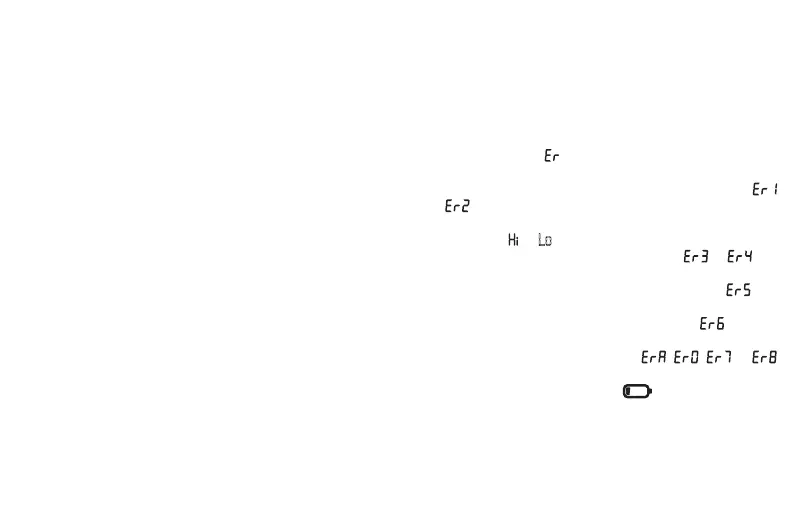
In case of faults, the _ message appears in the display.
Error messages may appear if:
•
systolic or diastolic pressure could not be measured (
or appears on the display),
•
systolic or diastolic pressure was outside the measure-
ment range ( or Lo appears on the display),
•
the cuff is fastened too tightly or loosely ( or ap-
pears on the display),
•
the pump pressure is higher than 300 mmHg ( ap-
pears on the display),
•
pumping up takes longer than 160 seconds ( appears
on the display),
•
there is a system or device error ( , , or
appears on the display),
•
the batteries are almost empty .
In such cases, repeat the measurement. Ensure you do
not move or speak. If necessary, re-insert or replace the
batteries.


 To Next Page