9
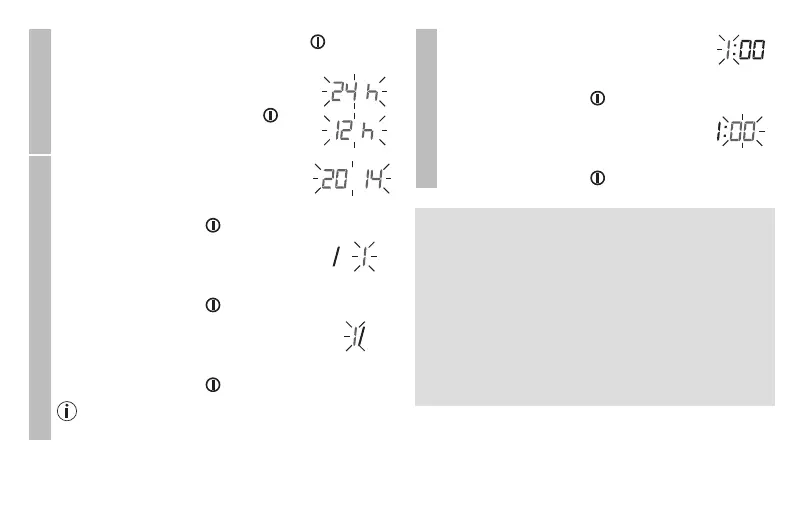
Hour format
•
Press and hold the Start/stop button for 5 sec-
onds.
•
Choose the desired hour format with
the M1/M2 memory buttons and con-
firm with the Start/stop button .
Date
The year flashes on the display.
•
Choose the desired year with the M1/
M2 memory buttons and confirm with
the Start/stop button .
The month flashes on the display.
•
Choose the desired month with the M1/
M2 memory buttons and confirm with
the Start/stop button .
The day flashes on the display.
•
Choose the desired day with the M1/
M2 memory buttons and confirm with
the Start/stop button .
If the hour format is set as 12h, the day/month dis-
play sequence is reversed.
Time
The hour flashes on the display.
•
Choose the desired hour with the
M1/
M2
memory buttons and confirm with
the Start/stop button .
The minute flashes on the display.
•
Choose the desired minute with the M1/
M2
memory buttons and confirm with
the Start/stop button .
5.4 Operation with AC Adapter
You can also operate this device with an
AC Adapter
.
When doing so, there must not be any batteries in the
battery compartment.
•
To prevent possible damage to the device, the blood
pressure monitor must only be used with the
AC
Adapter included with the unit.
•
Insert the connector into the device. The
AC Adapter
must only be connected to the power outlet with the
voltage specified on the rating plate of the adapter.
•
Then insert the AC Adapter in the power outlet.


 To Next Page