8
5.1 Inserting/Replacing
batteries
•
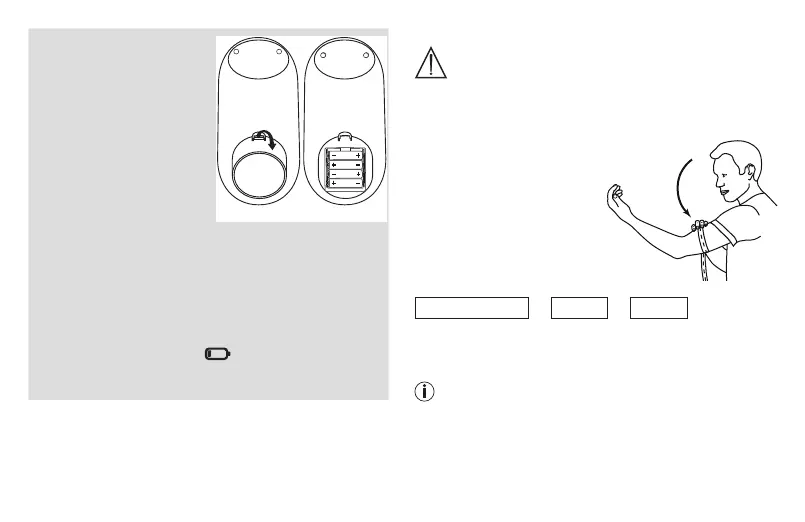
Remove the battery cov-
er from the back of the
monitor.
•
Clean the battery con-
tacts and those of the
device prior to installa-
tion with a soft dry cloth.
•
Insert or replace with only four AAA 1.5 V alkaline bat-
teries. Make absolutely sure that you insert them with
the correct polarity (+/-) as indicated (see the diagram
inside the battery compartment). Do not use other
types of batteries.
•
Replace the battery cover carefully.
If the battery change icon is continuously illumin-
ated, measurement is no longer possible and you must
replace all the batteries.
5.2 Cuff information
WARNING:
•
Proper cuff size is important for accurate measure-
ments. Only use the device on adults who have the
correct upper arm circumference for this instrument.
This unit includes 1 size of arm cuff:
•
Standard size fits 22 – 42
cm / 8.7” to 16.5”
5.3 Setting the hour for-
mat, date and time
This menu allows you to set
the following functions, one after another.
Hour format
➔
Date
➔
Time
It is essential to set the date and time. Otherwise, you will
not be able to save your measured values correctly with a
date and time and access them again later.
If you press and hold the M1 or M2 memory button,
you can set the values more quickly.


 To Next Page