Wellness Recovery Collection 7 6 LumiNova Red Light Therapy Neck Device User Manual Lifepro
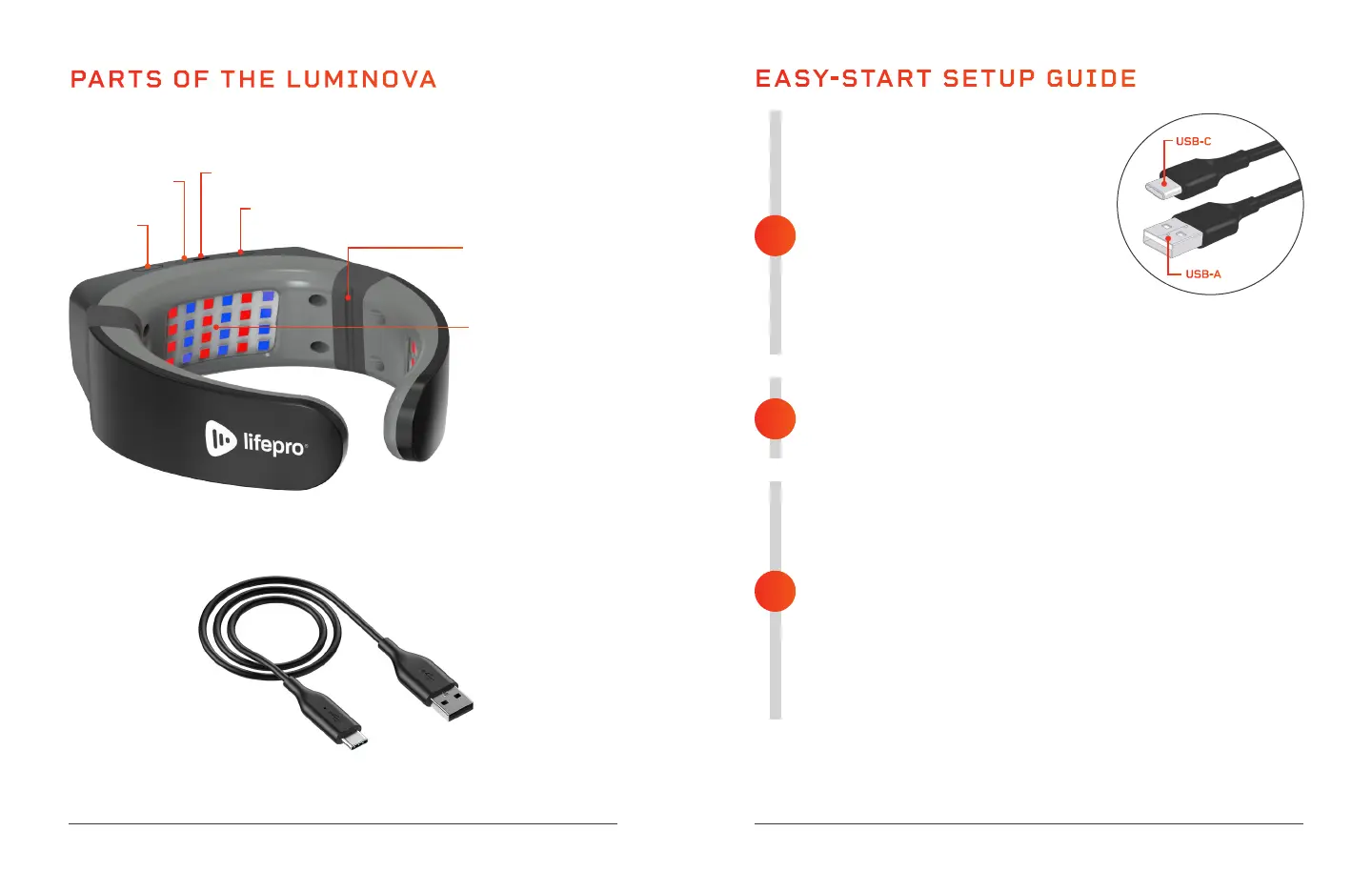
PARTS OF THE LUMINOVA
Lifepro LumiNova Red Light Therapy Neck Device
USB Charging
Cable
USB Charging Port
LED Light Panels (3)
CHARGE THE BATTERY OF THE LUMINOVA
• Insert the USB-C end of the charging cable
into the charging port on the LumiNova.
• Insert the USB-A end of the charging
cable into a USB charging device, such as
a computer or laptop, or use an AC wall
adapter to plug into a standard wall outlet.
• The power indicator light will glow red while
charging. When the LumiNova is fully charged,
the power indicator light will turn green.
• Charge the LumiNova for 10 hours before initial use.
POWER ON THE LUMINOVA
• Press and hold the On/Off button for 2 seconds to power on
the LumiNova and enter standby mode.
• The power indicator light will glow blue when powered on.
BEGIN YOUR LIGHT THERAPY TREATMENT
• In standby mode, quickly press the On/Off button to start the LED
light therapy (near infrared/red light therapy is the default).
• To switch to blue light therapy, quickly press the Switch button to
toggle between red light, blue light and red & blue light combined
therapy treatments.
• To pause the light therapy session, quickly press the On/Off
button. The blue power indicator light will remain on while the
therapy session is paused.
• .When paused, quickly press the On/Off button again to restart
your light therapy session.
NOTE: Be sure to remove any jewelry and accessories from the area
to be treated before using the LumiNova.
EASYSTART SETUP GUIDE
3
2
1
See THERAPY TREATMENT RECOMMENDATIONS on the next pages for details
about how to use your LumiNova Red Light Therapy Neck Device.
On/Off
Button
Power On
Indicator Light
LED Light Mode Button
USB-C
USB-A
Articulating Hinges for
Size Adjustment (2)


 To Next Page