EasyManua.ls Logo

Lifepro OCULAX SMART - User Manual

Lifepro OCULAX SMART
11 pages
Print Icon
To Next Page IconTo Next Page
Loading...
OCULAX SMART EYE MASSAGER
READY,
SET, PRO
USER MANUAL

Questions and Answers

Summary

Product Benefits

Key Benefits of Oculax

Highlights the health and wellness advantages of using the Lifepro Oculax Smart Eye Massager.

GET STARTED

Whats in the Box

Lists items included with the Oculax Smart Eye Massager.

First Steps

Initial actions before using the Oculax, including registration.

EASY-START SETUP GUIDE

Preparing to Use the Oculax

Steps for preparing your face and the device before the first use.

Customer Support

Contact information for assistance with setup or usage.

PARTS OF THE OCULAX

TIPS FOR USING YOUR OCULAX

Using the Oculax

Guidelines for operating the eye massager, including program selection and usage duration.

Using the Heat Function

Information on how the heat function works and its benefits.

Important Safety Information

Crucial safety precautions for using the Oculax, covering cleaning, liquids, and heat.

OPERATING INSTRUCTIONS

Charging the Battery

Instructions on how to charge the Oculax battery using the included USB-C cable.

Using Your Oculax

Step-by-step guide on turning on, wearing, and selecting massage programs.

Massage Program Details

Chart outlining the features and duration of each of the four massage programs.

Setting Up Bluetooth Music

Steps to connect your device to the Oculax for music playback.

Using the Control Panel

Explanation of the buttons and LED indicators on the Oculax control panel.

SAFETY

Disclaimer and Responsibilities

User's discretion and owner's duties regarding product use and information.

Electrical and Battery Safety

Precautions related to charging, water, heat sources, and general electrical safety.

General Safety Precautions

Important warnings about usage conditions, medical advice, and user comfort.

Cleaning, Storage & Maintenance

Guidelines for cleaning, storing, and maintaining the Oculax device.

WHERE TO USE THE OCULAX

LIFETIME WARRANTY

PRODUCT SPECIFICATIONS

Unit Specifications

Technical details of the Oculax, including size, weight, power, and programs.

Charging Cable and Battery Specifications

Details about the charging cable and the Oculax battery capacity and charging time.

TROUBLESHOOTING GUIDE

Summary

Product Benefits

Key Benefits of Oculax

Highlights the health and wellness advantages of using the Lifepro Oculax Smart Eye Massager.

GET STARTED

Whats in the Box

Lists items included with the Oculax Smart Eye Massager.

First Steps

Initial actions before using the Oculax, including registration.

EASY-START SETUP GUIDE

Preparing to Use the Oculax

Steps for preparing your face and the device before the first use.

Customer Support

Contact information for assistance with setup or usage.

PARTS OF THE OCULAX

TIPS FOR USING YOUR OCULAX

Using the Oculax

Guidelines for operating the eye massager, including program selection and usage duration.

Using the Heat Function

Information on how the heat function works and its benefits.

Important Safety Information

Crucial safety precautions for using the Oculax, covering cleaning, liquids, and heat.

OPERATING INSTRUCTIONS

Charging the Battery

Instructions on how to charge the Oculax battery using the included USB-C cable.

Using Your Oculax

Step-by-step guide on turning on, wearing, and selecting massage programs.

Massage Program Details

Chart outlining the features and duration of each of the four massage programs.

Setting Up Bluetooth Music

Steps to connect your device to the Oculax for music playback.

Using the Control Panel

Explanation of the buttons and LED indicators on the Oculax control panel.

SAFETY

Disclaimer and Responsibilities

User's discretion and owner's duties regarding product use and information.

Electrical and Battery Safety

Precautions related to charging, water, heat sources, and general electrical safety.

General Safety Precautions

Important warnings about usage conditions, medical advice, and user comfort.

Cleaning, Storage & Maintenance

Guidelines for cleaning, storing, and maintaining the Oculax device.

WHERE TO USE THE OCULAX

LIFETIME WARRANTY

PRODUCT SPECIFICATIONS

Unit Specifications

Technical details of the Oculax, including size, weight, power, and programs.

Charging Cable and Battery Specifications

Details about the charging cable and the Oculax battery capacity and charging time.

TROUBLESHOOTING GUIDE

Overview

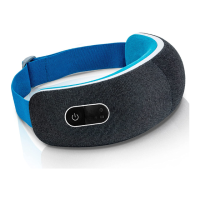
The Lifepro Oculax Smart Eye Massager is a device designed to provide therapeutic benefits for the eyes and surrounding areas, aiming to alleviate pain, reduce strain and fatigue, improve sleep quality, decrease stress, and refresh tired eyes. It utilizes a combination of vibration therapy and acupressure, along with heat and compression massage, to promote blood flow, relieve pain, and induce relaxation.

Function Description:

The Oculax Smart Eye Massager offers four unique massage programs (P1: Energize, P2: Relax, P3: Relieve, P4: Sleep), each with a specific combination of features including heat, compression massage, vibration, and music. These programs are designed to target various needs, from energizing tired eyes to promoting deep sleep. The device's ergonomic design ensures that it efficiently reaches important acupuncture points around the eyes, eyebrows, and temples. The heated massage function helps to loosen tight muscles and enhance relaxation and pain relief, with a gentle warmth set at 107°F (42°C). The Oculax also includes a Bluetooth music feature, allowing users to connect their device and control music playlists and volume for a personalized relaxation experience. The high-capacity lithium-ion battery provides approximately four hours of use per charge, and the device can be folded in half for portability.

Usage Features:

To use the Oculax, first ensure your hands and face are clean and free of makeup or dirt, and that the device is fully charged and powered off. Sit comfortably in a chair or upright in bed. Place the Oculax on your head, positioning the massager over your eyes with the elastic strap behind your head and the Power button on your right. Adjust the head strap for a snug, comfortable fit. Before starting, remove any eyeglasses, contact lenses, or jewelry.

To turn on the Oculax, press and hold the Power button for 2 seconds. The 5 LED indicators will light up. Quickly pressing the Power button allows you to toggle between the four preset massage programs (P1-P4). The selected program will begin after three seconds. Each program has different features, as detailed in the manual's program chart. To turn off the unit at any time, hold down the Power button. The unit will automatically shut off after a massage program ends, but you can press the Power button again to continue using it.

For the heat function, it takes about 5 seconds for the unit to begin heating up once turned on. If you have sensitive eyes or skin, you may place a clean towel or cloth between your eyes and the Oculax to avoid discomfort. It is recommended to start with the shortest program (P1) and gradually increase session length. Always use the Oculax while seated or lying down, never while standing, walking, or driving. Do not use continuously for more than 20 minutes.

To set up Bluetooth music, turn on the Oculax and ensure your mobile device's Bluetooth is enabled. In your device's Bluetooth settings, select "Oculax Smart Eye Massager" to connect. Music playback and volume can then be controlled from your device.

Maintenance Features:

For charging, ensure the Oculax is OFF. Connect the included USB-C charging cable to the charging port on the bottom edge of the unit and plug it into a USB port on a laptop, computer, or a 5V USB adapter (a 2A charger will charge faster) plugged into a standard wall outlet. The Battery Indicator LED will flash during charging and remain lit when fully charged. The Oculax takes up to 2 hours to charge. If the battery is very low, the LED will flash, a beep will sound, and the device will shut down automatically, indicating it needs to be charged.

For cleaning, turn off the device or unplug the charging cable and allow the Oculax to cool down. Wipe down the massage surface with 70% rubbing or isopropyl alcohol and a soft cloth after each use. Do not use abrasive, solvent, or chemical cleaners. The Oculax is not waterproof; keep it away from liquids and do not immerse it in water. If it becomes wet, do not use it.

Store the device in a cool, dry location. Do not remove screws or attempt to disassemble the unit, as the battery is not removable. Dispose of the product responsibly according to local regulations. Always power off the unit after each use. Never use the Oculax under a blanket or pillow to prevent excessive heat, and keep it away from heat sources and fire.

Lifepro OCULAX SMART Specifications

General IconGeneral
Product TypeEye Massager
Battery Capacity1200 mAh
Charging Time2.5 hours
Massage Modes5 modes
Usage TimeUp to 90 minutes
ColorWhite
Weight0.8 lbs
BatteryLithium Polymer
MaterialABS
Massage TypeVibration, Heat
Power SourceRechargeable Battery
Heat Levels2 levels

Related product manuals