
 Need help?
Do you have a question about the Lifepro VIBRACARE PLUS and is the answer not in the manual?
Step-by-step instructions for initial setup and operation of the VibraCare Plus foot massager.
Contact information and assistance details for users experiencing issues with the VibraCare Plus.
Critical safety guidelines to prevent injury or damage during operation.
Detailed instructions for operating the VibraCare Plus using its built-in control panel.
Instructions for operating the VibraCare Plus using the included remote control.
Instructions for massaging feet using the foot pads in the primary position.
Utilizing the tilt bar for an alternative foot massage angle.
How to position the massager for effective calf muscle massage.
Selecting and initiating preset massage programs via the device's control panel.
Selecting and initiating preset massage programs using the remote control.
Creating a custom massage program using the control panel's duration and speed settings.
Creating a custom manual massage with the remote control.
Essential precautions for safe operation, including warnings against misuse and specific conditions.
Guidelines for safe power usage, battery handling, and environmental considerations.
Warnings regarding medical conditions, usage limitations, and environmental factors.
Instructions for proper cleaning, storage, and maintenance of the device.
Solutions for common problems such as the massager not working or being too weak.
Troubleshooting steps for a non-functional remote control.
Addressing issues like sudden stoppage, low intensity, or excessive heat.
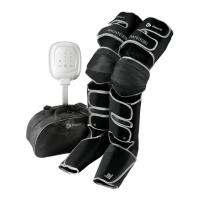
The Lifepro VibraCare Plus Foot Massager is a wellness recovery device designed to provide therapeutic benefits through vibration therapy and acupressure, aiming to improve blood flow, relieve pain, and reduce stress in the feet and lower extremities. It is suitable for a wide range of individuals, from professional athletes to those with physically demanding jobs or who spend long hours on their feet.
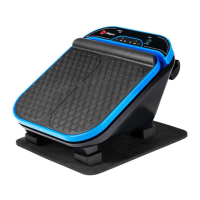
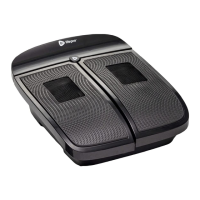
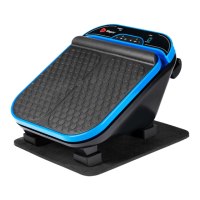
The VibraCare Plus combines vibration therapy and acupressure to deliver a comprehensive massage experience. Vibration therapy is known to improve performance, increase bone and muscle mass, boost metabolism, and reduce joint pain, while acupressure helps relieve pain, improve blood circulation, and reduce stress. The device features large massage pads for full foot and lower leg massage, and an arch massager to target hard-to-reach areas of the foot, enhancing relaxation and pain relief. Its ergonomic design is crafted to efficiently reach various acupuncture points on the feet and lower legs. The massager is particularly beneficial for alleviating chronic pain (such as from arthritis and carpal tunnel), improving joint flexibility by loosening tight muscles and tendons, reducing numbness in the feet and lower extremities by improving blood circulation, decreasing stress by increasing serotonin and decreasing cortisol, and reinvigorating tired feet with a relaxing massage.
The VibraCare Plus offers a customizable massage experience with five preset programs (P1-P5), a manual massage program, 30 speed intensity levels, and three massage positions. It operates by plugging directly into a wall outlet, eliminating the need for battery charging. A fully functional remote control allows users to easily change settings without needing to get up. The device's compact size makes it portable for use anywhere.
To begin, users must first activate the remote control by installing two AAA batteries. The massager should then be placed on a flat, non-slip surface in front of a chair with a back. Next, connect the power cable to the power jack on the side of the unit and plug it into a wall outlet, then flip the power switch to turn on the massager. Before use, it is recommended to wash and dry feet or calves thoroughly and roll up pant legs. Users should sit in a chair and place their feet or calves on the foot pads, then press the power button on the remote control to turn on the control panel.
The VibraCare Plus should only be used on the feet and calves, not on the abdomen, neck, or other body parts. Users should not sit or stand on the massager, as its maximum weight capacity is 66 lbs, and excessive downward force on the foot pads should be avoided. It should never be used under a blanket or pillow due to the risk of excessive heat, fire, electrocution, or injury. The unit, power cord, and remote should be kept away from heat sources, fire, and liquids, as they are not waterproof. Users should never use the remote or plug/unplug the power cord with wet hands. After each use, the unit must be powered off and unplugged. Adjustments to the massage should be made using the remote control once a program has started to prevent accidents or injuries from using the control panel while the unit is moving.
When using the massager, it should be placed on a flat, non-slip surface. It is crucial to start at the lowest speed intensity level and increase it slowly, especially for those with sensitive feet, who may also benefit from wearing socks. Use should be stopped if the user feels tired, dizzy, or experiences pain. It is best to avoid using the massager just before bedtime, as it can have a stimulating effect. Drinking plenty of water before and after use is recommended. Daily use can help achieve wellness and pain-reduction goals. The default massage time is 10 or 15 minutes, and continuous use should not exceed 20 minutes.
The heat function operates within a temperature range of 108-113° F. Once turned on, it takes approximately 3-5 minutes to reach the desired temperature.
The VibraCare Plus offers three main massage positions:
Massaging Your Feet (Position 1): In this position, the massager rests on its bottom four positioning legs. Users sit on a sofa or sturdy chair, place the massager in front of them with foot pads facing up and the control panel pointing up, and then place their feet on either the foot pads or the arch massager. Users can alternate between foot and arch massage or move their feet slowly and rhythmically for complete relaxation.
Massaging Your Feet Using the Tilt Bar (Position 2): The massager has a tilt bar on its underside that allows it to be tilted slightly forward, providing an alternative foot massage angle. To use this, users sit on a chair, pull down the tilt bar to extend it, place the massager in front of them with foot pads and control panel pointing up, and then place their feet on the foot pads. The massager can be moved closer to the chair if needed.
Massaging Your Calves (Position 3): The VibraCare Plus features six position adjustment legs for switching between foot and calf massage. For calf massage, users sit on a chair, tip the massager forward 180° onto the four front position adjustment legs (the control panel will point down), and place their calves on the foot pads. The massager can be moved closer to the chair if needed.
The device can be operated via its control panel or the remote control.
Users can create a custom massage from 1-15 minutes, with adjustable speed from level 1-30.
 General
| Type | Percussion Massager |
|---|---|
| Speed Settings | 5 |
| Warranty | Lifetime Warranty |
| Speeds | 3200 RPM |
| Charging Time | 3 hours |


 To Next Page