28 PawRunner User Manual Lifepro
Endurance Training Collection 29
Scan Speed
Mode
Speed
Time Dist. Cal.
OPERATING INSTRUCTIONS
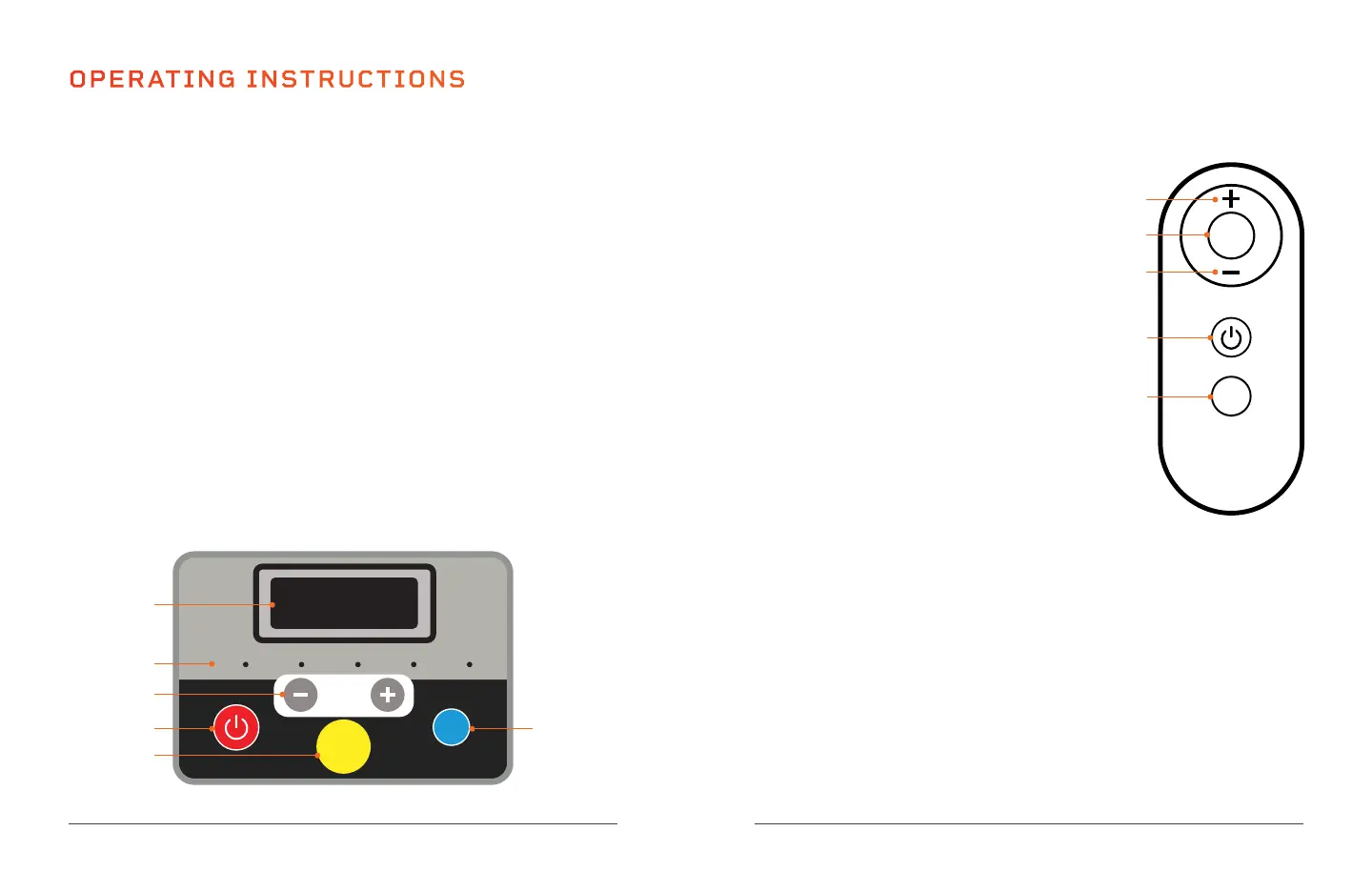
USING THE CONTROL PANEL TO OPERATE THE PAWRUNNER
1. Window: Shows the value of the selected display mode: scan, speed, time,
distance, or calories burned. Scan mode shows the value of each mode in turn.
2. Display Mode LEDs: The LEDs indicate which display mode is currently selected:
scan, speed, time, distance, or calories burned.
3. Speed + / - Buttons: During exercise, use the buttons to increase/decrease
the speed from 0.5–7.5 mph, in 0.1 mph increments. In standby mode, use the
buttons to adjust the time before starting a preset program or to adjust the
settings when selecting a countdown mode: increase/decrease the time goal
from 5–99 minutes, in 1-minute increments, the distance goal from 0.4–99
miles, or the calorie goal from 10–990 kilocalories.
4. Start/Stop Button: Press once to start the selected preset program or
countdown mode workout. Press again to pause the workout. While paused,
press a third time to restart the workout.
5. Magnetic Safety Key Port: The magnetic safety key must be in place on the
magnetic port in order to begin using the treadmill.
6. Mode Button: In standby mode, press to toggle through the three countdown
modes: time, distance, calories, then the 12 preset programs (the window
shows: 30:00, 1.00, 50.0, P01–P12). During a workout, press the button
to toggle through the display modes in order: scan, speed, time, distance,
and calories burned. The Display Mode LEDs indicate which display mode is
currently selected.
6
1
2
3
4
5
*Speed cannot be adjusted
for preset programs.
USING THE REMOTE CONTROL TO
OPERATE THE PAWRUNNER
1. +/- Buttons*: During exercise, use the
buttons to increase/decrease the speed
from 0.5–7.5 mph, in 0.1 mph increments.
In standby mode, use the buttons to adjust
the time before starting a preset program
or to adjust the settings when selecting a
countdown mode: increase/decrease the
time goal from 5–99 minutes, in 1-minute
increments, the distance goal from 0.4–99
miles, or the calorie goal from 10–990
kilocalories.
2. Mode Button: In standby mode, press to
toggle through the three countdown modes:
time, distance, calories (the window shows:
30:00, 1.00, 50.0). During a workout, press the
button to toggle through the display modes in
order: scan, speed, time, distance, and calories.
The Display Mode LEDs on the control panel
indicate which display mode is currently selected.
3. Start/Stop Button: Press once to start the selected preset program or
countdown mode workout. Press again to pause the workout. While paused,
press a third time to restart the workout.
4. Program Button: Press to toggle through the twelve preset programs,
P01–P12.
*Speed cannot be adjusted for preset programs.
MODES
Standby Mode: The PawRunner is powered on, but no workout is in progress.
Program Mode: Choose from twelve preset programs: P1–P12.
Countdown Mode: Choose between time, distance, and calorie countdown modes.
P
M
1
1
2
3
4








 To Next Page