6 Vitalize User Manual Lifepro Recovery + Fitness Collection 7
*Speed and time cannot be
adjusted for preset programs.
*Speed and time cannot be adjusted for preset
programs.
OPERATING INSTRUCTIONS
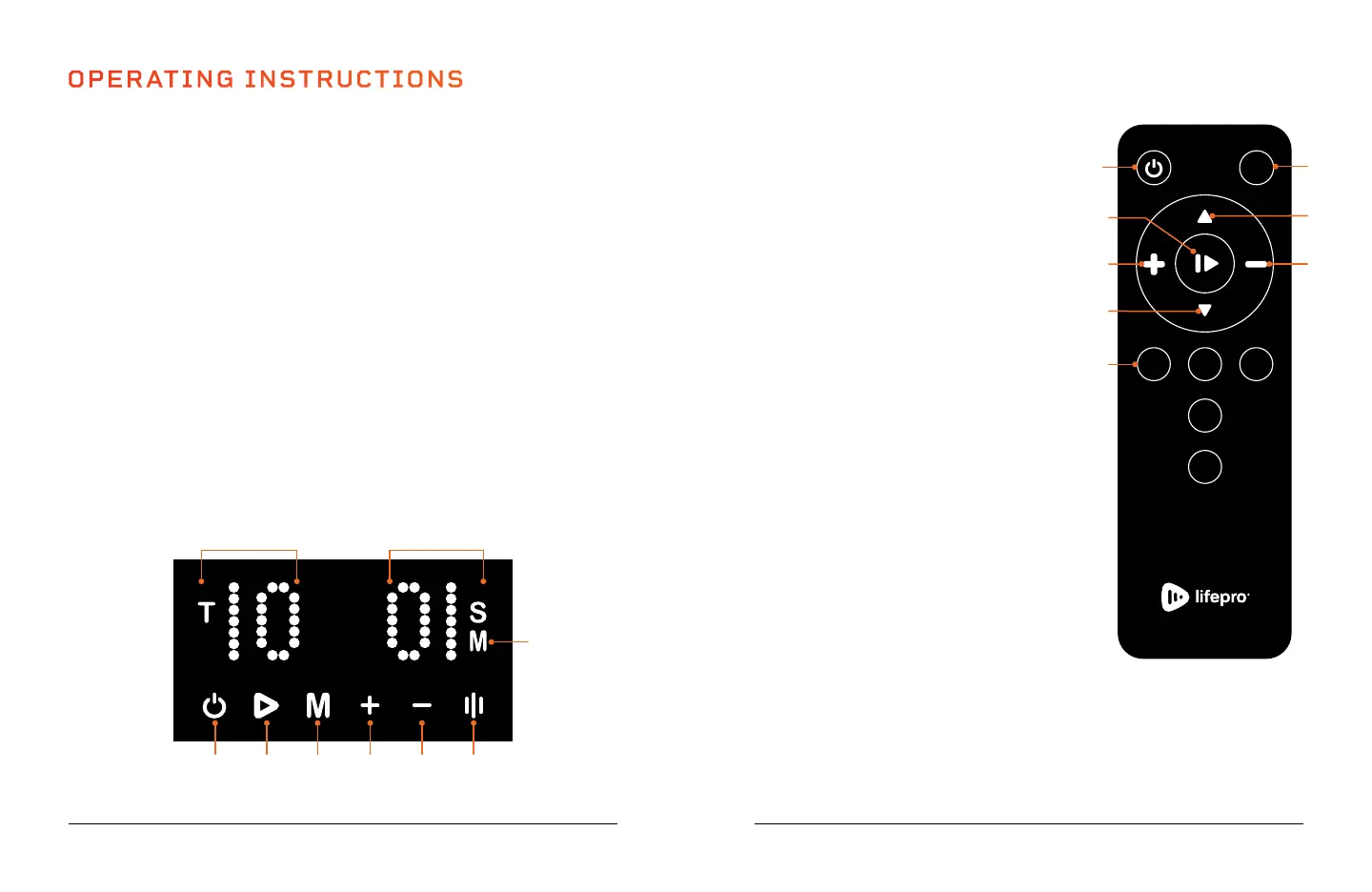
USING THE DISPLAY PANEL TO OPERATE THE VITALIZE
1. Power Button: Power the Vitalize on and off. NOTE: Unit will auto power-
off after 3 minutes of inactivity.
2. Start/Stop Button: Start/stop the selected preset program or custom
workout.
3. Roller Button: Toggle the acupressure roller on ond off.
4. Increase Speed Button*: Increase the speed after the custom workout
begins. Speed automatically starts at 1.
5. Decrease Speed Button*: Decrease the speed after the custom workout
begins. Speed automatically starts at 1.
6. Auto Mode Button: Toggle through preset programs: P1, P2, P3, P4, P5.
7. Roller Indicator: When the acupressure roller is turned on, “M” will
display. When the roller is turned off, the indicator icon will disappear.
8. Speed Indicator: Shows the current speed.
9. Time Indicator: Shows the remaining time in the current preset program
or custom workout. Time shows in one-minute increments until the last
minute, which will count down the remaining seconds.
USING THE REMOTE TO OPERATE
THE VITALIZE
1. Power Button: Power the Vitalize on
and off.
2. Start/Stop Button: Start/stop the
selected preset program or begin a
custom workout.
3. Set Time Buttons*: In standby mode,
press the buttons to increase or
decrease the time duration for your
custom workout.
4. Set Speed Buttons*: Once the custom
workout has begun, press the buttons
to increase or decrease the speed.
5. P1, P2, P3, P4, P5 Buttons: Press a
button to choose one of the five preset
programs.
6. Roller Button: Toggle the acupressure
roller on and off.
MODES
Standby Mode: The Vitalize is
powered ON, but no program is
selected.
Auto Mode: Choose from preset
workout programs: P1-P5.
M
P2P3P1
P4
P5
7
89
5
64321
1
3
2
4
6
4
3
5


 To Next Page