8 Vivid User Manual Lifepro Recovery + Fitness Collection 9
USING THE REMOTE TO OPERATE THE
VIVID
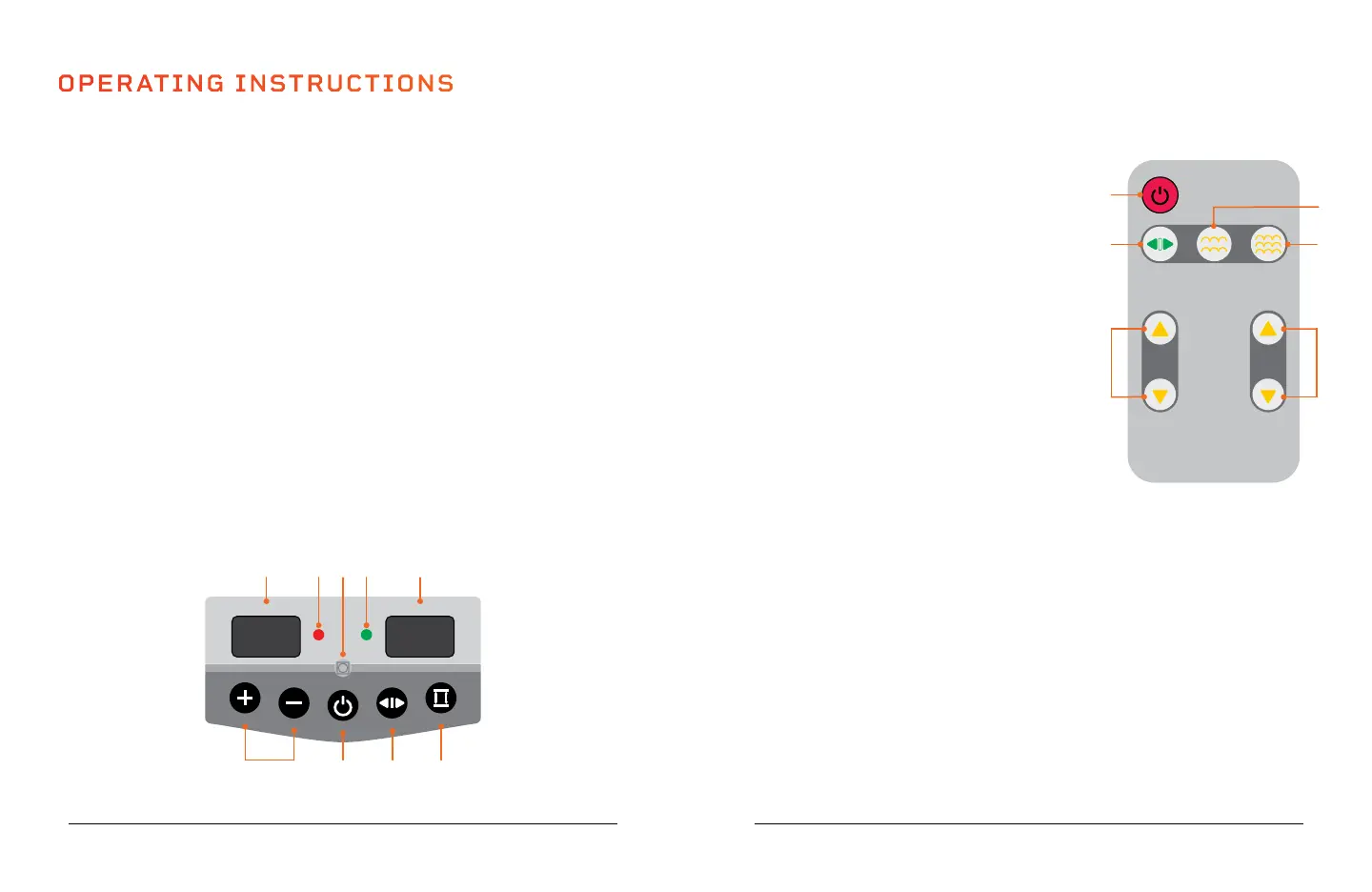
1. Start/Stop Button: The button starts/stops
the selected preset program in auto mode or a
custom workout in manual mode.
2. Mode Button: Toggle through manual mode
(00) and auto mode (preset programs P1,
P2, P3) and.
3. Speed Buttons*: After a custom workout
has begun, press the the buttons to adjust
the speed.
4. Time Buttons*: While in standby mode,
with manual mode (00) selected: press
the buttons to set a time duration for your
custom workout.
5. Strong Button*: Switch to strong mode (high
vibration intensity).
6. Soft Button*: Switch to soft mode (low vibration
intensity).
*Speed, time, and vibration intensity (soft/strong mode)
cannot be adjusted for preset programs.
OPERATING INSTRUCTIONS
USING THE DISPLAY PANEL TO OPERATE THE VIVID
1. Time/Speed Buttons*: With manual mode (00) selected, use the buttons to adjust
the time for a custom workout. After the custom workout begins, use the buttons
to adjust the vibration speed (the speed automatically begins at level 1).
2. Start/Stop Button: Start/stop the selected preset program or manual mode
workout.
3. Mode Button: Toggle between manual mode (00) and auto mode (preset programs
P1, P2, P3).
4. Switch Button*: Toggle between soft and strong vibration intensity modes.
5. Speed/Mode Display: In standby mode, the display shows the mode selected:
manual (00) or auto mode (preset programs P1, P2, P3). When the machine is
running, the display shows the current speed level (1-20).
6. Soft Indicator: When the green LED is lit, the machine is in soft mode (low
vibration intensity).
7. RC Receiver: Infrared receiver for the remote control. Point the remote control
directly at the receiver for best results.
8. Strong Indicator: When the red LED is lit, the machine is in strong mode (high
vibration intensity).
9. Time Display: Shows the time remaining in the selected preset program or current
manual mode workout.
*Speed, time, and vibration
intensity (soft/strong mode) cannot
be adjusted for preset programs.
MODES
Standby Mode: The unit is powered on, but no program or manual workout
has started (vibration is OFF).
Manual Mode (00): Create your own custom workout.
Auto Mode (P1, P2, P3): Choose from 3 preset workout programs: P1-P3.
TIME SPEED/MODE
TIME/SPEED
TIME/SPEED
START/STOP
MODE
SWITCH
RC Receiver
STRONG SOFT
SPEED
MODE SOFT STRONG
TIME
1
2
6
5
3
4
431 2
5689 7








 To Next Page