14
12
Add Grid Extender (if included)
DETERMINE THE LOCATION
14
Place the Grid Extender in a location that is spread apart from the Console and Base. A
second floor location is a great place to install this, if you choose. Having these devices spread
throughout the home will maximize system coverage. A power outlet is required to operate the
Grid Extender.
A
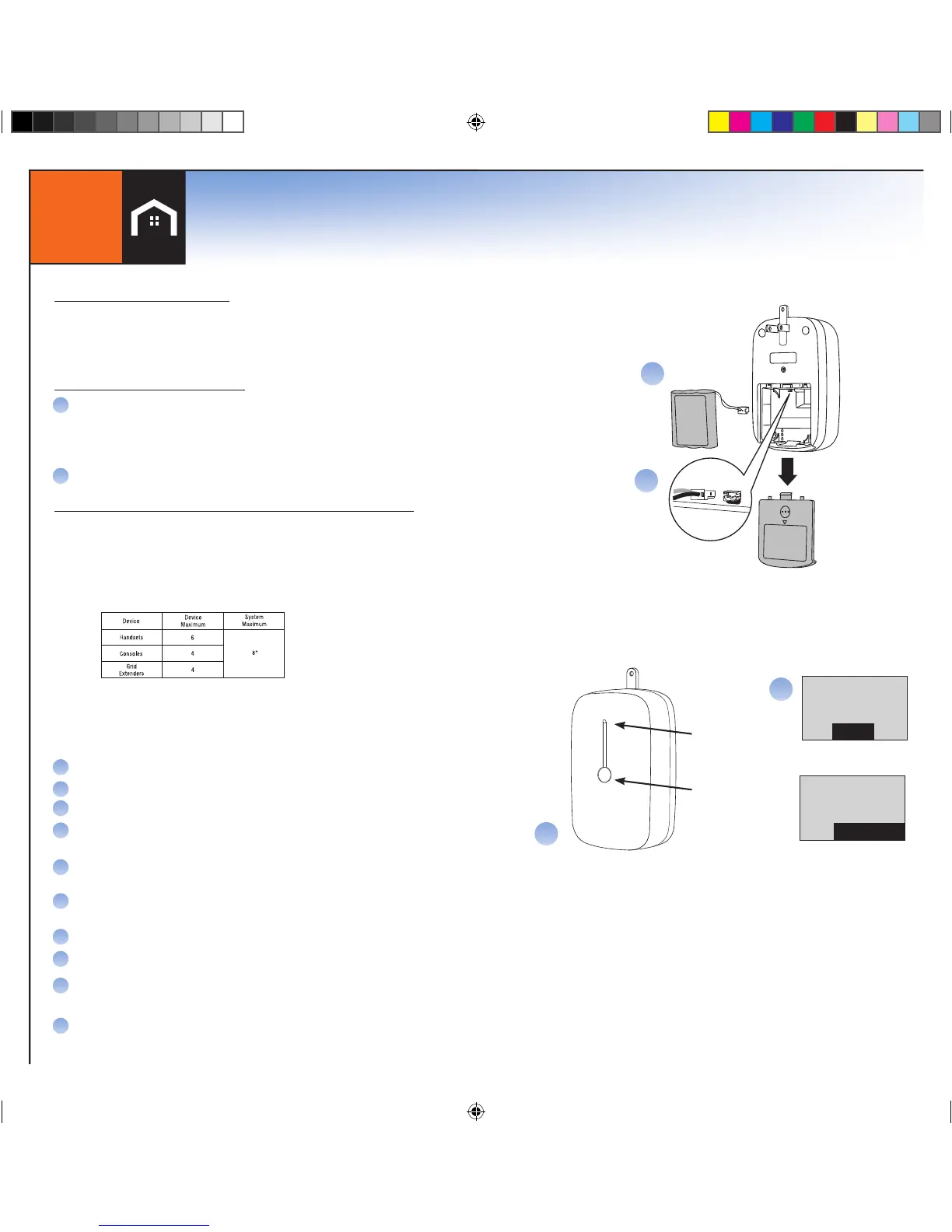
Install Battery Pack
Open the Battery compartment.
1) Insert the Battery plug into the two-pin jack, and insert the Battery.
2) Replace the Battery cover.
Plug the Grid Extender into the electrical wall outlet.
INSTALL THE GRID EXTENDER
B
Follow these steps for adding an additional device to an existing system.
Devices packed with kits are pre-registered and do not require these steps.
After the initial installation of the LifeShield System, components may be
added to enhance access or performance. The maximum number of devices
that can be added to a LifeShield System are:
ADD THE GRID EXTENDER TO YOUR LIFESHIELD SYSTEM
After the hardware is installed, use a Handset or Console that is currently
registered on the System to follow the steps for adding the Grid Extender.
After installing the hardware, enter MENU on your Handset or Console.
Scroll to Security Setup and press SELECT.
Enter Master Code*
Scroll to GCs or Handsets and press SELECT.
Press the SELECT key to <Add New>. The system will begin searching
for the new Grid Extender you are adding.
On the Grid Extender, press and hold the center button until the green
light rapidly flashes.
The following messages will appear on the Handset or Console when the
system has found and added the Grid Extender.
Press OK when you have been informed that the GX has been added.
You will then be given the option to edit the default name
Use DELETE to erase the current name and replace with new text by
using the keypad.
Press OK when editing is complete.
A
B
C
D
E
F
G
H
I
J


 To Next Page
 Loading...