5
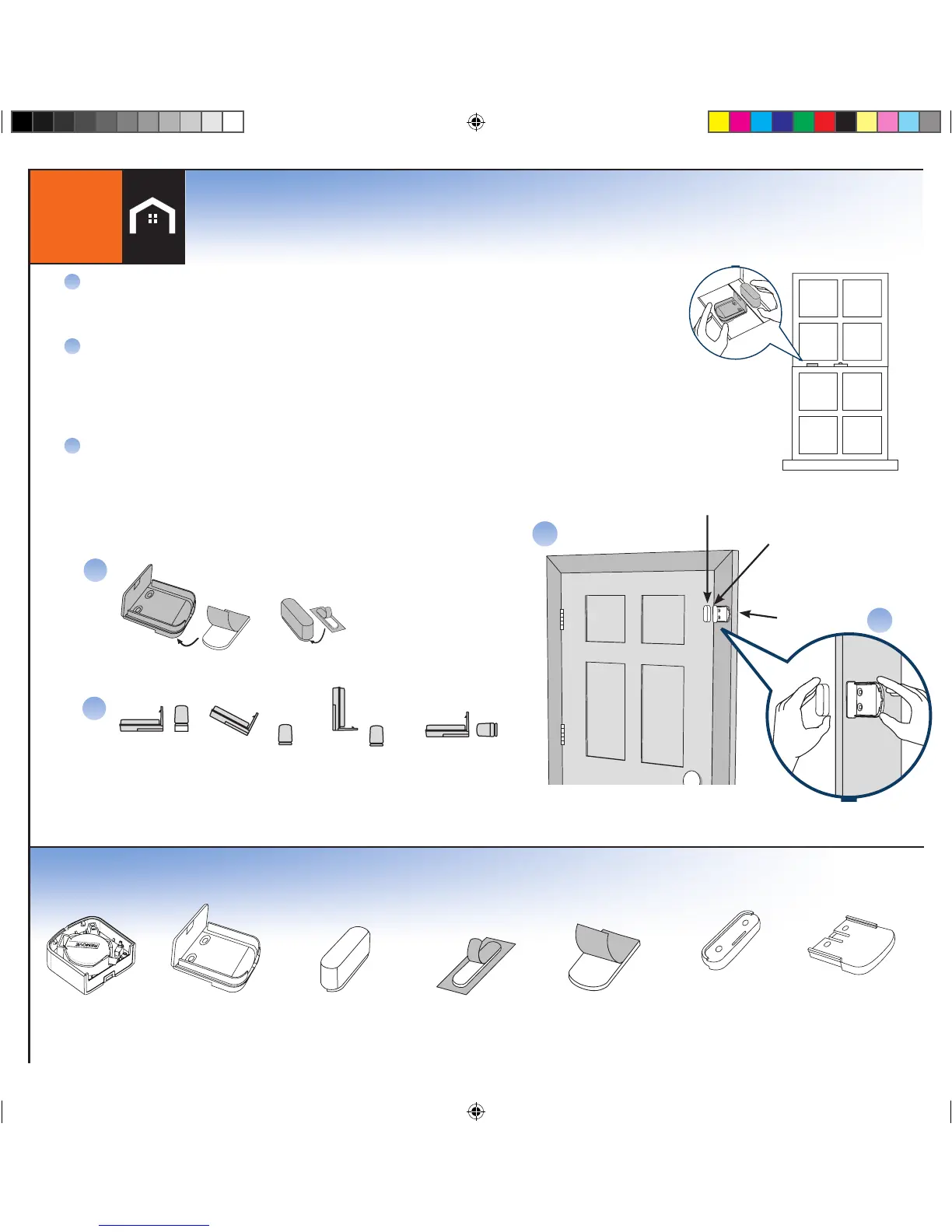
SENSOR KIT CONTENTS
Sensor
Bracket Tape Bracket
Magnet
Magnet Tape
Magnet Spacer
(optional use)
Bracket Spacer
(optional use)
3
There are up to 3 preprogrammed sensors:*
•MainDoor
•2
nd
Door
•Window1(ifincluded)
Once you have determined the appropriate location and
orientation for the Bracket and Magnet, attach them with
double-sided tape
A
B
*NOTE: WHEN POSSIBLE, PLACE THE BRACKET ON THE STATIONARY FRAME OF
DOOR OR WINDOW, AND PLACE THE MAGNET ON THE DOOR OR WINDOW ITSELF.
Double-Hung Window
Window Mounting
Various orientations between the Bracket and Magnet may be used
as long as 3/4" distance is not exceeded.* See Example in Figures 1-4
*NOTE: SPACERS IN BOTTOM TRAY MAY BE USED ON THE
BRACKET OR MAGNET TO ADJUST ALIGNMENT.
C
Figure 3.
Perpendicular Orientation
Figure 2.
Angled Orientation
Figure 1.
Level Orientation
C
Figure 4.
Perpendicular Orientation
Place Preprogammed Sensors
Magnet
A
Bracket
Door Mounting
3/4" spacing
B
Bracket
B
Magnet
*If you would like change any of the preprogrammed sensors see Step 4


 To Next Page