6
Change Preprogrammed Sensors
or Add Additional Sensors
4
If you would like to change any of your preprogrammed sensors you can.
Just follow the steps below.
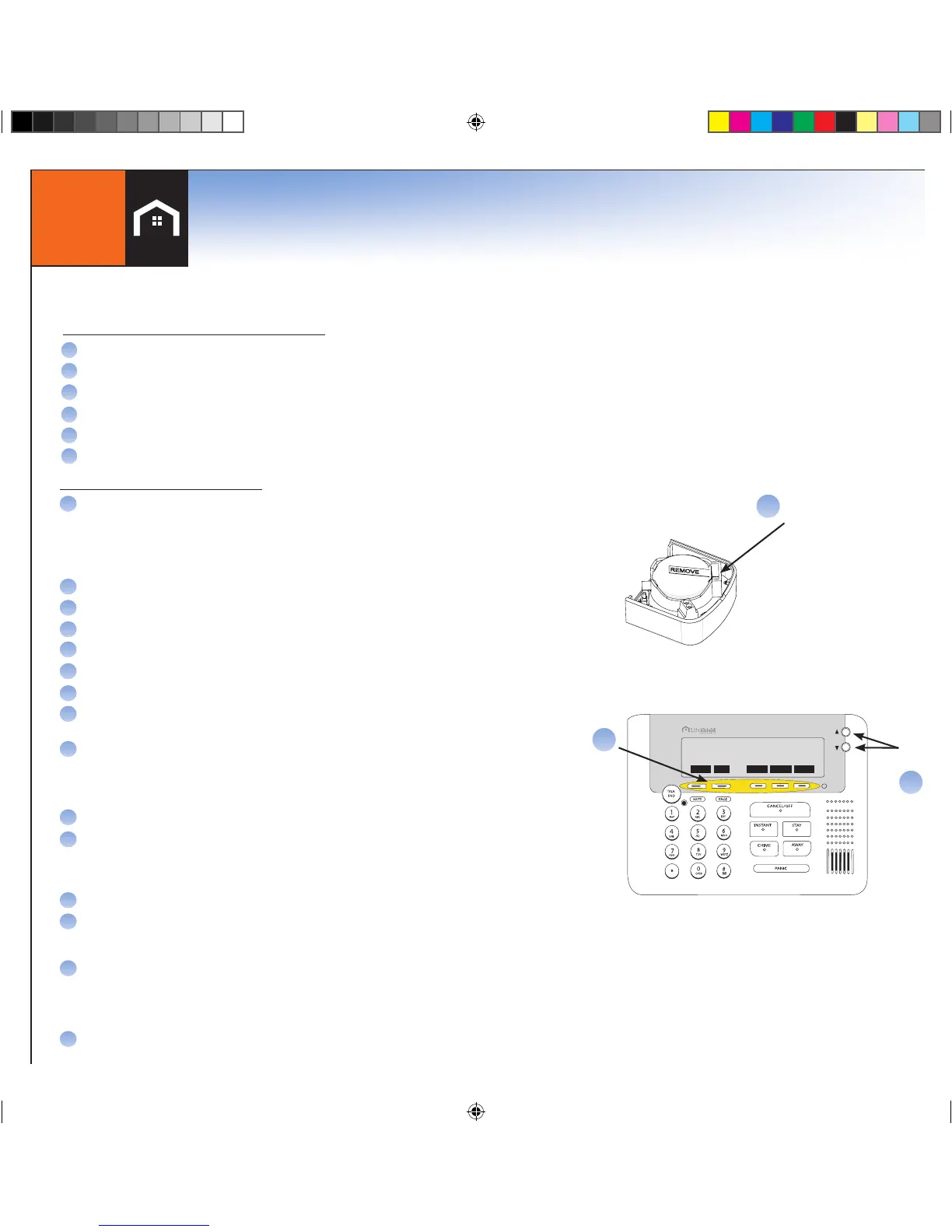
Squeeze & Hold
Metal Clip
A
Scroll
Buttons
Menu
B
C
PHNBK MENU CONNCT WEATHR ALERTS
Ready To Arm
Thu 2/8 11:48a
Remove the battery tab by squeezing and holding the metal spring clip where
the REMOVE tab folds around battery. The battery will spring upward. Carefully
remove the insulating tab from under the battery, then gently press the battery
back into the spring clip
A
For this step you will need your Console and Sensor: Using Console:
B
C
D
E
F
G
H
I
J
K
L
M
Press MENU
Scroll to Security Setup, press SELECT
Enter Master Code* (found in the front cover of this book)
Scroll to Sensors, press SELECT
On <Add New>, press SELECT
Scroll to the type of Sensor (Open/Close), press SELECT
Wait 5 seconds before clipping the Sensor into the Bracket.
You will then have 30 seconds to complete the setup
Clip the Sensor into the Bracket. The Console will beep when the system
finds the Sensor. This may take a few seconds
*IF “NO GCS HEARD SENSORS” IS DISPLAYED, THE SENSOR IS TOO FAR
FROM THE CLOSEST CONSOLE, BASE, OR CELLULAR GATEWAY.
Press OK
Edit Sensor Name (Optional. You can change the name now or at a later time)
•TochangetheSensor Name, press the DELETE key to remove the default name
•UsingthekeysonyourConsole keypad, type in the desired name
•PressOKwhencomplete
Sensor Placement: Scroll to Door or Window. Press OK
Alarm Type: Scroll to Stay & Away, Away Only, or Convenience. Press OK
N
O
Testing your Sensor:
With system disarmed, test your Sensor by opening the door or window.
Correct setup will generate a chime sound. If you don’t hear, a chime sound, see
troubleshooting in the User Manual
Repeat steps A-N for additional Sensors
Adding additional Sensors:
TO ADD ADDITIONAL SENSORS:
A
B
C
D
E
F
Press MENU on Console
Scroll to Security Setup on the screen, press SELECT
Enter Master Code* (found in the front cover of this book)
Scroll to Sensors
Select sensor to be modified
Use menu to select and change sensor attributes
TO CHANGE PREPROGRAMMED SENSORS
6
*NOTE: WHEREVER MASTER CODE IS SHOWN P
LEASE USE YOUR UNIQUE MASTER CODE FOUND IN THE FRONT COVER OF THIS BOOK


 To Next Page