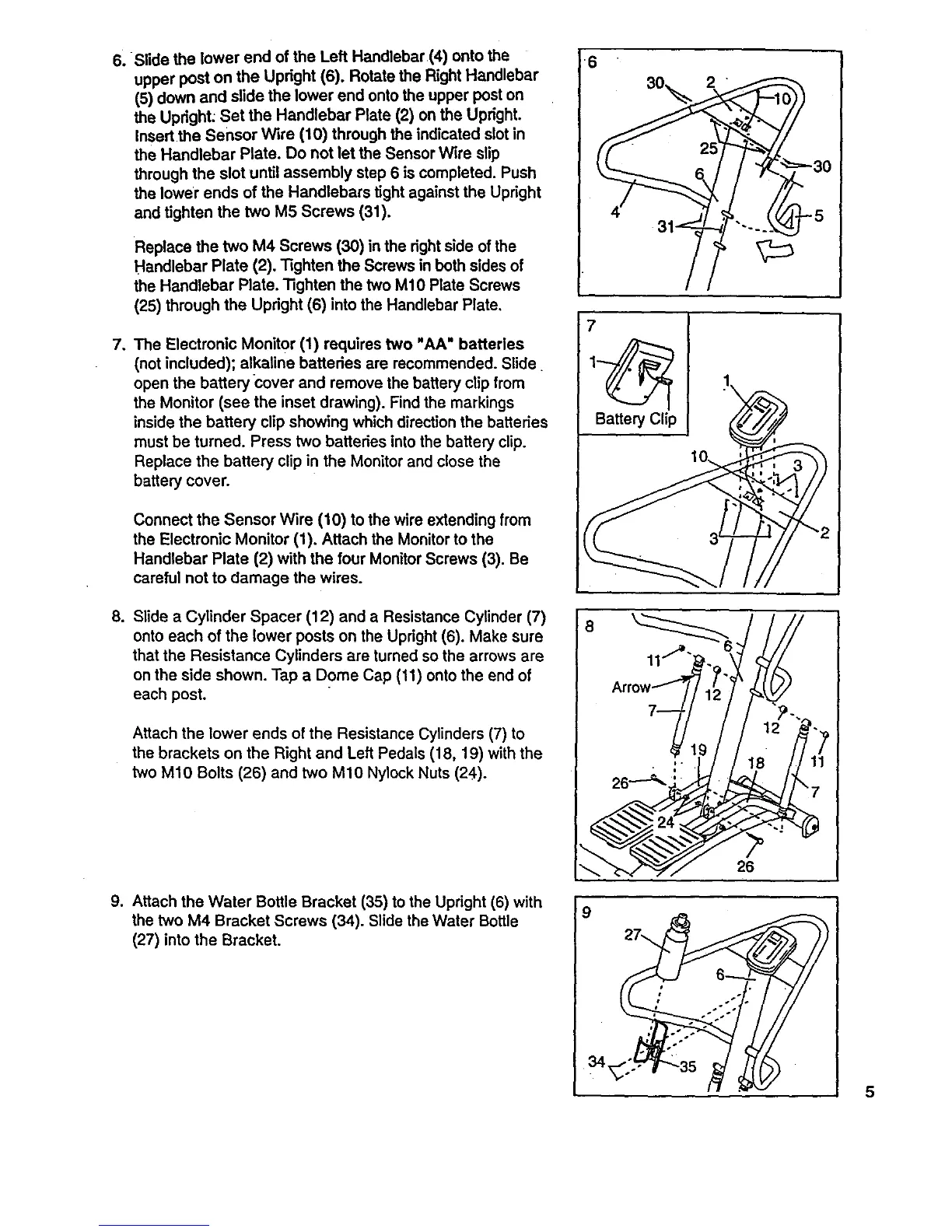
6.Slide the lowerendofthe LeftHandlebar(4)ontothe
upperpostonthe Upright (6). Rotate the Right Handlebar
(5) down and slide the lower end onto the upper post on
the Upright; Set the Handlebar Plate (2) on the Upright.
Insertthe Sensor Wire (10) through the indicated slotin
the Handlebar Plate. Do not let the Sensor Wire slip
through the slot until assembly step 6 is completed. Push
the lower ends of the Handlebars tight against the Upright
and tighten the two M5 Screws (31).
Replace the two M4 Screws (30) in the rightside of the
Handlebar Plate (2). Tighten the Screws in both sides of
the Handlebar Plate. Tighten the two M10 Plate Screws
(25) through the Upright (6) into the Handlebar Plate,
7, The Electronic Monitor (1) requires two "AA" batteries
(not included); alkaline batteries are recommended. Slide
open the battery cover and remove the battery clip from
the Monitor (see the inset drawing). Find the markings
inside the battery clipshowing which directionthe batteries
must be turned. Press two batteries into the battery clip.
Replace the battery clip in the Monitor and close the
battery cover.
Connect the Sensor Wire (10) to the wire extending from
the Electronic Monitor (1). Attach the Monitorto the
Handlebar Plate (2) with the four MonitorScrews (3). Be
careful not to damage the wires.
8. Slide a Cylinder Spacer (12) and a Resistance Cylinder (7)
onto each of the lower posts on the Upright (6). Make sure
that the Resistance Cylinders are turned so the arrows are
on the side shown. Tap a Dome Cap (11) onto the end of
each post.
Attach the lower ends of the Resistance Cylinders (7) to
the brackets on the Right and Left Pedals (18, 19) with the
two M10 Bolts (26) and two M10 NylockNuts (24).
9. Attach the Water Bottle Bracket (35) to the Upright (6) with
the two M4 Bracket Screws (34). Slide the Water Bottle
(27) into the Bracket.
_6
30_, 2
31.==
3O
7
Battery Clip
o o.lJlJ
df
i ,I)I_ IJI
5


 To Next Page
 Loading...