TOOLS AND HARDWARE REQUIRED FOR THIS PAGE
20
SEC
SEC
2.7
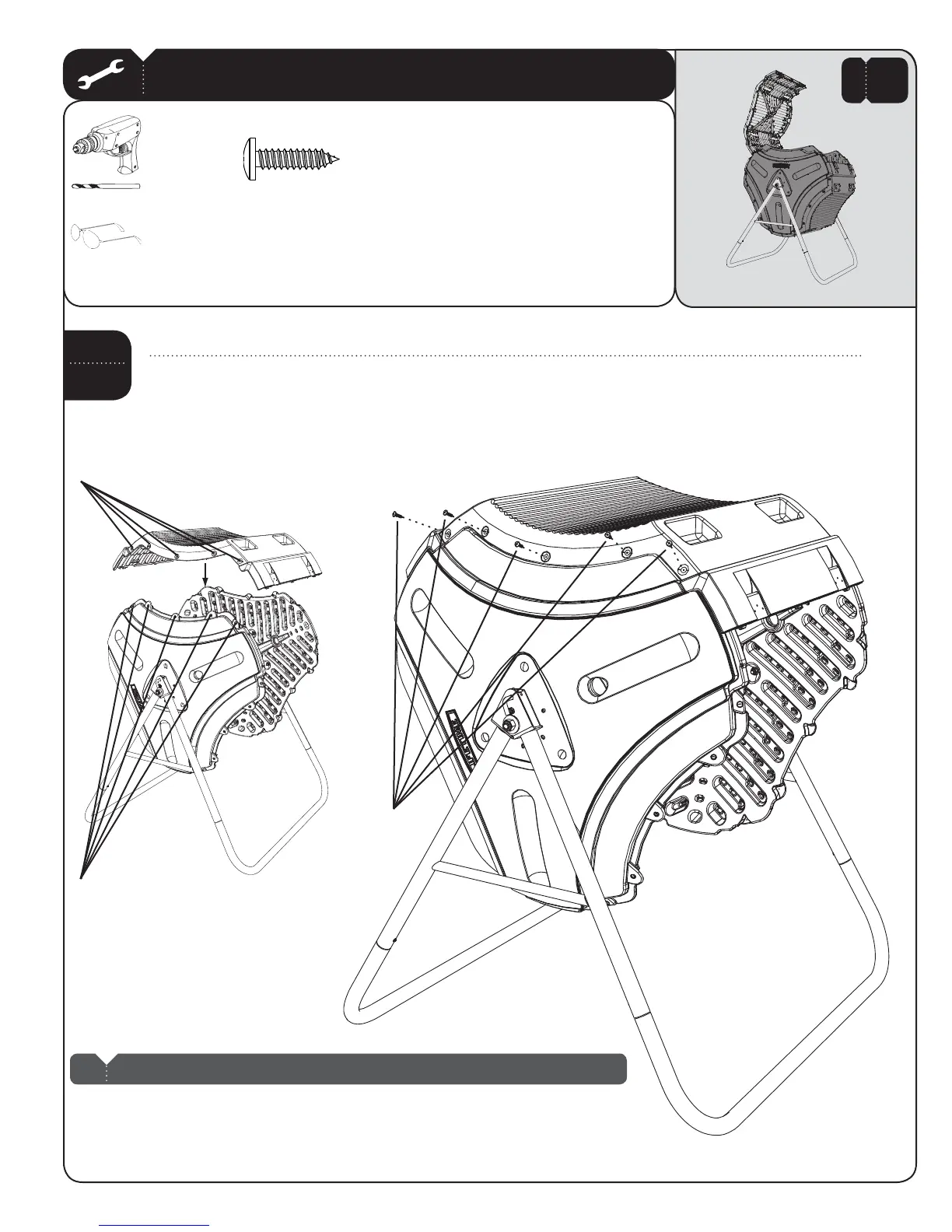
Place a Panel/Lid (BHN)OVERTHE%ND0ANELSANDALIGNTHEDIVOTSINTHE0ANEL,IDWITHTHOSEINTHE%ND0ANELS
5SINGANELECTRICDRILLDRILLTHROUGHTHElVEDIVOTSANDINSERTlVEXv0HILLIPS0AN(EAD3CREWS!$7
UNTILTHEHEADSOFTHE3CREWSAREmUSHWITHTHE%ND0ANELIt’s OK if the Screws (ADW) spin freely at this point. Do not
worry about stripping the plastic. Repeat this step for the other side of the Front Panel/Lid.
Divots in Front/Lid Panel
Divots in End Panel
ADWX
ADW
BHN
Note: It’s OK if the Screws (ADW) spin freely at this point. Don’t worry about stripping the plastic.
!
2 ADULTS REQUIRED FOR THIS STEP
2
ARAX


 To Next Page