29
2
TOOLS AND HARDWARE REQUIRED / INSTRUMENTAL Y HERRAJE REQUERIDOS / OUTILS ET QUINCAILLERIE REQUIS
X SECTION 6 (CONTINUED) / SECCIÓN 6 (CONTINUACIÓN) / SECTION 6 (SUITE)
CUD
CUW
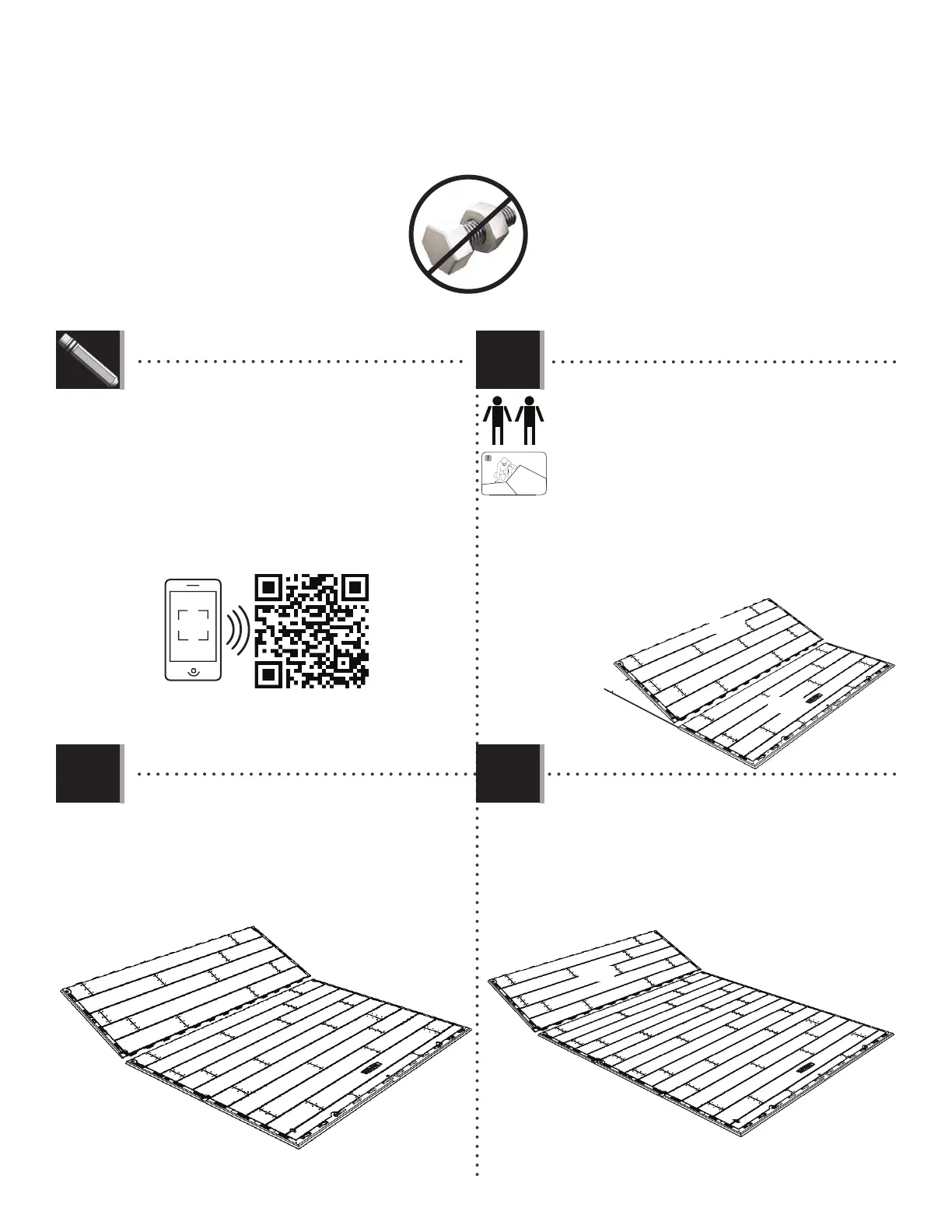
• Attach the second Inner Floor Panel (CUD) to the
fi rst Inner Floor Panel.
• Fije el segundo Panel de piso interior (CUD) al
primer Panel de piso interior.
• Attachez le deuxième Panneau de plancher intérieur
(CUD) au primier Panneau de plancher intérieur.
• Repeat the last step for the third Inner Floor Panel (CUD).
• Repita el paso anterior para el tercer Panel de piso
interior (CUD).
• Répétez l’étape précédente pour le troisième Panneau de
plancher intérieur (CUD).
45°
• If you have trouble with this section, follow the code below to view
a video on how to assemble the Floor.
• Si tiene problemas con esta sección, siga el código debajo para
ver un video sobre el ensamble del Piso.
• Si vous avez des problèmes avec cette section, suivez le code en
bas pour voir un vidéo sur l’assemblage du Plancher.
6.2
6.1
6.3
CUD
http://go.lifetime.com/8x20fl oorassembly
• Hold an Inner Floor Panel (CUD) at a 45° angle and
slide the tabs along the edge underneath an Outer
Floor Panel (CUW). The tabs interlock. Lay Panel fl at.
• Coloque un Panel de piso interior (CUD) a un ángulo
de 45° y deslice las lenguetas a lo largo del borde
debajo el Panel de piso exterior (CUW). Las lengüetas se
entrelazan las unas con las otras. Aplane el Panel.
• Posez un Panneau de plancher intérieur (CUD) à un
angle de 45° et glissez les languettes le long du
bord au-dessus du Panneau de plancher extérieur
(CUW). Les languettes s’enclenchent les uns les
autres. Étendez-le par terre.
CUD
LIFETIME
©


 To Next Page