Installation
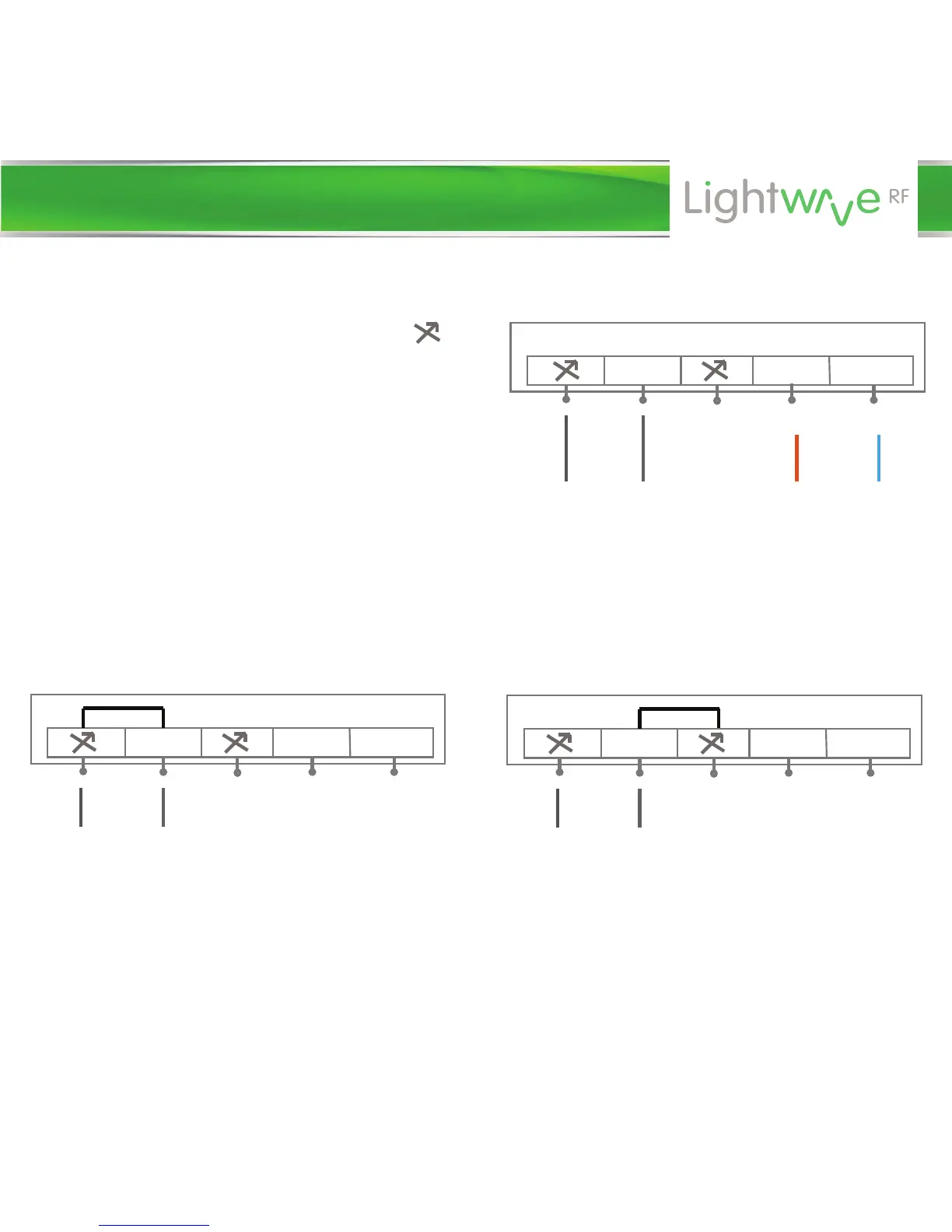
COM L N
L N
On Position - circuit
connected
IMPORTANT: When the relay is operated remotely via RF, it is always the
lefthand load terminal that will be connected when the ‘on’ button is pressed.
Therefore, if the circuit is wired as shown, pressing ‘on’ using an RF remote
will turn on the circuit, and ‘o’ will disconnect it.
COM L N
L N
O Position - circuit
disconnected
2. Connect the outgoing wire ‘load’
to the leftmost load terminals ( )
as shown in the diagram. This is the
wire that will be collected to the ‘load’
(i.e. device to be switched or lamp).
The relay now has 2 positions - ‘on’
and ‘o’. The diagrams below show
the on and o positions if a live were
to be connected to the common and
load to the leftmost load terminal.
COM L N
L N
Mains power
to relay
Circuit
live wire
Circuit
switched
live (to
device)


 To Next Page