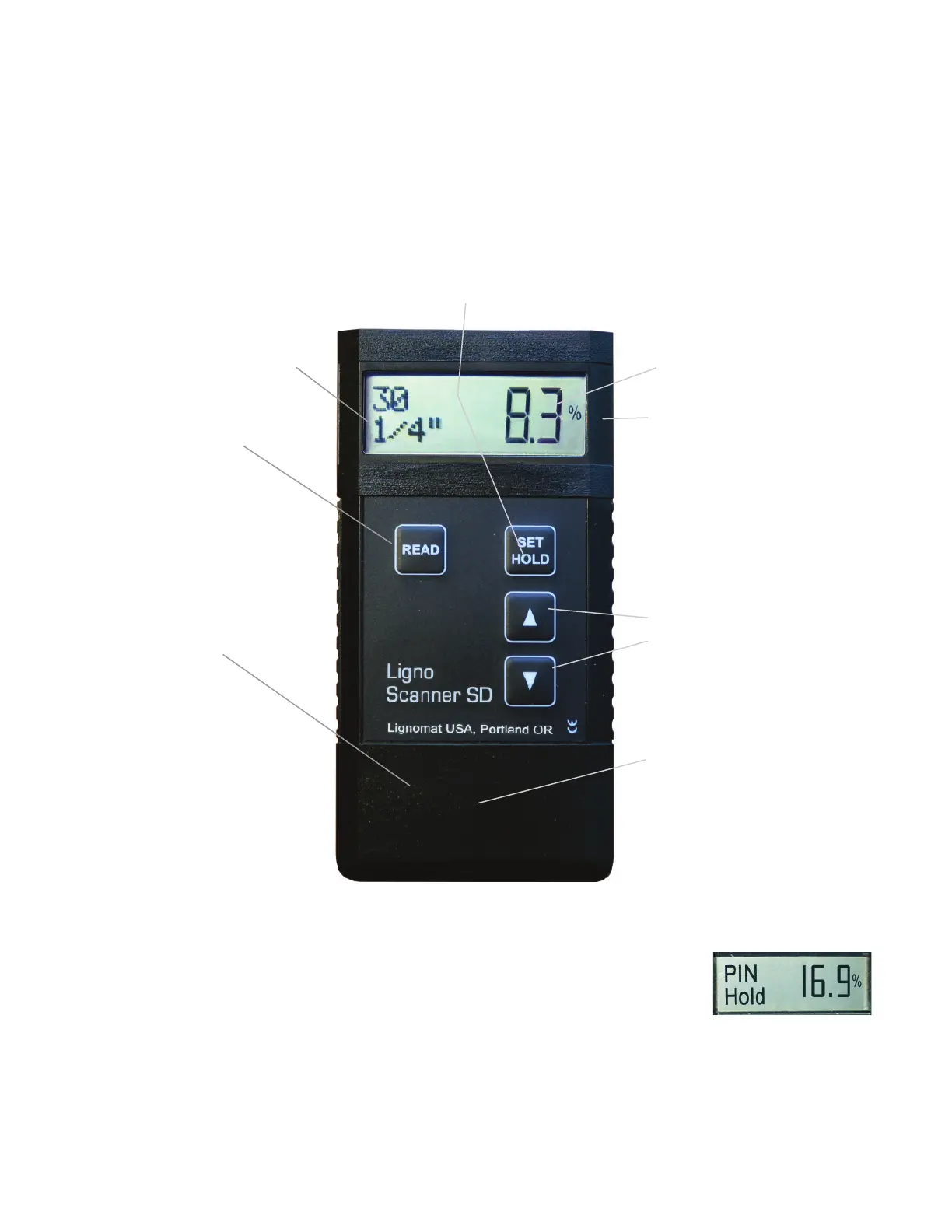
Measured value.
% sign is only present, if
the indicated value is a
moisture percentage.
If % sign is missing,
the value is a reference
number (setting #0).
Press up or down key
to change settings for
Wood Species.
Battery cover is located
at the back of the meter.
Battery: One 9V battery.
A low battery symbol will
appear on the display,
when the battery is
drained to 25%.
If the display is blank and the
SET/HOLD key is pressed, the
active setting is displayed:
- wood species #30-100
or reference scale #0
If the display shows a measured
value and the SET/HOLD key
is pressed repeatedly:
- Scanner is put into Hold mode
- Scanner is put into Set mode,
- wood species setting can be
changed.
Two measuring pads are
mounted on the back of the
meter. The measuring pads
cover an area of:
2.75” L x 1.75” W
(6.8 x 4.2 cm)
Overall size of Meter:
4.5” x 2.4” x 1”
(12 x 6 x 2.5 cm)
Ligno-Scanner SD - Meter Functions
3
On the left side of the display,
the active wood species set-
ting and measuring depth are
indicated.
For measurements
press the READ key.
Automatic shut-off after
3 minutes.
Hold Function
The HOLD key is used (while taking readings) to “freeze” measured values for
one minute. During that time you can switch back to measuring by pressing the
READ key again. This feature is helpful when taking notes or when measuring in
areas, where the display cannot be read.
Warranty: All Lignomat meters have a 2-year warranty.
Accessories have a 1-year warranty. Battery and pins are excluded.


 To Next Page