Speech-Generating Device User Guide | 13
Device Basics
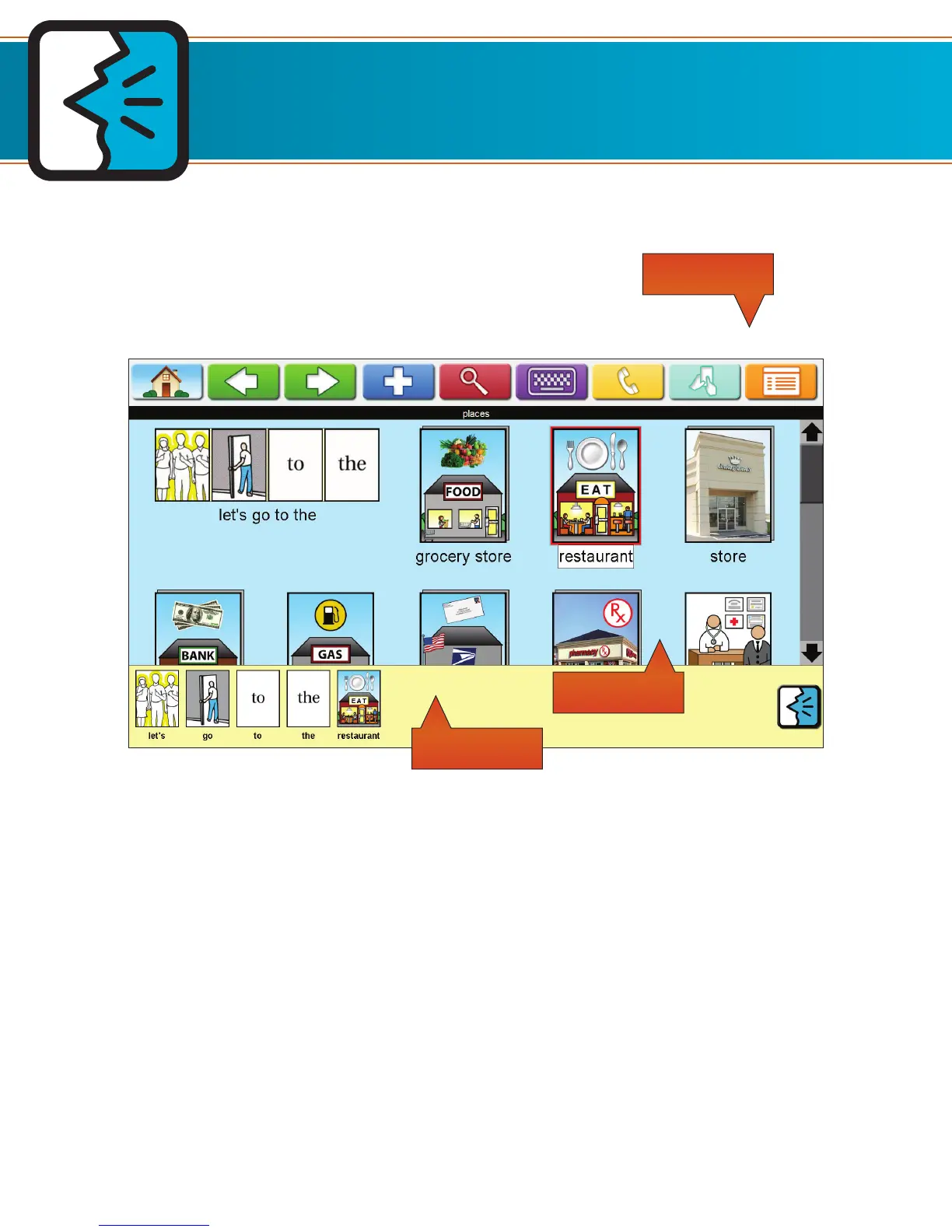
Screen Layout on AllTalk
When you turn on the device, you are always taken to the Home Page.
The Toolbar contains the Home, Back, Forward, Plus, Search, Type and Talk, Calling, SmallTalk, and
Menu buttons.
• Home: This button brings the user back to the Home Page.
• Green Back and Forward: These buttons are used to navigate between pages.
• Plus: The Plus is used to add icons to the Workspace and to load exercises.
• Search: The magnifying glass is used to search for icons.
• Type and Talk: The keyboard brings the user to the Type and Talk feature.
• Calling: This button brings up video calling.
• Smalltalk: This button is used to transfer icons to the mobile app.
• Menu: Provides access to all Device functions and settings.
• Page Name: The name of the page is always located just below the Toolbar.
The Picture Gallery is where icons are stored. This area is blue.
The Workspace is where you create phrases and temporarily store icons so that they may be
copied to a different page. This area is yellow.
Toolbar
Workspace
Picture Gallery
Home Back Forward Plus Search
Type and
Talk
MenuCalling SmallTalk


 To Next Page