Speech-Generating Device User Guide | 32
Changing Pages
Adding a new icon to a page
See the “Making New Icons and Pages” section for details on page 22.
Deleting an icon
Deleting icons from a page is fast and easy. It is important to remember that by deleting an icon, it is only
removed from that page, not from the device. If you want to delete a page icon and one-touch navigation is
turned on then touch the green arrow pointing to the left before proceeding to step 2.
Rearranging icons on the page
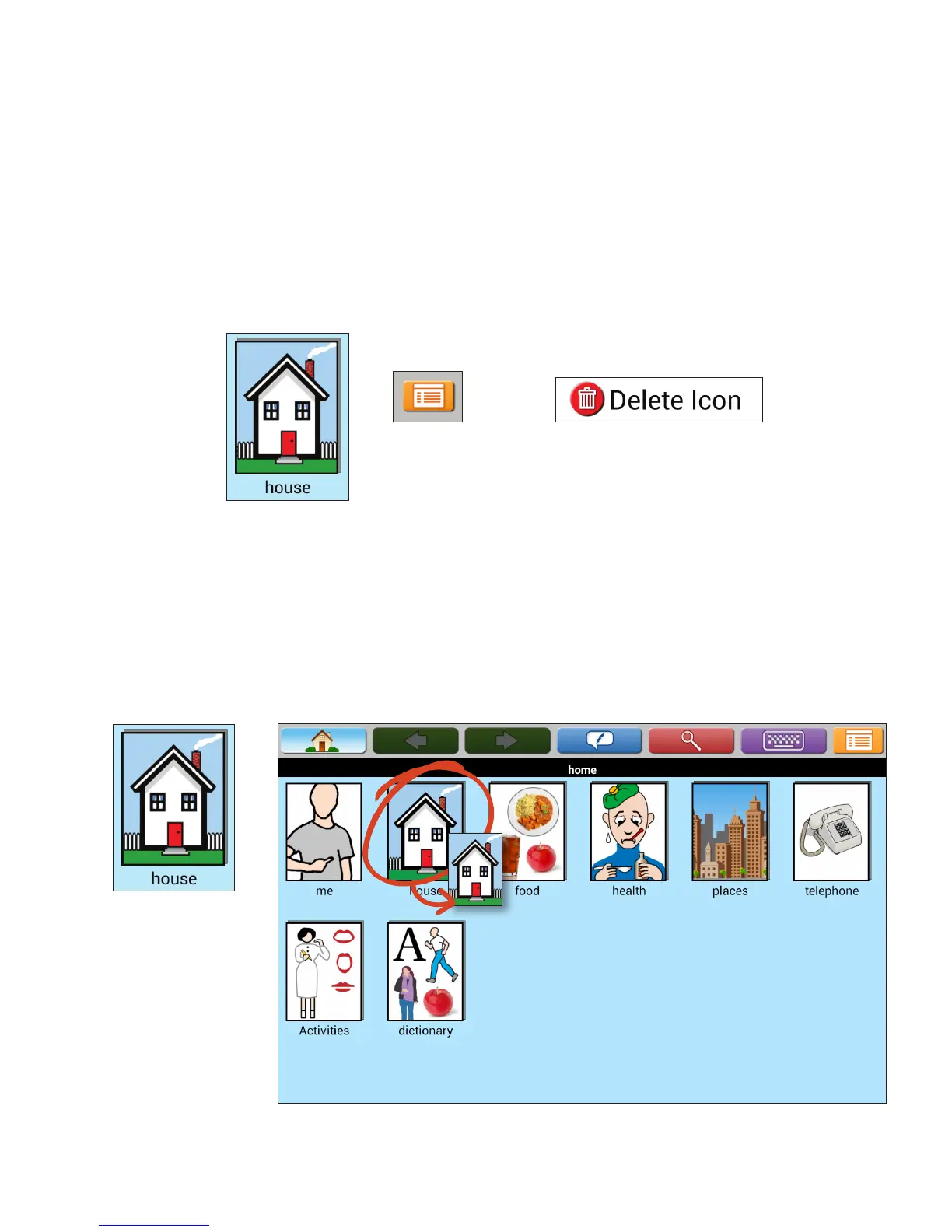
You can rearrange icons on pages based on the user’s unique needs and/or preferences. On the AllTalk the icons
will not dance when you touch and hold. This is a feature on the TouchTalk and MiniTalk.
1. Touch the icon
you would like
to delete.
1. Touch and hold the icon you
want to move until icons start
dancing on page (TouchTalk
and MiniTalk only).
2. Drag and drop to new location.
2. Touch Menu. 3. Touch Delete Icon.


 To Next Page