960-3100-00 iPonic 614 Installation Manual 7
Navigation
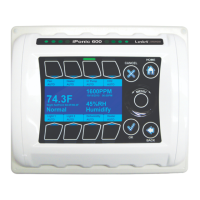
The iPonic™ 614 has a unique touch sensitive navigation design that utilizes a touch wheel and 4 navigational
touch sensitive “buttons” ( HOME, CANCEL, OK, BACK). The behaviors of the wheel and buttons are:
WHEEL
o Navigate to the main menu by pressing the top portion.
o Use wheel to highlight a choice in a menu, press OK to make the selection.
o If an alphanumeric field is highlighted, the wheel can be used to increase or decrease the
value of the entry.
o Note that the center of the wheel is not a button.
• HOME
o Brings you back to the main status screen.
o If changes have been made, user will be prompted for input (e.g. save/discard changes)
• CANCEL
o Pressing CANCEL in the middle on an entry will bring the user back up a level, without
making any changes.
• OK
o Pressing OK will prompt the system to accept the most recent data entry.
• BACK
o BACK will bring the user back up one level. User will be prompted to save data, if needed.
BUTTONS
o There are also EIGHT soft buttons surrounding the display. Their behaviors will be described
by the notations displayed either below or above the buttons.
Note that the display area itself is not touch sensitive.
Equipment Selection
From the home screen of your iPonic
TM
614, press the menu button. Select option 3, “System Setup” with
the wheel and press OK. Select option 1, “Equipment Setup” by pressing OK. Select option 1, “Quick
Setup” by pressing OK. A table will appear showing the available equipment types. From this table you
can select up to 6 outputs. The default equipment types are lights (output 1, outlet 1), CO
2
injector (output
2, outlet 2), irrigation pumps (output 3, outlets 3 & 4), dehumidifier (output 4, outlet 5), heater (output 5,
outlet 6) and ventilation fans (output 6, outlets 7 & 8). Any of these equipment types can be replaced with
a humidifier or an air conditioner. If you choose to do this, the humidifier or air conditioner will take the
place of the output and outlets of the unused equipment type.
Use the wheel to select each equipment type and Button 3 on the user interface to select or deselect
each equipment type by checking or unchecking the box beside it. When you are through choosing your
equipment types, press OK. Press OK again to acknowledge that you may lose the settings for any
deselected equipment. Press OK again to save your changes. Once the controller returns to the menu
you can hit the Home button to return to the home screen. The home screen will now be populated with
your equipment types with each of the first 6 interface buttons corresponding with the same number
output of the displayed equipment type. This can be used as a guide to show you which outlets to plug
each equipment type into.
Equipment Installation
The iPonic
TM
614 has eight 115 VAC electrical outlets, a resettable 15 ampere fuse and a six foot power
cord. Each of the eight electrical outlets is hardwired to one of six independently controlled outputs. On
each side of the unit the bottom two outlets are ganged, whereas the top two are independent. The


 To Next Page