960-3100-00 iPonic 614 Installation Manual 25
12am
1
2 3
4 5
6
7
8 9 10
11
12pm
1
2 3
4 5
86
7
9 10
11
65°F
70°F
75°F
Setpt 1
72.5°F
Setpt 1
68.0°F
Setpt 2
70.5°F
Beginning of
Ramp time
8:00am
End of
Ramp time
9:00am
Cool Stage 1
Cool Stage 2
Cool Stage 3
Cool Stage 4
Heat Stage 1
Heat Stage 2
Setpt 2
67.0°F
End of
Ramp time
6:30pm
Beginning of
Ramp time
6:00pm
1°F Deadbands
In this example:
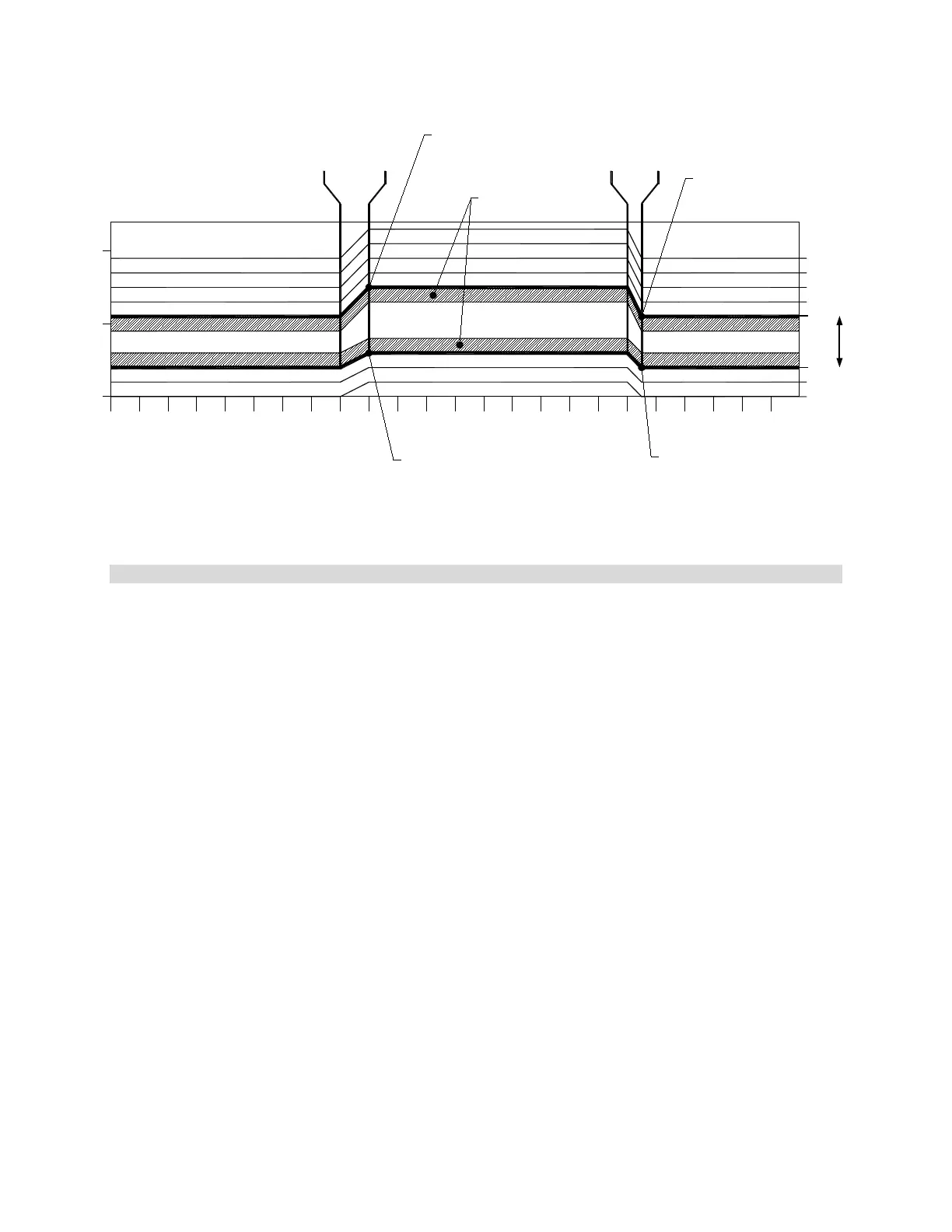
Setpoint 1 is set to 9:00am with a 60minute Ramp, Temp is set as 68 to 72.5°F
Setpoint 2 is set to 6:30pm with a 30minute Ramp, Temp is set as 67 to 70.5°F
Figure 2.1 Example of Setpoints, Staging, & Deadbands
Stage Separation/Width
The number of degrees between each heating and cooling stage is called the “Stage Separation” or “Stage
Width,” and is a variable increment. By default this increment is 3 degrees. Whenever the temperature rises
above the cool setpoint, the iPonic
TM
614
will activate stage Cool 1 and the appropriate equipment to bring the
greenhouse to the normal temperature range. If the temperature rises 3 additional degrees above the cool
setpoint the controller will activate stage Cool 2. The same applies for the heating stages when the temperature
drops below the heating setpoints. In Figure 2.1, there is an example with four cooling stages and two heating
stages.
Changing the Stage Separation
Menu->SystemSetup->6. Advanced->button 2 for Global Temp Settings->button 2 for Stage Width->wheel
Deadbands
While cooling or heating equipment may be engaged as soon as the measured temperature falls outside of the
normal range, a deadband will prevent the equipment from shutting off when the temperature returns to slightly
within the normal range. If the temperature is below the cool setpoint and rises into the first stage of cooling,
some cooling equipment will be turned on. This may then lower the temperature and bring it into the normal
range. In order to keep the equipment from oscillating off and on, a “deadband” is employed when the
temperature is barely within the limits of a new stage. This deadband prevents the cooling or heating equipment
from turning off too soon to keep the temperature of the environment within this new stage. In Figure 2.1, the
deadband is set at 1 degree so that when the greenhouse is attempting to return to Normal temperature from
Cool 1 the controller will use a deadband of 1 degree to keep the equipment running until the temperature of the
environment is one degree lower that the lowest temperature allowed by the “Normal” range. When the
temperature drops below the cool setpoint, the system remains in the Cool 1 stage until the temperature drops
below the cool deadband. The concepts that we described for cooling operate in the same manner for heating.
Changing the Temperature Deadband
Menu->SystemSetup->6. Advanced->button 2 for Global Temp Settings->button 1 for Deadband->wheel (1 to
change increment)
Temp
Range


 To Next Page