Field Electronics Setup Guide FLASH DRIVES
Rev 10 1/23/2013 23 ©2012 FIRST Tech Challenge
5.3. Create Primary Network Key Folder on the flash drive:
Plug in a new 2GB flash drive
From your Start menu choose: >Samantha Field Control System>Samantha Competition Network
Config
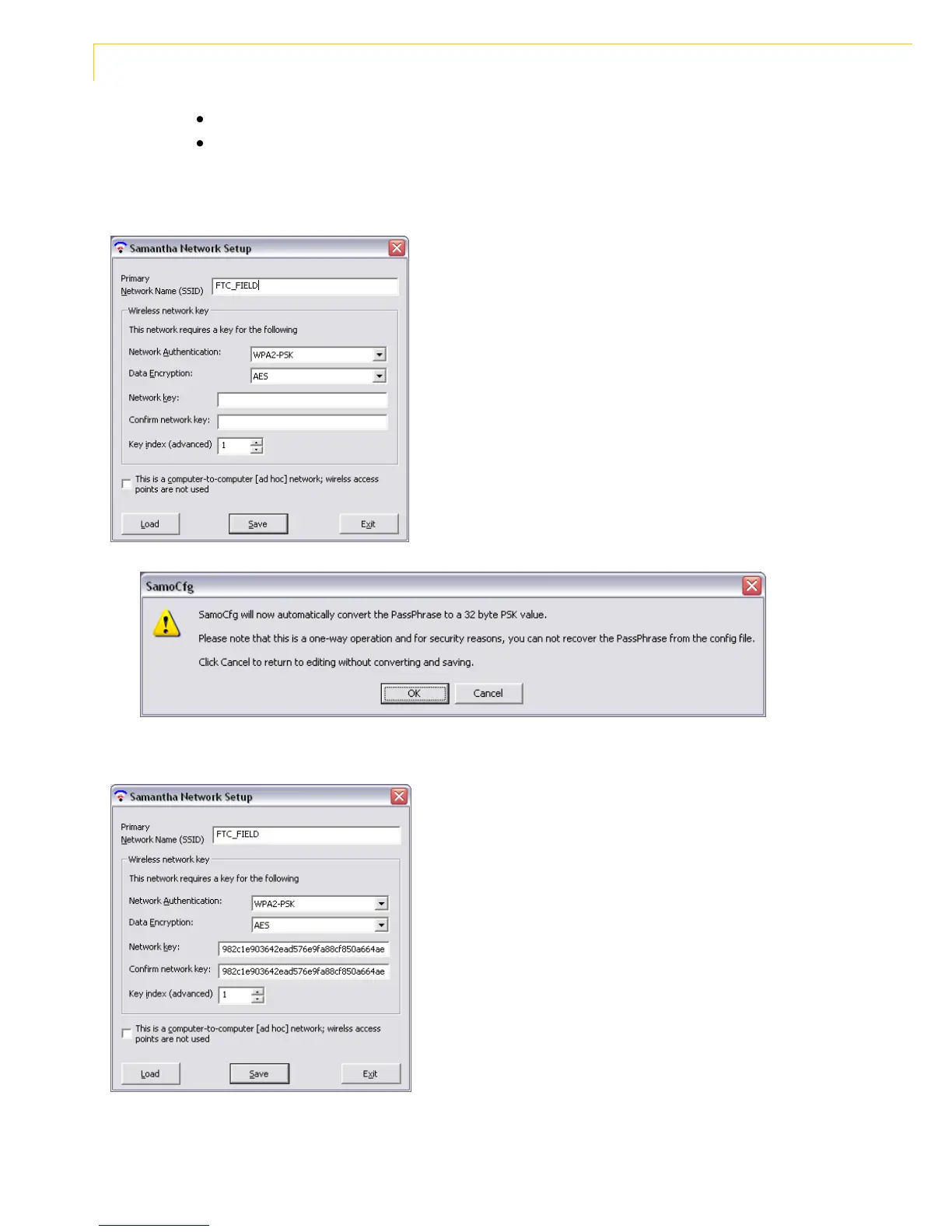
The following dialog box will open:
Enter FTC_FIELD in the Primary Network Name (SSID) field.
Network Authentication: WPA2-PSK
Data Encryption: AES
Network Key: Enter the secure admin password you created when
you configured your router (page 10 step 2.3).
Confirm the network key and click “Save”.
The following popup will appear. Click “OK” This will encrypt the
password and change it on your input screen.
The illustration shows the encrypted Network key.
Click “OK” to accept the confirmation message.
Your flash drive should now have two files: Samantha.hex and
FTCNTKY.
Click “Exit” to close the Samantha Network Setup.


 To Next Page