Need help?
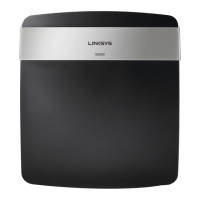
Do you have a question about the Linksys E2500 and is the answer not in the manual?
Step-by-step instructions for physically connecting and installing the router.
Guide to accessing the router's web interface for advanced network settings.
Configures the router's connection type and settings for internet access.
Settings for configuring the Wi-Fi network name (SSID) and wireless standards.
Options for securing the wireless network using WPA2 Personal or Enterprise.
Solutions for problems encountered during the initial router setup process.
Addresses the "Your Internet cable is not plugged in" error message and solutions.
Troubleshooting steps for when the internet connection appears unavailable.
 General
| Brand | Linksys |
|---|---|
| Model | E2500 |
| Category | Wireless Router |
| Language | English |

 To Next Page