EasyManua.ls Logo

Linksys Etherfast BEFSX41 - Page 57

Linksys Etherfast BEFSX41
75 pages
Print Icon
To Next Page IconTo Next Page
To Previous Page IconTo Previous Page
Loading...
EtherFast
®
Cable/DSL Firewall Router with 4-Port Switch/VPN Endpoint
107
Instant Broadband
®
Series
106
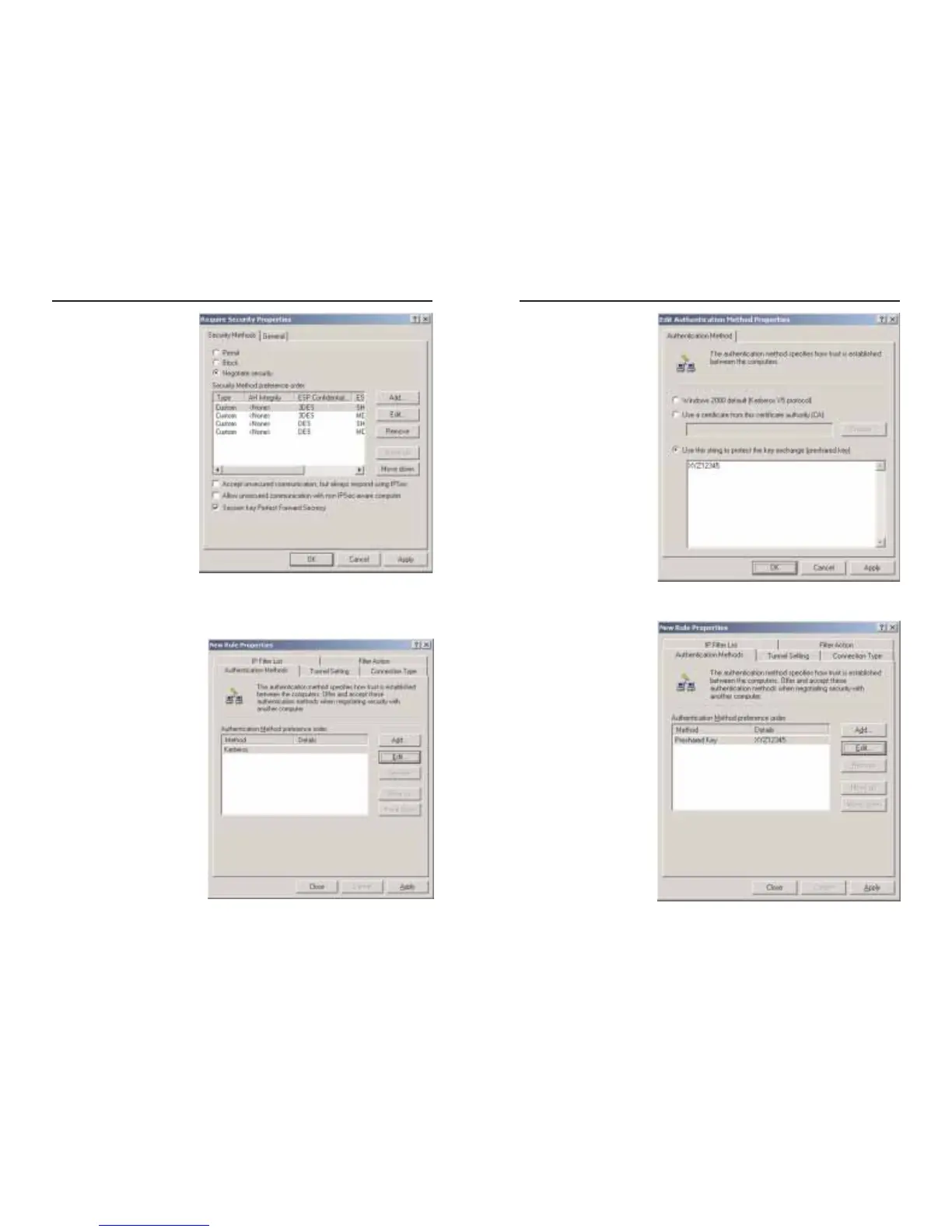
5. Change the authentica-
tion method to Use this
string to protect the
key exchange (pre-
shared key), as shown
in Figure C-14, and
enter the preshared key
string, such as
XYZ12345. Click the
OK button.
6. This new Preshared
key will be displayed in
Figure C-15. Click the
OK or Close button to
continue.
Figure C-14
Figure C-15
3. From the Security
Methods tab, shown in
Figure C-12, verify that
the Negotiate security
option is enabled, and
deselect the Accept
unsecured communica-
tion, but always
respond using IPSec
check box. Select
Session key Perfect
Forward Secrecy, and
click the OK button.
4. Select the Authentication
Methods tab, shown in
Figure C-13, and click the
Edit button.
Figure C-12
Figure C-13

Table of Contents

Related product manuals