Kinsky Desktop (DAVAAR family)
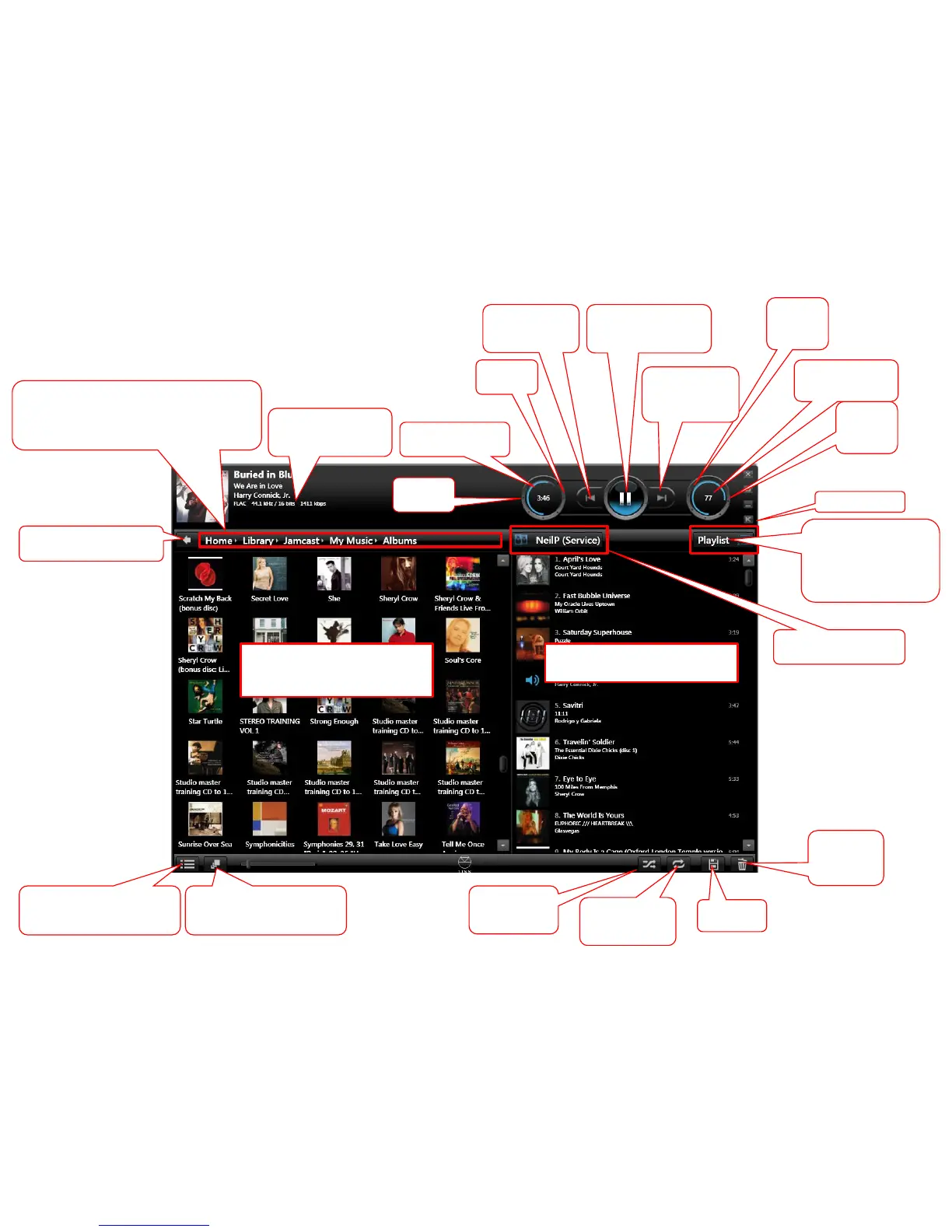
Change left hand window
(Album. Artist and Cover art
and picture size)
Kompact view
This will change the library
listing to letter groups or no
groups
This will take you library
listing back one step
This is your library path. That is, the route to your
library listing in the left window. You this will allow
you to go back multiple levels to select different
Music listing easily within the Music library
Clear all
Music in the
Playlist
window
PLAYLIST WINDOW (This is
the Music that the DS will play)
Save your
Playlist
MUSIC LIBRARY WINDOW
(This is a list of the Music
available to play)
Play the tracks
in a random
order
Repeat the
whole playlist
until disabled
Track information (this
can be
enabled/disabled
Volume
UP
key
Volume value
and MUTE
Volume
DOWN
key
Next Track &
Play track/Album
next
PLAY / PAUSE & play
dragged track/Album
now
Last Track &
add track/Album
to end of playlist
Source selection:
Playlist
Radio
Songcast (party mode)
or local preamplifier input
Room selection &
STANDBY option
Search
forward
Search
back
Track time
elapsed/remaining



 To Next Page