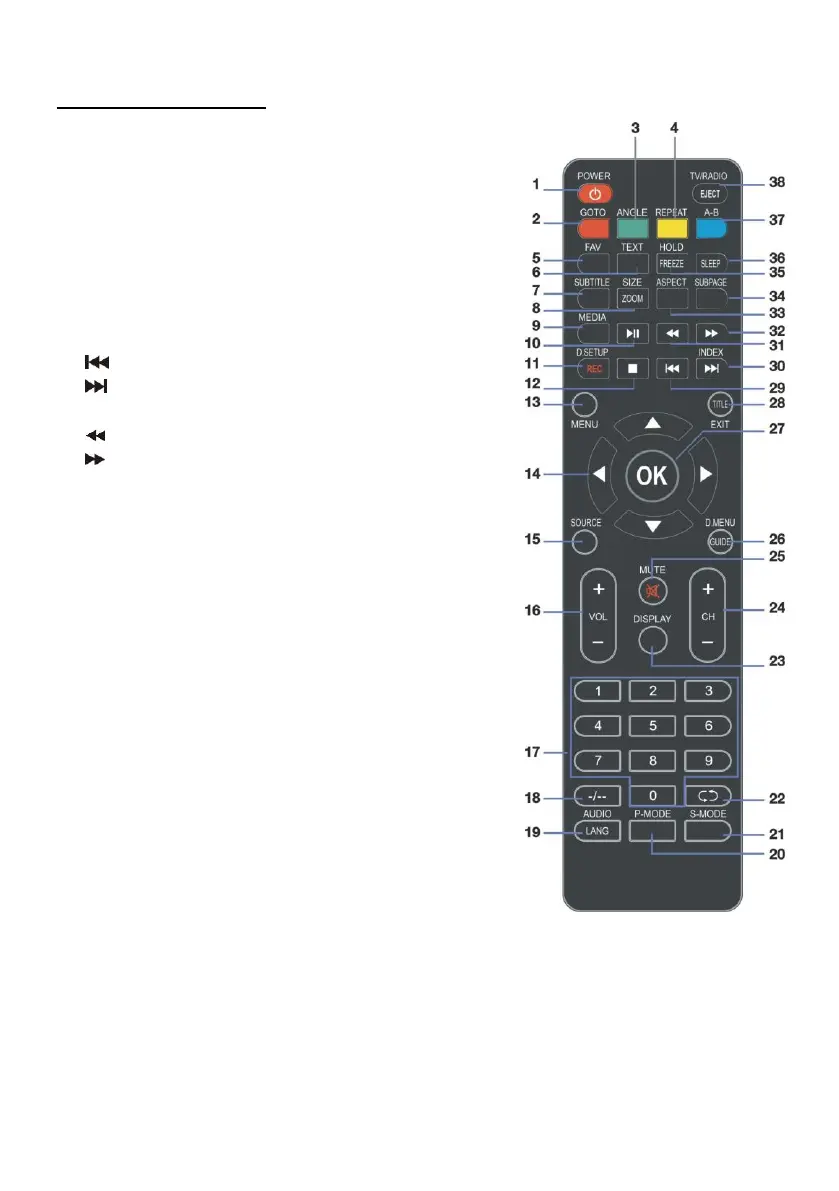
REMOTE CONTROL
24 CH +/-: Press to play the next or previous channel;
press repeatedly to scan through the channels.
25 MUTE: Mute the sound. Press again or press VOL+
to restore the sound.
26 GUIDE / D. MENU: Display electronic program guide;
Display the main disc menu.*
27 OK: Confirm selection.
28 EXIT / TITLE: Exit from the main TV menu displayed
on the screen; Display the DVD title menu. (DVD)*
29 : Play the previous file.
30 / INDEX: Play next file; Display the record
program list (DTV).
31 : Move fast backward.
32 : Move fast forward.
33 ASPECT: Press repeatedly to select the desired
screen aspect ratio.
34 SUBPAGE: Manually jump to previous or next
subpages of Teletext.
35 FREEZE: Hold the picture.
36 SLEEP: Set the TV sleep timer.
37 A-B: Repeat DVD scenes of your preference.
38 TV/RADIO: Switch the unit between TV and radio;
EJECT: Open or close the disc compartment. (DVD)*
NOTE: The functions of those buttons, which marked
with “DVD”, are available only when your TV has fitted a
DVD player.



 To Next Page