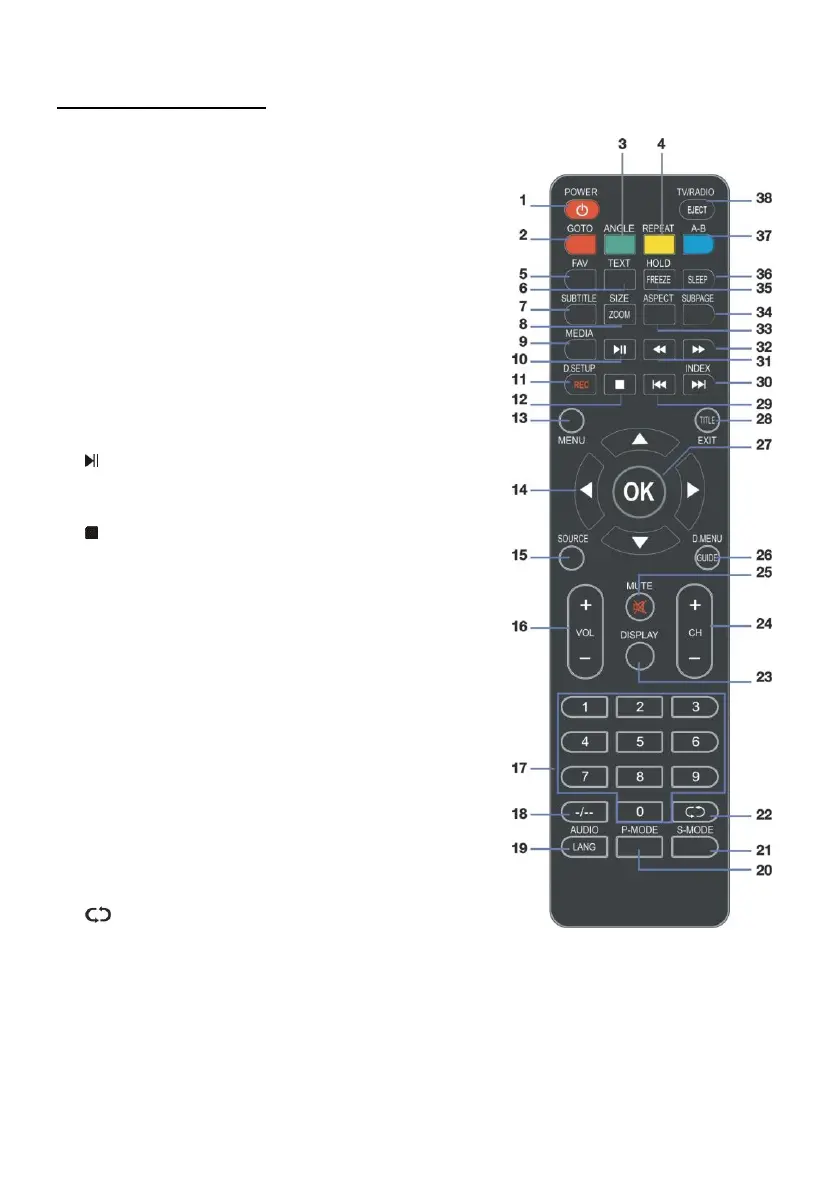
REMOTE CONTROL
1 POWER: Set the unit in standby mode; press it
again to switch it on.
2 GOTO: Jump to a different chapter of DVD.*
3 ANGLE: View DVD playback from different angles,
if the DVD has this feature.*
4 REPEAT: Repeat different chapter/title or entire
DVD.*
5 FAV: Press to display your favourite program in
DTV mode.
6 TEXT: Switch between TV and Teletext mode.**
7 SUBTITLE: Enable/disable subtitles.
8 SIZE / ZOOM: Change the Teletext & DVD size.
9 MEDIA: Select USB mode.
10 : PLAY/PAUSE in TIMESHIFT and USB mode.
11 RECORDER/D-SETUP: Record / Display the DVD
setup menu.
12 : Stop playing.
13 MENU: Display the main TV menu.
14 ◄/►/▲/▼: Press the LEFT/RIGHT/UP/DOWN
button to navigate the on-screen menus and
adjust the system settings to your preference.
Press OK to confirm your selection.
15 SOURCE: Switch the input source.
16 VOL +/-: Turn the volume up/down.
17 NUMBER BUTTONS (0-9): Press to select a TV
channel directly when watching TV. The channel
changes after 2 seconds.
18 -/--: Switch the digits.
19 AUDIO / LANG: Switch the available soundtrack
language (DTV/DVD).*
20 P-MODE: Cycle through the different picture mode.
21 S-MODE: Cycle though the different sound modes.
22 : Return to the previous channel.
23 DISPLAY: Display information of the current
program.



 To Next Page