8 | REMOTE CONTROL
N/P
STANDBY
OPEN/CLOSE
VOLUME
1 2 3
+
-
4 5 6
7 8 9
0/10
10+
MUTE
MENU
SETUP
OK
OSD
SUBTITLE STEP STOP TITLE
ANGLE ZOOM GOTO AUDIO
PROG A-B SLOW REPEAT
N/P
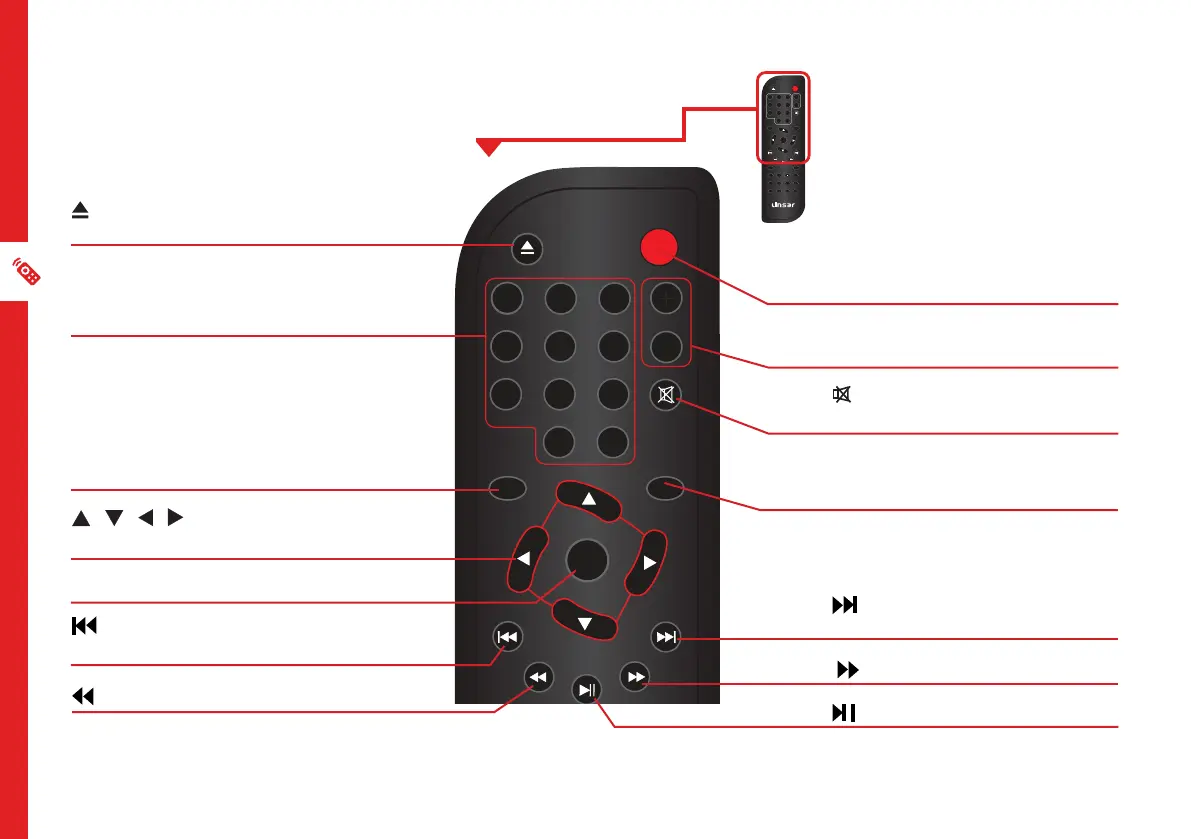
Remote Control
OPEN/CLOSE: Press to open
or close the disc tray
NUMBER BUTTONS: Numerical
input to directly access a specific
chapter or track
SETUP: Access/exit the System
Setup menu
/ / / : Navigate the
System menu
OK: Confirm a selection
: Skip to the previous title,
chapter or track
: Fast rewind current track
STANDBY: Turn the unit ON
from standby mode; press again
to put the unit back into standby
mode
VOL + / VOL - : Adjust the
volume level
/ MUTE: Mute the sound;
press again to restore the sound
MENU: Return to the disc’s menu
in DVD mode. Set the menu
function on/off in VCD mode.
: Skip to the next title, chapter
or track
: Fast forward current track
: Play/pause playback
N/P
STANDBY
OPEN/CLOSE
VOLUME
1 2 3
+
-
4 5 6
7 8 9
0/10
10+
MUTE
MENU
SETUP
OK
OSD
SUBTITLE STEP STOP TITLE
ANGLE ZOOM GOTO AUDIO
N/P


 To Next Page