REMOTE CONTROL | 9
N/P
STANDBY
OPEN/CLOSE
VOLUME
1 2 3
+
-
4 5 6
7 8 9
0/10
10+
MUTE
MENU
SETUP
OK
OSD
SUBTITLE STEP STOP TITLE
ANGLE ZOOM GOTO AUDIO
PROG A-B SLOW REPEAT
N/P
N/P
STANDBY
OPEN/CLOSE
VOLUME
1 2 3
+
-
4 5 6
7 8 9
0/10
10+
MUTE
MENU
SETUP
OK
OSD
SUBTITLE STEP STOP TITLE
ANGLE ZOOM GOTO AUDIO
PROG A-B SLOW REPEAT
N/P
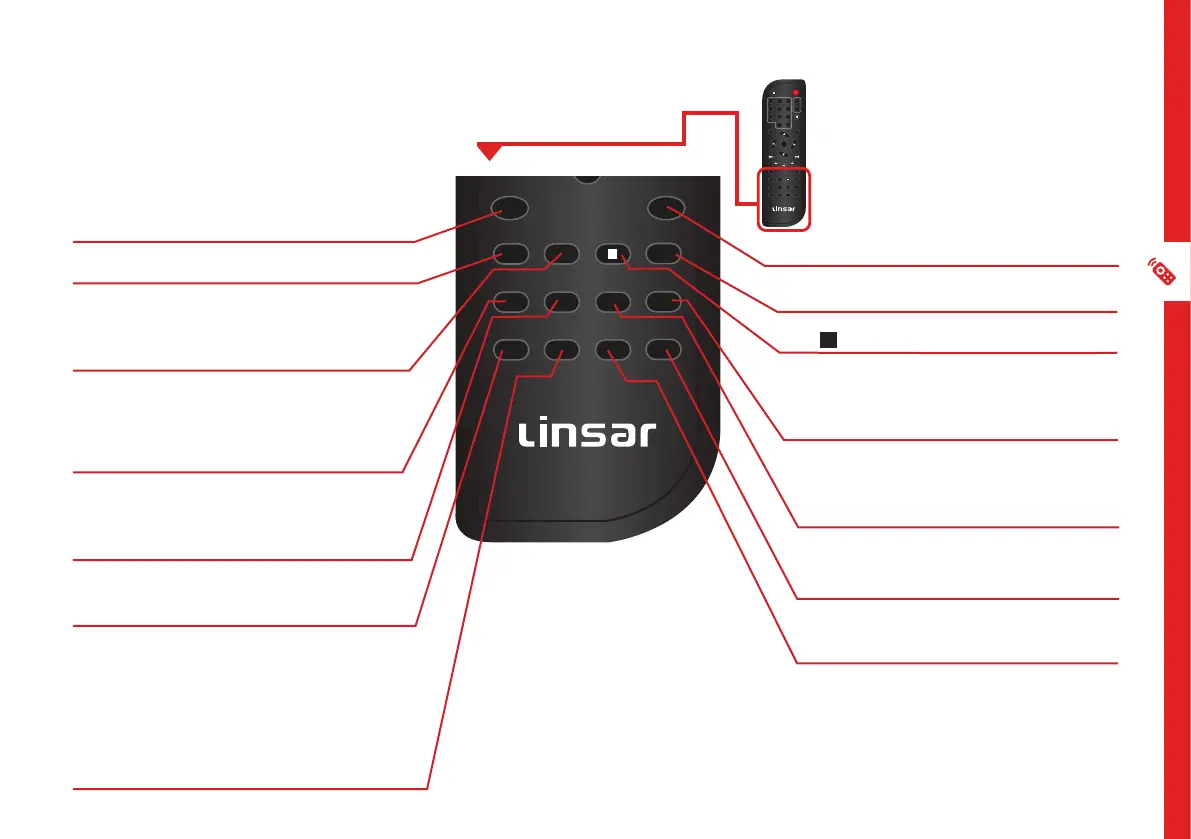
OSD: Display/hide detailed
information about the currently
playing media
SUBTITLE: Turn the subtitle on/off
STEP: Press to freeze the current
frame, press repeatedly for
following frames
ANGLE: While playing a DVD
with multi-angle recording, press
repeatedly to select the viewing
angle
ZOOM: During DVD playback, press
repeatedly to zoom in or out of the
picture
PROG: Enter or exit the PROGRAM
function
A-B: During DVD playback, press to
define a starting point, then press
again to define a finishing point. The
selected portion will then be played
continuously. To cancel, press the
A-B button again. (Function not
available for all discs)
N/P: Switch between NTSC or PAL
TITLE: Return to the title page
/ STOP: Stop playback
AUDIO: DVD mode: select multi
language sound. CD/VCD: select
audio channel
GOTO: Press to input a specific
title/chapter/time to jump to on the
DVD/CD
REPEAT: Press repeatedly to cycle
through available repeat modes
SLOW: To play the video in slow
speed


 To Next Page