10 | CONTROLS AND CONNECTIONS
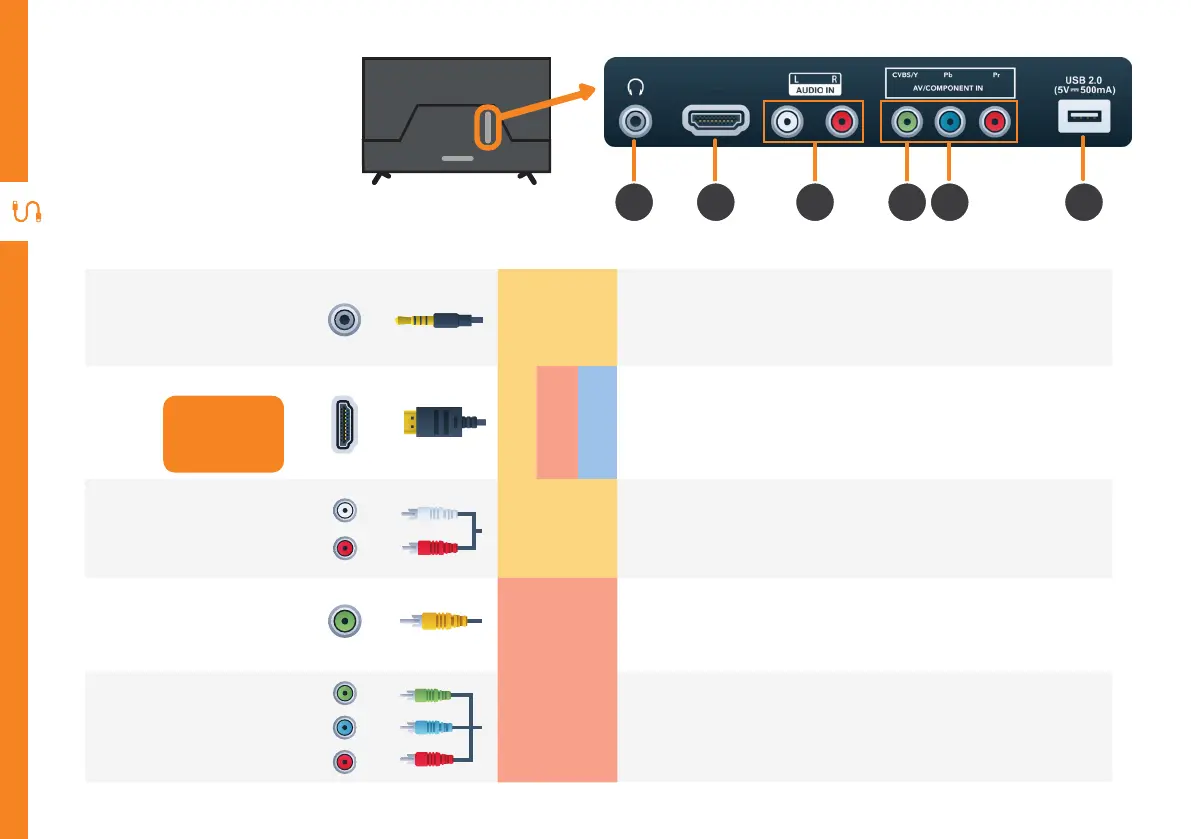
HDMI3 (ARC)
Ports on the TV
1 652 3 4
1
Headphone
Jack
SOUND
Connect to your headphones, amplifier, soundbar or audio
device, using an AUX cable. (AUX cable not included.)
2
HDMI
Use a HDMI
cable for best
picture and
sound quality.
SOUND
PICTURE
COMPUTER
All-digital connection between the TV and any HDMI device.
Supports Ultra HD. (Requires a high-speed HDMI cable, not
included.)
3
Audio L/R
SOUND
You can use this to connect audio from your DVD player using
the AV cable (included).
4
AV IN
CVBS/Y
PICTURE
You can use this to connect your DVD player. Supports
Standard Definition (SD) picture quality. Requires an AV cable
(included).
5
Component
IN
PICTURE
You can use this to connect your DVD player. Supports Full
High Definition (FHD) picture quality. This also requires a
component cable (not included).


 To Next Page