REMOTE CONTROL | 15
1 2
3
4
5
7 8
0
6
9
MENU
OK
EXIT
SOURCE
INFO
RETURN
CH.LIST
1 2
3
4
5
7 8
0
6
9
MENU
OK
EXIT
SOURCE
INFO
RETURN
VOLC H
/ TIMESHIFT
/ FAV
GUIDE
/RECORD INDEX
P.MODE
SUBTITLE S.MODE
PIC SIZE
CH.LIST
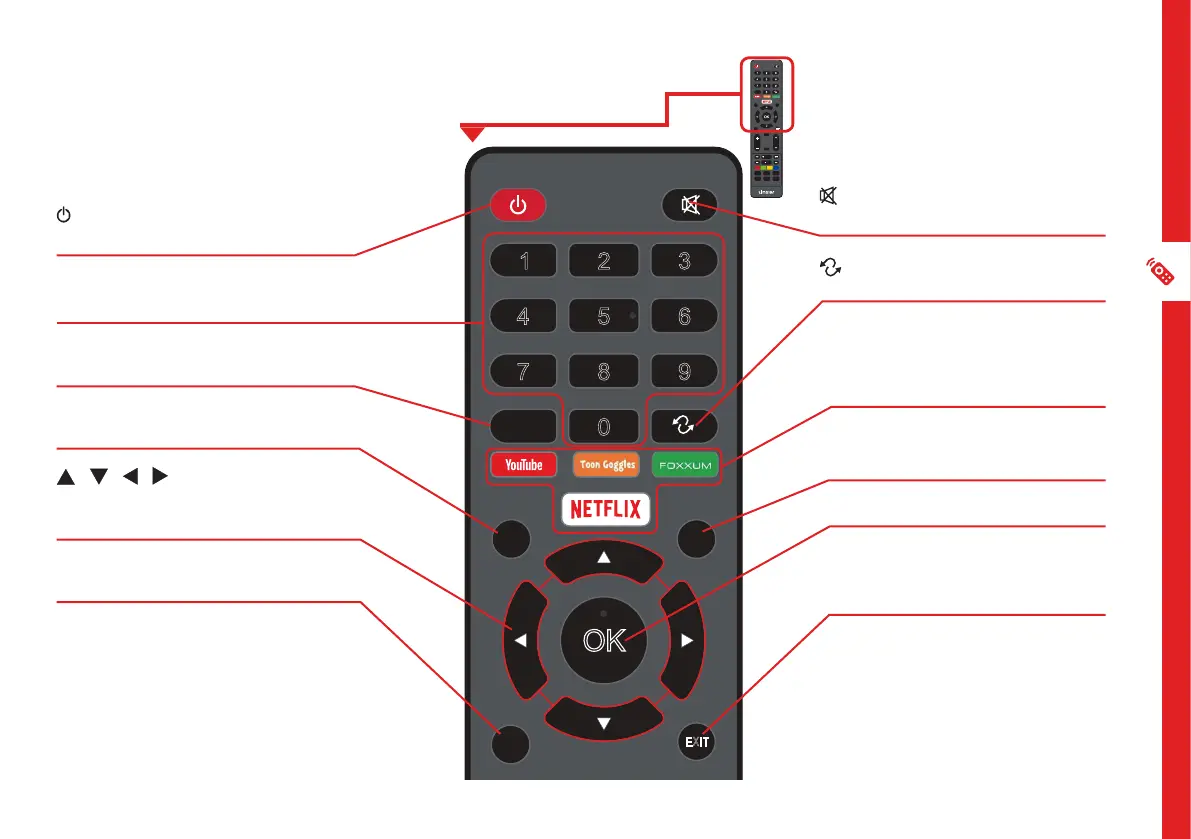
Remote Control
ON: Switch the TV to On or
Standby.
NUMBER BUTTONS: Key in a
TV channel number.
CH.LIST: Display or exit the
channel list.
MENU: Access streaming apps,
TV settings.
/ / / : Press the UP/
DOWN/LEFT/RIGHT buttons to
navigate.
RETURN: Return to the previous
screen or channel.
(MUTE): Mute or restore
sound.
: Return to previous viewing
channel
APPS: Direct access to YouTube,
Toon Goglles, Foxxum and
Netflix app.
SOURCE: Switch the input
source
OK: Confirm your selection.
EXIT: Exit/Quit the current
screen.



 To Next Page