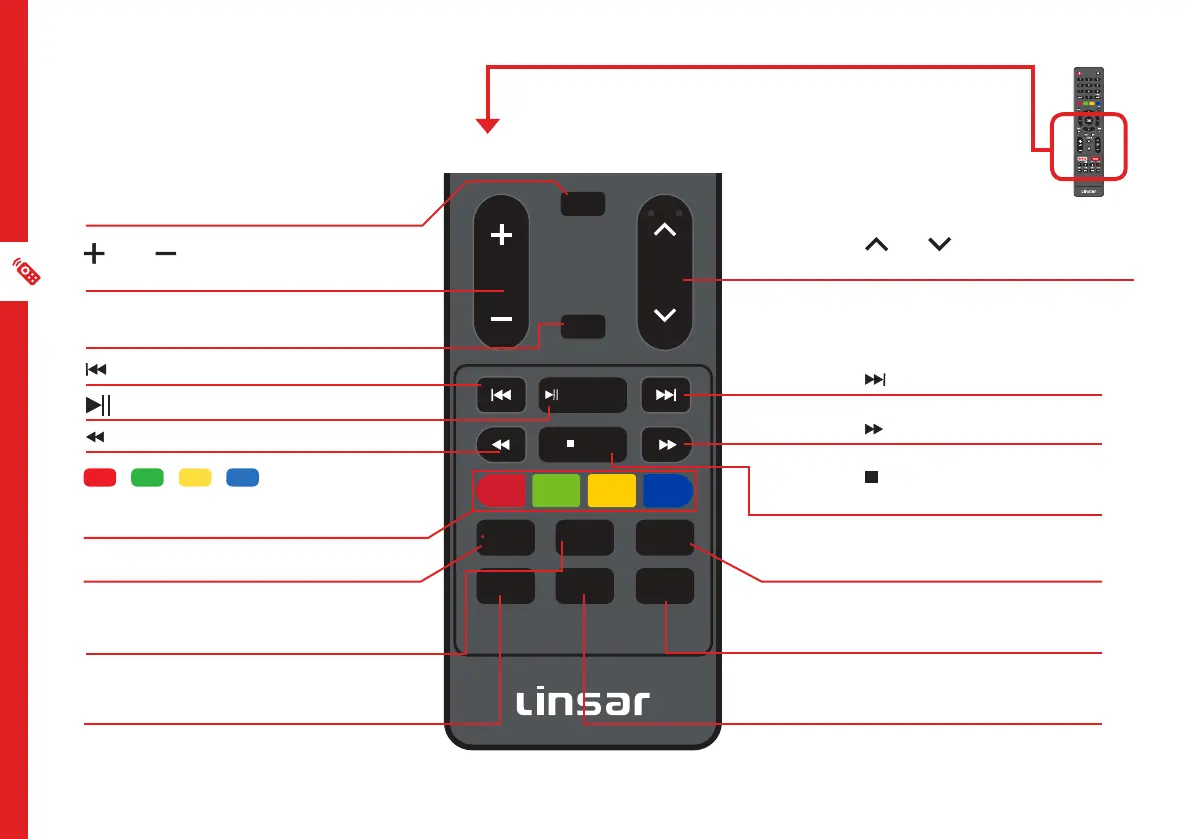
16 | REMOTE CONTROL
OK
EXIT
INFO
RETURN
VOLC H
/ TIMESHIFT
/ FAV
GUIDE
/RECORD INDEX
P.MODE
SUBTITLE S.MODE
PIC SIZE
1 2
3
4
5
7 8
0
AUDIO
6
9
GUIDE
INFO
LIST
QMENU
OK
SOURCE
MENU EXIT
REC
INFO: Display program information
VOL : Turn the volume up or
down.
GUIDE: Launch the TV Guide (DTV)
: Skip backwards.
: Rewind.
RECORD: Record a TV.
INDEX: Display the list of recorded
programs.
P-MODE: Cycle through the
different picture modes.
CH : Go to the next or
previous channel.
: Skip forwards.
: Fast forward.
/ FAV:Display your favourite
channel list.
PIC.SIZE: Press to select
desired screen size
S-MODE: Cycle through the
different sound modes.
SUBTITLE: Enable/disable
subtitles.
/ / / RED/GREEN/
YELLOW/BLUE: Functions are
according to the on-screen display.
CH
/ TIMESHIFT: Play/Pause



 To Next Page