C
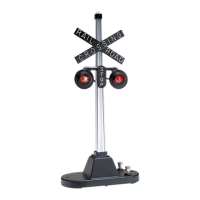
ongratulations on your purchase of the Lionel #154 Railroad Crossing Flasher. Place the
signal at any grade crossing on your Lionel railroad, and passing trains will automatically
cause the red lights to flash.
2
Table of contents
Installing the 153C Contactor 3
Wiring your #154 Railroad Crossing Flasher to a power source 4
Adjusting the Contactor 5
Operating the #154 Railroad Crossing Flasher 5
Connecting your #154 Railroad Crossing Flasher to a 153IR Controller 5
Connecting your #154 Railroad Crossing Flasher with the FasTrack track system 6
Replacing your #154 Railroad Crossing Flasher’s lamps 7
Limited Warranty/Lionel Service 8
The following Lionel marks may be used throughout this instruction manual and are protected under law.
All rights reserved.
Lionel
®
, TrainMaster
®
, Odyssey
®
, RailSounds
®
, CrewTalk
™
, TowerCom
™
, DynaChuff
™
,
StationSounds
™
, Pullmor
®
, ElectroCoupler
™
, Magne-Traction
®
, CAB-1 Remote Controller
®
,
PowerMaster
®
, Lionel ZW
®
, ZW
®
, PowerHouse
®
, TMCC
®
, Lionelville
™
, Lockon
®
The name FasTrack
®
is used with permission from Pitsco, Inc.







 To Next Page