Adjusting the Contactor
A
fter all the connections are made and your layout is powered up, the Contactor must be
adjusted so that the train will properly trigger the accessory.
1. Stop the train several sections away from the Contactor so that it does not press on the
Contactor plate.
2. Turn the adjustment nut either up or down until the signal is activated. Refer to Figure 1 on
page 3 for the location of the adjustment nut.
3. Back up the adjustment nut just enough to turn off the signal.
Operating the #154 Railroad Crossing Flasher
When properly adjusted, the 153C Contactor will respond to light pressure on the track,
causing the lights to flash as long as any part of the train is triggering the Contactor. After the
train has cleared the Contactor, the signal will turn off.
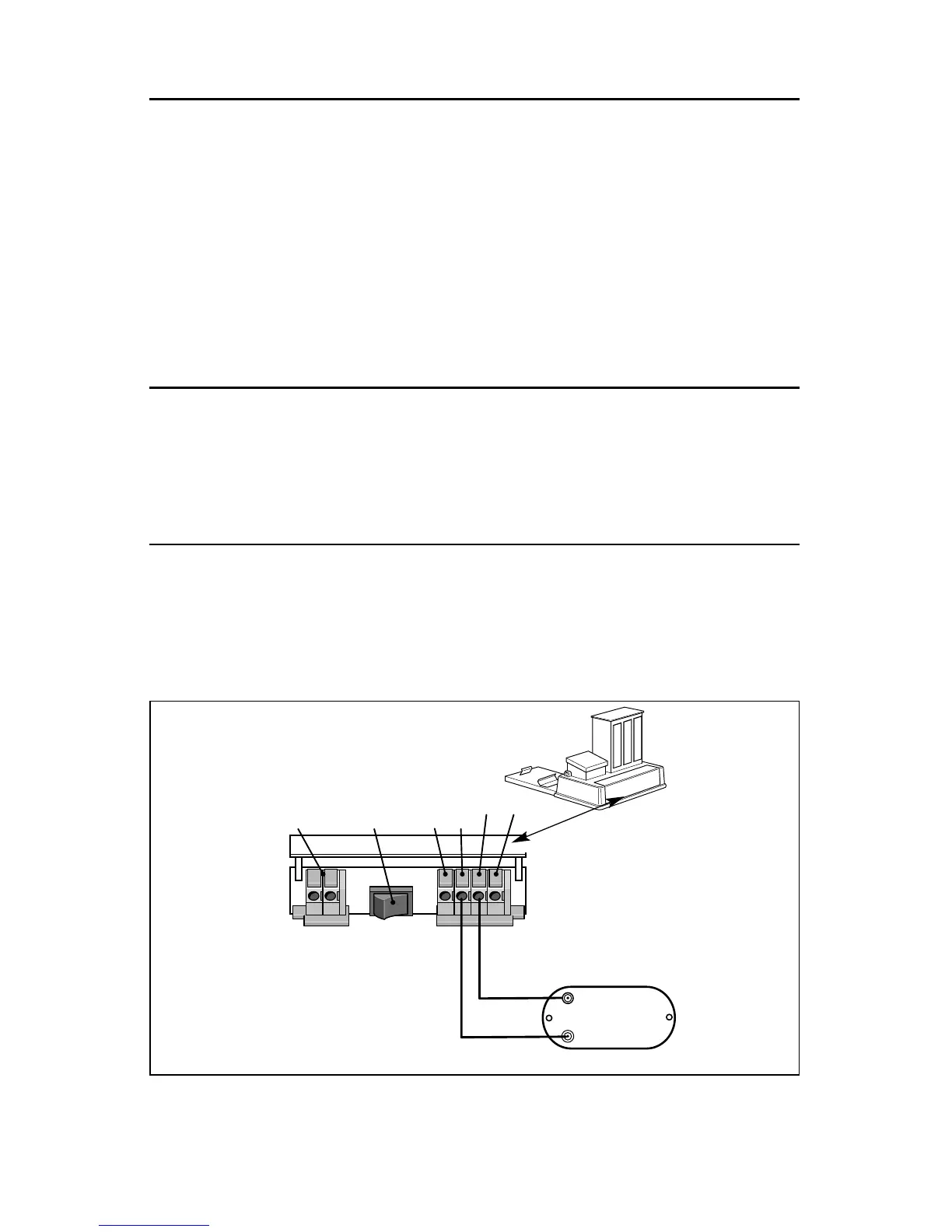
Connecting your #154 Railroad Crossing Flasher to a 153IR Controller
T
he 153IR Controller (available separately, 6-14111) is an alternative to the 153C Contactor.
While the 153C Contactor relies on the weight of the train to cause the contact points to
change, the 153IR Controller is triggered by an Infrared motion sensor. The 153IR Controller
also allows you to set the length of time that the accessory remains on. Consult the 153IR
Controller owner’s manual for more information and refer to Figure 3 below.
5
Figure 3. 153IR connections







 To Next Page