Operating the Uncoupling Track section in the Command Control
environment
F
or operation in the TrainMaster Command Control environment, you may choose to
purchase an Operating Track Controller (available separately, 6-14185). A FasTrack
Accessory Power Wire is required (available separately, 6-12053). Refer to these manuals for
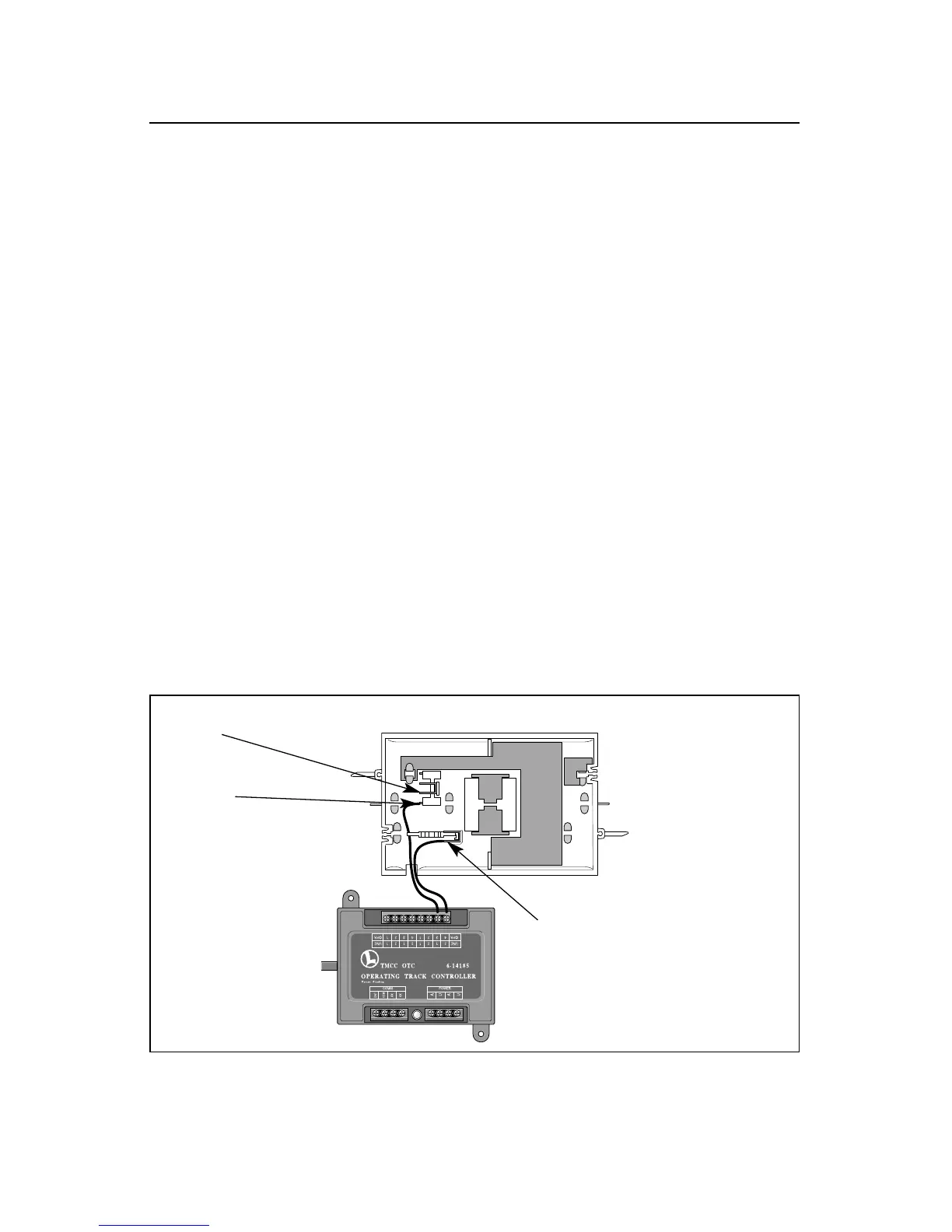
additional information. Refer to Figure 7 as you connect the Uncoupling Track section to the
OTC.
1. Remove the controller button by sliding the quick connectors off the tabs on the underside
of the track.
2. Attach a bare wire at the end of the Accessory Power Wire to a numbered position on the
OTC.
3. Attach the other bare wire at the end of the Accessory Power Wire to the COMMON position
on the OTC.
4. Determine the appropriate power tab connection.
• If the Uncoupling Track section is powered through the track, slide a quick connector at
the end of the Accessory Power Wire over the TPK PWR tab.
• If the Uncoupling Track section is powered by a separate power supply, slide a quick
connector at the end of the Accessory Power Wire over the AUX PWR tab.
5. Slide the remaining quick connector over the COIL tab. Use the AUX1 button on your CAB-1
Remote Controller to operate the track section.
9
Figure 7. OTC connections
TRK PWR
(for track power)
AUX PWR
(for fixed voltage)
COIL









 To Next Page