Rev: 12.21.18 Page 2
CCD-0001440
System Information
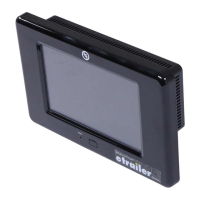
The OneControl® Touch Panel (OCTP) is a touchscreen device that provides system controls and monitoring
software for the recreational vehicle unit. The systems include slide-outs, leveling systems, awnings, lighting,
temperature, water tanks, tire pressure, battery levels and any other compatible systems installed on the
unit and programmed into the OneControl® system. Powering up the unit will also power the OneControl®
Touch Panel and the various controllers throughout the unit.
Operation
Power On/Off
1. The device can be powered on or off using the button on the front of the device.
NOTE: It will take a few moments to start up and load the system.
2. To enter or exit sleep mode, press and release the power button.
Control Panel
1. Locate OneControl® control panel (Fig. 1).
2. Press the power button (Fig. 1A) to turn on the OneControl® Touch Panel.
3. Press the icon of the system to be operated; i.e., awning, bed lifts, generator, etc. (Fig. 2).
NOTE: The control panel will show icons representing the devices connected to the OneControl® system.
Press the back button (Fig. 3A) at any time to return to the OneControl® home screen.
A
Fig. 1 Fig. 2
TABLE OF CONTENTS
System Information 2
Operation 2
Power On/O 2
Control Panel 2
System Operations 3
OneControl Resources 10
OneControl
®
Assembly 13
OneControl
®
Components 14-19


 To Next Page