Rev: 03.30.23 Page 7 CCD-0007179
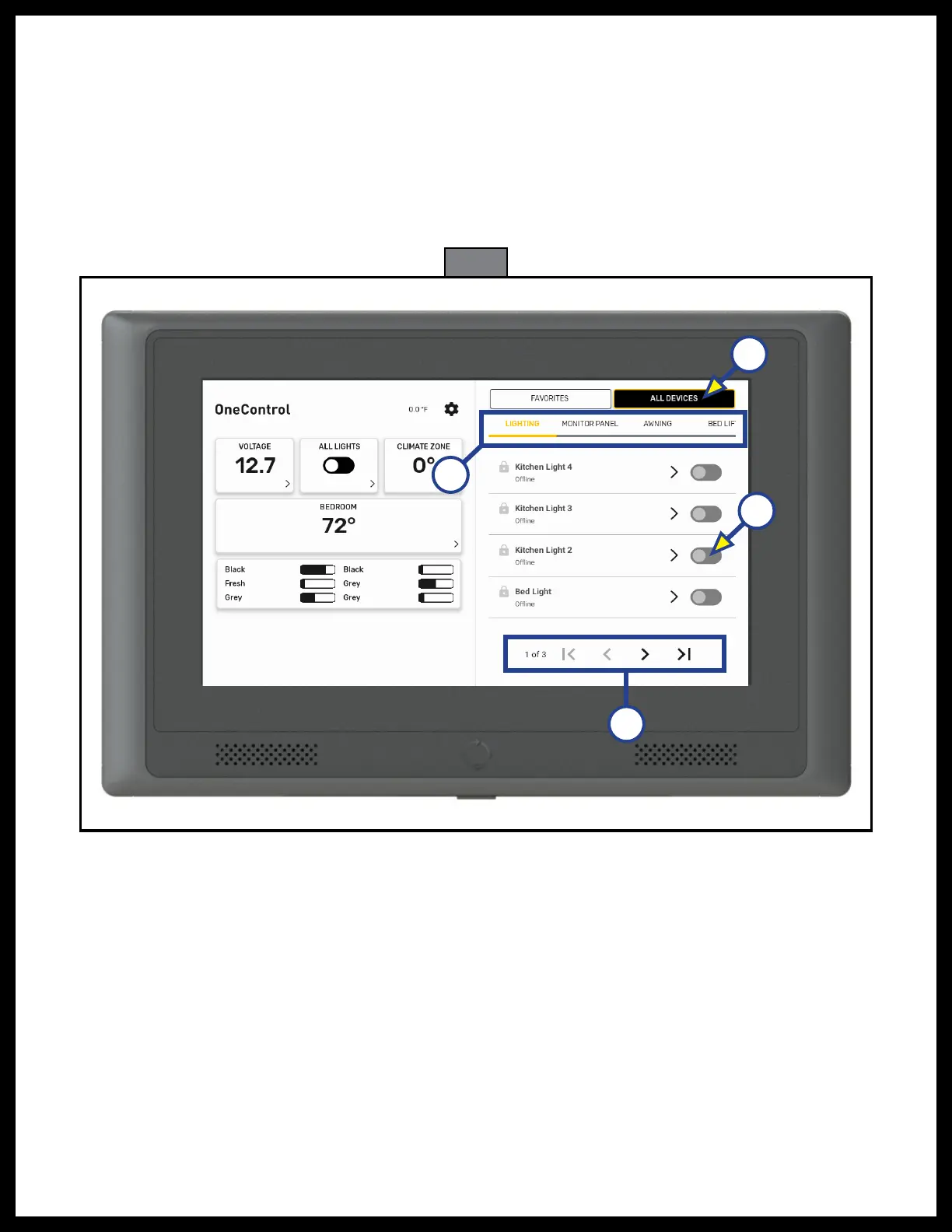
Fig. 4
3. Tap ALL DEVICES (Fig. 4A) to show all controls.
A. Lighting devices are shown first. To turn on the device, tap the slider button (Fig. 4B). Tap it again
to turn it off.
B. Tap the
< or > icons (Fig. 4C) at the bottom to view the other light group selections if necessary.
NOTE: Tapping
|< or >| (Fig. 4C) will jump to the beginning or the end of the list.
4. Use index finger to drag the group sections and then tap to open all controls for that group (Fig. 4D).
NOTE: If the control is left idle with the screen on, it will enter sleep mode after a period of five minutes. To
wake the control up, tap the screen or press the power button (Fig. 1A) on the bottom of the control.
A
B
C
D



 To Next Page