Rev: 03.30.23 Page 9 CCD-0007179
Change Settings
1. Tap the gear icon (Fig. 5B) at the top of the screen.
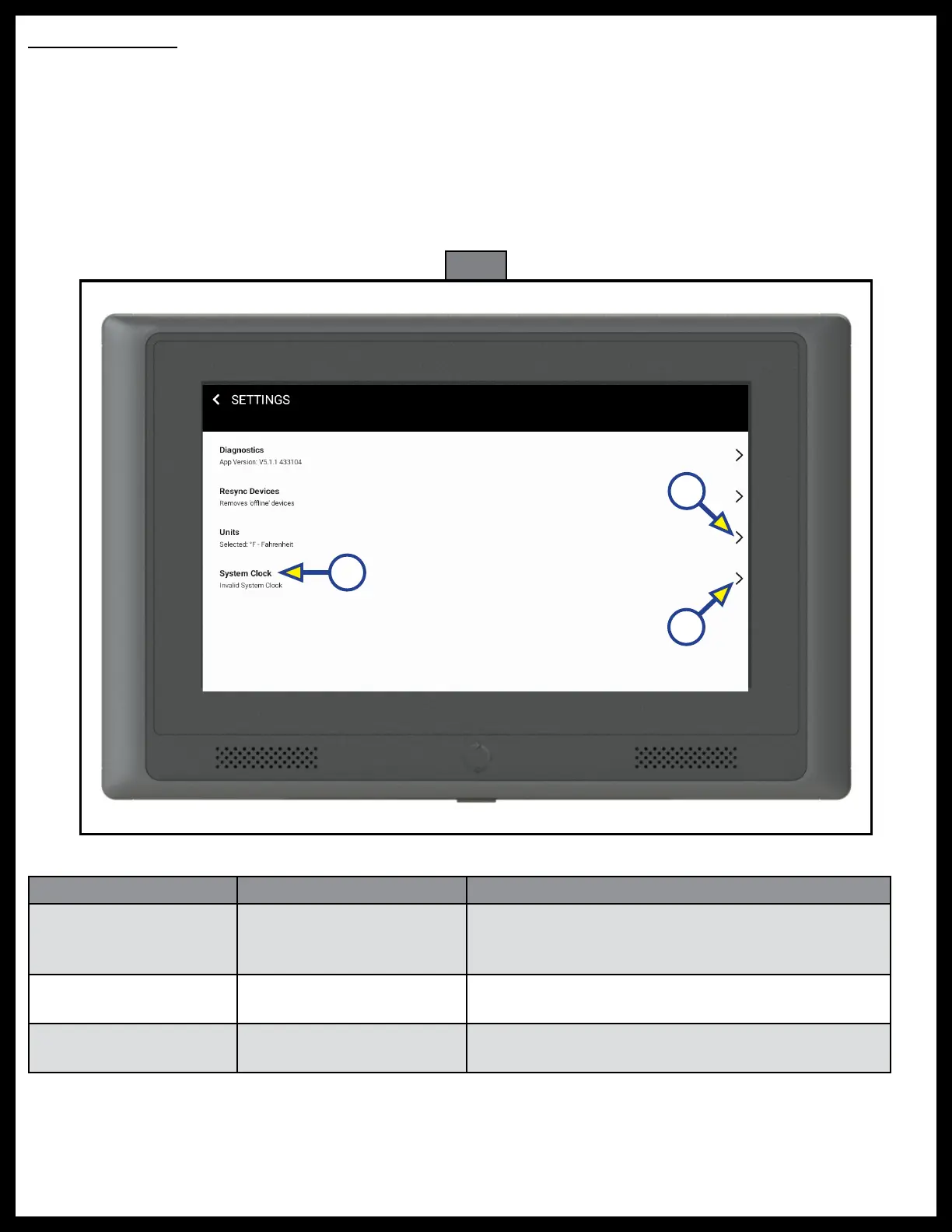
A. Diagnostics - App Version: Option for System Report and a snapshot summary of all available
devices connected to the system.
B. Resync - removes "off-line" devices. This option is used to resync the system devices after one has
been removed, serviced or repaired and shown to be off-line.
C. Units - shows the currently selected temperature unit of scale (Fig. 8A). Tap > to change from
Fahrenheit to Celsius.
D. System Clock (Fig. 8B) - tap > (Fig. 8C) to adjust the time and date of the OCTP.
Fig. 8
A
B
C
Troubleshooting
What is Happening Why? What Should Be Done?
OCTP does not
turn on.
No power.
Make sure system power is on, the OCTP power
cable is connected, and the power button on the
bottom of the unit has been pressed.
OCTP is on, but no
display
Program not loaded.
Contact Lippert Customer Care Center at
432-LIPPERT (432-547-7378)
Installed device not
available.
Device not configured.
Contact Lippert Customer Care Center at
432-LIPPERT (432-547-7378)



 To Next Page