Rev: 03.30.23 Page 6 CCD-0007179
Navigating The Screen
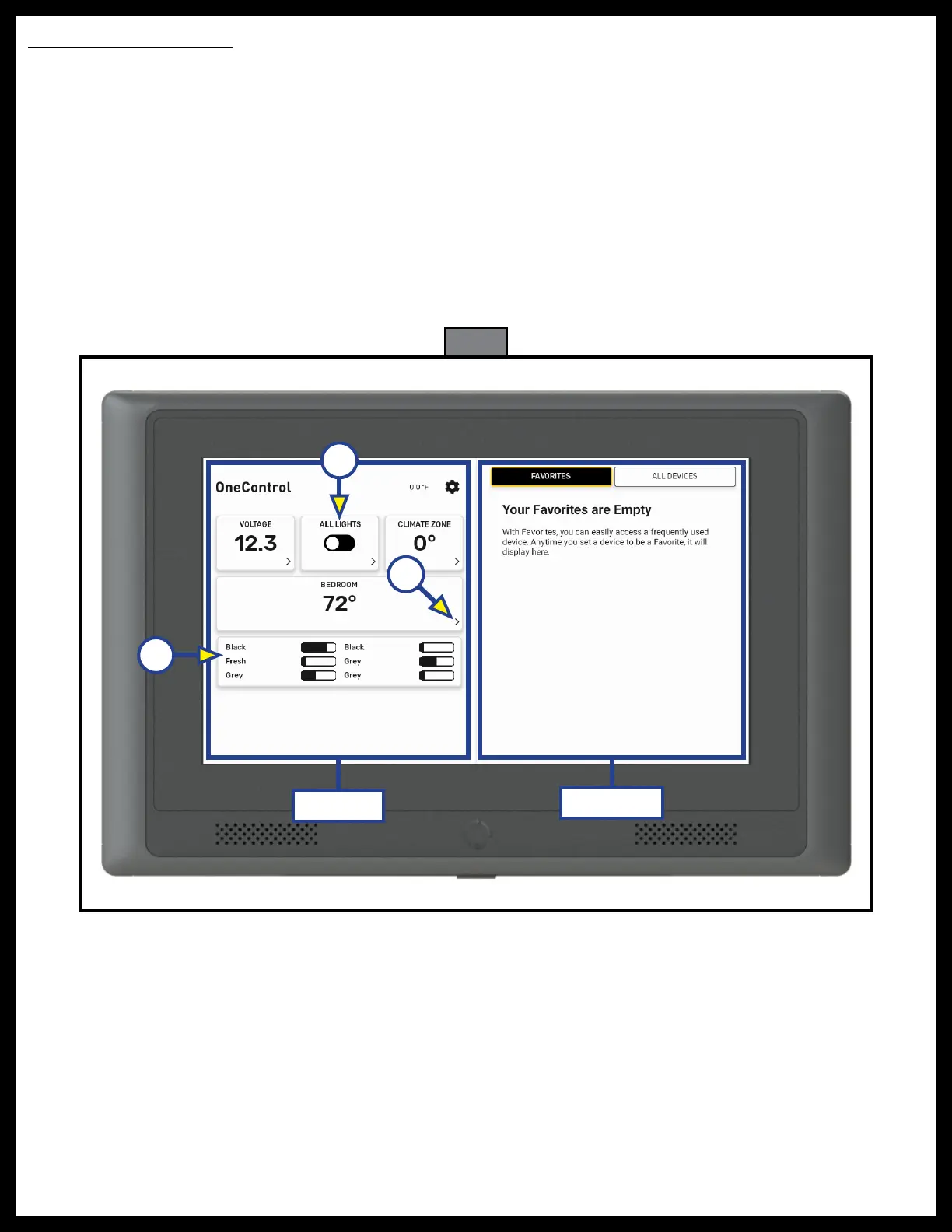
The main screen is split into two sections, left side and right side (Fig. 3).
NOTE: Functions and devices shown will vary depending on the components installed in the unit.
1. The left side of the main screen (Fig. 3) will show functions and information that are frequently used
and monitored. These functions are static and are not able to be changed.
A. Tapping a function with an arrow icon > in the corner (Fig. 3A) will bring up the controls for that
device on the right side of the screen.
B. Tapping the slider button (Fig. 3B) for ALL LIGHTS will toggle all lights on or off.
C. Tank levels are shown here (Fig. 3C).
2. The right side of the main screen shows FAVORITES and ALL DEVICES (Fig. 3). By default, FAVORITES
appears first and is blank. When a function is designated as a favorite, it will display here. See Setting
Favorites section.
Fig. 3
Left Side
Right Side
A
B
C



 To Next Page