EasyManua.ls Logo

Lippert True Course - User Manual

Lippert True Course
8 pages
Print Icon
To Next Page IconTo Next Page
Loading...
1
lippert.com 432-LIPPERT (432-547-7378) Rev: 09.26.22
True Course
Electronic
Sway Control System
Installation and Owners Manual
(For Aftermarket Applications)
CCD-0004358
Table of Contents
Introduction ............................................ 2
Safety ................................................... 2
Resources Required ................................... 2
Parts List ................................................ 2
Installation .............................................. 3
Operation ............................................... 4
True Course
Electronic
Sway Control
System
Installation and
Owners Manual
(For Aftermarket Applications)
True Course Electronic Sway Control SystemTrue Course Electronic Sway Control System
Kit #Kit # DescriptionDescription
2021010680
Tow control system with 7-way cord and
attaching hardware
Question and Answer IconNeed help?

Do you have a question about the Lippert True Course and is the answer not in the manual?

Summary

Introduction to True Course System

Safety Precautions and Warnings

Avoid Using Module as a Step

Warning against using the module as a step to prevent system damage.

Caution Regarding Moving Parts

Warning about pinch, crush, or cut hazards from moving parts.

Required Tools and Materials

True Course System Components

Installation Procedure

Marking Pilot Hole Locations

Mark pilot hole locations on the trailer frame for module mounting.

Drilling Pilot Holes

Drill pilot holes using a 1/8" bit for self-drilling screws.

Securing the Control Module

Secure the control module to the trailer frame using screws.

Connecting to Tow Vehicle

Connect the module's 7-way cord to the tow vehicle.

Connecting Trailer Connector

Connect the trailer's 7-way connector to the module.

System Operation and App Setup

Download and Install OneControl App

Download and install the Lippert OneControl mobile app.

Accept License Agreement

Read and accept the license agreement within the app.

Account Connection Prompts

Connect to an existing account or create a new one in the app.

Connect RV and Devices

Tap the '+' icon in the app to connect the RV and devices.

Navigate to Safety Systems

Navigate to Safety Systems on the Add and Explore page in the app.

Initiate Camera Scan

Initiate scanning for the device using the camera function.

Scan Credential QR Code

Scan the QR code on the credential label to connect the system.

Verify System Connection

Confirmation message indicates successful connection of the Safety System.

Confirm Connector and Engine Status

Ensure correct 7-way connector connections and tow vehicle engine is running.

Overview

The provided document is an installation and owner's manual for the Lippert True Course™ Electronic Sway Control System, designed for aftermarket applications.

Function Description

The Lippert True Course™ Electronic Sway Control System is an intermediary module for a trailer's brake system. Its primary function is to detect trailer sway and automatically send a brake signal to the trailer to mitigate the sway, even without a brake command from the tow vehicle. This system enhances towing safety by actively counteracting undesirable trailer movements.

Important Technical Specifications

The manual details the components included in the True Course Electronic Sway Control System Kit, PN 2021010680:

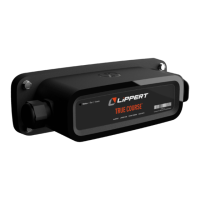
  • Control module with attached tow vehicle 7-way cord (PN 2021010679): This is the core unit that detects sway and applies braking. It integrates seamlessly into the existing 7-way electrical connection between the tow vehicle and the trailer.
  • Hex self-drilling steel screws, 1/4" - 14 x 1 1/4": Four screws are provided for securely mounting the control module to the trailer frame.
  • Lippert True Course Bluetooth Credential Card (Owner's Tag): This card contains a QR code and Bluetooth credentials necessary for connecting the system to the Lippert OneControl app.

The system operates by monitoring trailer movement. When sway is detected, it intelligently applies the trailer brakes to stabilize the trailer, providing a smoother and safer towing experience. The module is designed to be installed level with the top of the trailer frame.

Usage Features

The True Course system is designed for ease of use and integration with smart devices:

  • Automatic Sway Mitigation: The system automatically detects and corrects trailer sway by applying the trailer brakes, requiring no manual intervention from the driver during a sway event.
  • 7-Way Connectivity: The control module connects in-line with the existing 7-way cord from the tow vehicle and the trailer's 7-way connector, ensuring compatibility with standard trailer setups.
  • Lippert OneControl App Integration: The system can be connected to the free Lippert OneControl app, available on Apple App Store® (for iPhone® and iPad®) and Google Play™ (for Android™ users). This app provides:
    • System Status: Real-time updates on the sway control system's operational status.
    • Notifications: Alerts and information regarding the system's performance.
    • Easy Connection: The app facilitates connecting to the system via Bluetooth by scanning a QR code on the provided credential card. The app guides the user through the process of creating an account or connecting to an existing one, then adding the RV and devices, specifically the "Safety Systems."
  • Owner's Tag: The Bluetooth credential card doubles as an owner's tag, which can be removed and placed in the trailer for future reference, containing the necessary information for app connectivity.
  • Aftermarket Application: The system is specifically designed for aftermarket installation, making it suitable for a wide range of existing trailers.

Maintenance Features

The manual provides basic information regarding installation and operation, which implicitly covers aspects of maintenance:

  • Secure Installation: The use of self-drilling screws ensures a robust and secure mounting of the control module to the trailer frame, minimizing the need for frequent re-tightening or adjustments.
  • Digital Updates: While not explicitly stated as "maintenance," the reliance on the Lippert OneControl app suggests that software updates for the system could be delivered through the app, ensuring the system remains current with the latest features and improvements.
  • Visual Inspection: Although not detailed, regular visual inspection of the module and its connections (7-way cords) for any signs of wear, damage, or loose connections would be a standard maintenance practice for any trailer accessory.
  • Troubleshooting: The app connectivity could potentially offer diagnostic information or troubleshooting guidance, though this is not explicitly detailed in the provided pages.
  • Avoid Stepping on Module: A crucial safety caution explicitly states, "DO NOT USE THE MODULE AS A STEP FOR THE TRAILER. STEPPING ON THE MODULE MAY DAMAGE THE SYSTEM." This highlights a key aspect of preventing damage and ensuring the longevity of the device.

The manual emphasizes reading and fully understanding all instructions before installation or operation, and adhering to all safety labels, which are foundational to proper maintenance and long-term functionality of the system. The contact information for Lippert (lippert.com, 432-LIPPERT) is provided for support and inquiries, including questions about obsolete materials, implying a support structure for product longevity.

Lippert True Course Specifications

General IconGeneral
BrandLippert
ModelTrue Course
CategoryController
LanguageEnglish