28
l
LT-82 Setup and Operating Instructions
7
Select Operating Channel
7A
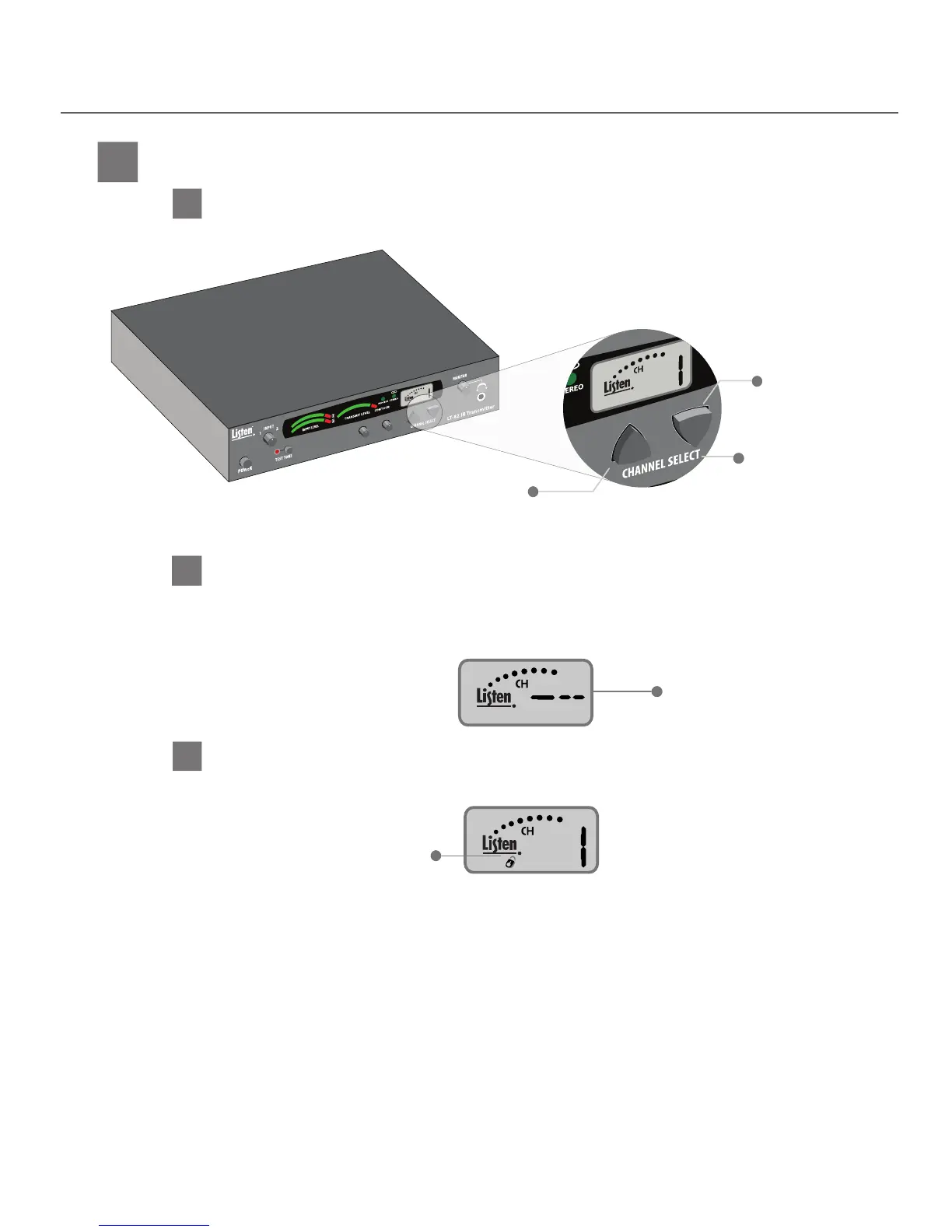
Select the operating channel (1-4). For single channel systems any channel can be used. In multi-channel systems
each transmitter must be on a dierent channel.
Select the operating channel
7C
After channels have been selected, the transmitter(s) can be locked on that channel by pressing and
holding the Channel Select Up button for three seconds. When locked, a padlock icon will be displayed
on the LCD (see below).
After channels have been selected, the transmitter(s) can be locked
Up Button
Down Button
Channel select buttons
Icon indicates
channel is locked
7B
This channel does not have a carrier present however allows pass through from RF input to RF output. This
allows a channel to be disabled in a daisy chain but allows the system to still operate as the RF signal from
the transmitter(s) before it will still pass through. Note that the power (RJ-45 with CAT-5 connectors) will pass
through in all conditions (unit o, channel -- or channels 1-4).
RF-O Channel Setting Information
RF-O Channel Setting


 To Next Page