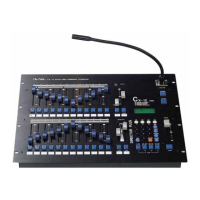
CX-12 DIRECTOR PLUS
Example: How to set the level of the following channels;
Ch#25------70%
Ch#26------50%
Ch#01------100% (fl)
Ch#95------90%
Steps :
1. Press page 2 (ch25~48) ------>LCD:PAGE START CH25
2. Adjust fader VR #1 to 70% (LCD shows channel level)
3. Adjust fader VR #2to 50% (LCD shows channel level)
4. Press page 1 (ch01~24) ------>LCD shows :PAGE START CH01
5. Adjust fader VR #1, and #2 to 0% -bottom (LCD shows channel level)
note: ch25 &ch26 will remain unchanged.
6. Adjust fader VR #1 to 100% (fl)
7. Press page 4(ch73~96) ------>LCD: PAGE START CH73
8. Adjust fader VR #1 to 0%
9. Adjust fader VR #23 to 90% (LCD shows channel level)
P.s. : if you want to change the level of ch26 to 40%;
1. Press page 2 (ch25~48) ------>LCD:PAGE START CH25
2. Adjust fader VR #23 to 0%
3. Adjust fader VR #2 to 100%, then down to 40%
TO SET CHANNEL LEVEL TO A SCENE, SEE NEXT PAGE


 To Next Page